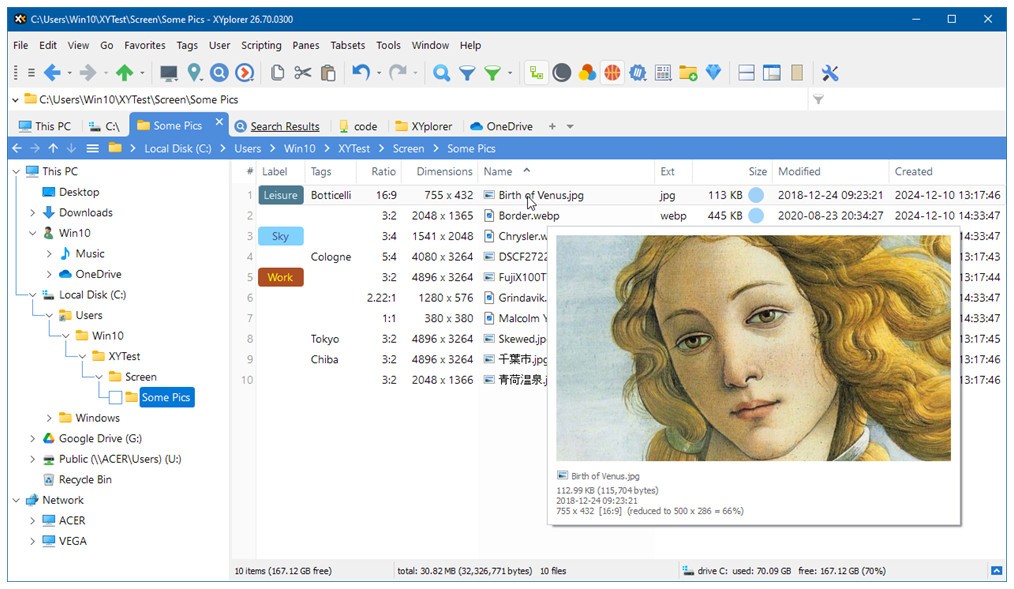
Beyond just listing directories, XYplorer is a Windows file manager. The application slips into your everyday schedule without drawing attention, even though it offers extensive features. The program replaces the conventional Windows File Explorer with its advanced tabbed layout, which offers enhanced configuration options.
The software serves as a tool beyond basic file-moving, supporting smarter work practices. The application presents straightforward folders while delivering expert-friendly capabilities for sophisticated users. Regular users who are not familiar with advanced system features will still be able to interact effortlessly with this interface.
The main strength of XYplorer lies in its enhanced speed alongside workflow optimization features. The program demonstrates its speed through features such as fast directory transitions, automatic tab session recall, and improved search capabilities that surpass those of basic directory automation tools. XYplorer avoids the distracting elements found in other software designs.
The software primarily delivers precise performance with helpful features. Within its user-friendly interface, XYplorer includes scripting features, color filters, file previews, and customizable keyboard shortcuts. XYplorer serves as a trustworthy partner that remains unobtrusive as you organize your documents across different drives and sort media files across directories.
Why Should I Download XYplorer?
XYplorer offers users who dislike the default Windows File Explorer controls a solution that eliminates many common operating system interface problems. Having control over file browsing and sorting, while benefiting from tab features, represents the main value that XYplorer provides. XYplorer enables users to work on multiple folders in separate tabs, which they can lock and color-code to save automatic session lists. The functionality provides significant help when you manage multiple tasks or try to locate files from today to yesterday.
The file search functionality on this platform is so quick that users consistently return to perform additional searches. Running a file search in XYplorer goes beyond basic names, since you can use date filters alongside attribute filters and search through file contents. The system continues working at its regular speed as this operation finishes instantly. You can use this tool on any Windows machine without installation by placing it onto a USB flash drive. The tool has gained popularity among IT professionals for its flexible approach and usefulness for freelancers and those who value low-maintenance tools.
XYplorer should be tried for its extensive customization capabilities. The program enables users to modify all aspects of fonts, colors, layouts, and system conduct. XYplorer offers custom scripting capabilities to automate tasks, along with file-naming patterns and file-path copying functions that run with one-click execution. XYplorer offers numerous customization options without forcing them on users, so users can begin with basic functions if desired. The application remains available at your convenience. The program demonstrates an intuitive understanding that users develop proficiency with their tools naturally, so it avoids pressuring its users.
The development process for XYplorer demonstrates refined workmanship to its users. The development process required an extended time to produce this software without any haste. The program delivers steady updates without causing major disruptions to users. The developers spend time considering novel additions rather than defining them as trivial add-ons.
The program prioritizes human-assisting capabilities over innovative methods for improving work. All types of file management activities, such as creative production, office programming tasks, and system maintenance, will find alignment in the XYplorer interface. You don’t adapt to it. The kind of retained memory comes from patient development instead of chaotic, rapid development.
Is XYplorer Free?
XYplorer Pro provides all advanced features, such as scripting, automation, and customization, with a single lifetime purchase. The program is free, and generous ongoing updates are provided to users.
What Operating Systems Are Compatible with XYplorer?
The Windows operating system supports XYplorer from Windows 7 through Windows 11. The application functions on operating systems with both 32-bit and 64-bit architectures. The product can operate on any system due to its mobility and ability to run with minimal machine resources.
The tool runs without requesting administrator access, and the portable edition allows it to be used without any installation steps. The application operates independently of system files while remaining neutral toward Windows Explorer functionalities.
What Are the Alternatives to XYplorer?
Q-Dir serves as a simple, appropriate option that offers multiple screen panels to enhance file management. The XYplorer interface consists of tabs, scripting capabilities, and advanced search features, but Q-Dir provides a four-pane display system that makes frequent inter-location file movements more efficient. The program comes with a portable setup, which allows users who want better than Windows Explorer to gain accessibility without requiring complex management skills. Although Q-Dir lacks the flexibility of XYplorer, it provides reliable basic functionality through an unorthodox interface.
Total Commander maintains its position as a dependable file manager because it has existed for a long time. Users can switch between two displays, while Total Commander offers an extensive library of plugins and extensions. This tool excels at FTP functionality, automatic file contrast, and simultaneous processing. Total Commander allows users to work through keyboard commands rather than relying on visual cues, while providing them with a deep toolbox of functionality. Total Commander presents an interface that will seem old-fashioned to users accustomed to contemporary design languages. The reliability, coupled with its power design, makes Total Commander a strong choice for users who require additional plugin features and extensive file management capabilities.
Unreal Commander serves as an intermediate program that offers features superior to Q-Dir while accommodating users who do not need all of Total Commander's capabilities. The software provides users with two-view file management, contemporary design aesthetics, file compression, folder synchronization, and batch file renaming. Drag-and-drop functionality, together with quick file preview and ease of navigation through a traditional interface, characterize this program. The free personal license of Unreal Commander attracts users seeking enhanced control beyond Windows Explorer, but unwilling to buy XYplorer Pro.