
Avira is a company famous for its punchy antivirus. However, you’re here for the Avira Phantom VPN review, for obvious reasons. You want to see how good Avira Phantom VPN is, knowing that this company’s antivirus is efficient and reliable.
Does the VPN fare identically or is it a bit better? Or a bit worse, perhaps?
If you want a short answer, it’s worse. We hung out with this provider for a few weeks, carefully examining its every nook and cranny. During our Phantom Avira VPN testing, we noticed many good but also many bad things we want to share with you.
As we review Avira VPN, we’ll also draw parallels to its premium competitors to give you a full picture of how good and safe it really is. Speaking of the full picture, there’s no other way of achieving it than reading our review carefully. Sit back, relax, and let’s dive right into it!
Avira Phantom VPN
Avira Phantom VPN is ultimately a disappointment. Its free plan, although restricted, is a welcome bonus. Apart from unlimited concurrent connections and powerful encryption, the VPN provides very little value for the money. Due to intrusive logging, slow speed, and underwhelming streaming performance, it's hard to recommend it at the given price.
Pros
- It offers a free plan
- Handy 60-day money-back guarantee
- Unlimited simultaneous connections
Cons
- Limited device compatibility
- Slow connection speed
- Not great for streaming
- Unfavorable logging practices
- Poor value for money
Avira Phantom VPN Pricing: Is It Affordable?
We’ll begin with pricing, which many of you will be interested in. Avira is generally known for likable prices. For example, its Avira Prime plan, which includes a VPN and malware protection, costs roughly $60 a year.
The VPN, however, is much more expensive and its prices are highlighted below:

You essentially have two plans to choose from. One is the annual plan at $78 a year, while the other is a monthly plan at $10/mo. Avira Phantom VPN includes a mobile plan, which is an in-app purchase and costs $5.99/mo. This VPN is only for iPhones (or other iOS devices) and Android devices.
The annual plan remains the best pick because you can protect both desktop and mobile devices. What’s more, you can protect an unlimited number of them, which is also the case with recently tested Surfshark.
Avira Phantom VPN also includes a free plan, which, while easy to download and use, is underwhelming at best. You get only 500 MB of daily bandwidth, and while you don’t need to register, this tiny amount of bandwidth is barely enough for a few minutes spent online.
Payment Methods & Refund Policy
Payment methods are up next and in our Avira Phantom VPN review, we were surprised to see the lack of those. I mean, no actual “lack” but rather two payment methods, which you can guess from a mile away — credit cards and PayPal. No crypto methods here. Nope.
Since we’re discussing payments, it’s good to know that all purchases come with a 60-day money-back guarantee. That’s more than CyberGhost’s 45 and two times more than the run-of-the-mill 30-day money-back guarantee from ExpressVPN, NordVPN, PIA, and others.
Avira Phantom VPN also includes a 7-day free trial for which you need to provide credit card info. The company doesn’t charge you anything but it’s there for when the trial expires, in which case, you’re immediately charged.
Avira Phantom VPN is very costly for what it offers — more so than NordVPN, ExpressVPN, PIA VPN, and other reputable, and far better VPNs. Its generous refund policy, which serves as a long free trial is a redeeming factor but you’ll have to pay to use it in the long run and that investment will be significant.
Device Compatibility & Ease of Use
Avira Phantom VPN supports all major desktop and mobile devices. By that, we mean:
- Windows
- macOS
- Android
- iOS
They say “Get Phantom VPN on all your devices” but what if you have a Fire TV Stick or a neat little Apple TV device? You’ll be angry when you see your VPN’s support for them is null. Perhaps these amazing Fire TV VPNs will suit you better if your heart desires them.
These VPNs also work on an Apple TV and your typical Smart TV.
As for Avira Phantom VPN, it compensates for average compatibility with unlimited simultaneous connections. It’s handy for protecting all devices and even splitting costs with your friends and family who can also protect their devices and spend a fraction of the price.
Avira Phantom’s apps are nothing to write home about. Below is the Windows app, which looks kinda dated. To open the server list, click “Nearest Location”. Now click on the server from the list and connect. Avira Phantom VPN takes a bit of time to connect. Be patient.

The Gear icon launches Settings, where you’ll find some (very few) VPN features.
The mobile app is nothing better. It’s functional and looks “okay” but won’t move mountains or reinvent the wheel. Besides, you can’t even choose the protocol you’ll use, not on mobile but on desktop platforms, as well.
During our Avira Phantom VPN analysis, we were far from blown away by its “setup”. Its outdated apps bring no excitement to the table, and with no more than four supported platforms, Avira does very little if anything at all to justify the sky-high asking price.
Avira Phantom VPN Review: Security Features
In our comprehensive testing of Avira Phantom VPN, we were baffled at just how poor the VPN was. You’ll get a few security features but don’t expect anything more than pure basics.
For example, the provider uses 256-bit encryption. It calls it “Advanced Encryption Standard” and while we know it’s advanced in terms of security “power”, it’s not uncommon. In fact, even the worst of the worst VPNs use this encryption level, so bragging is a bit silly.
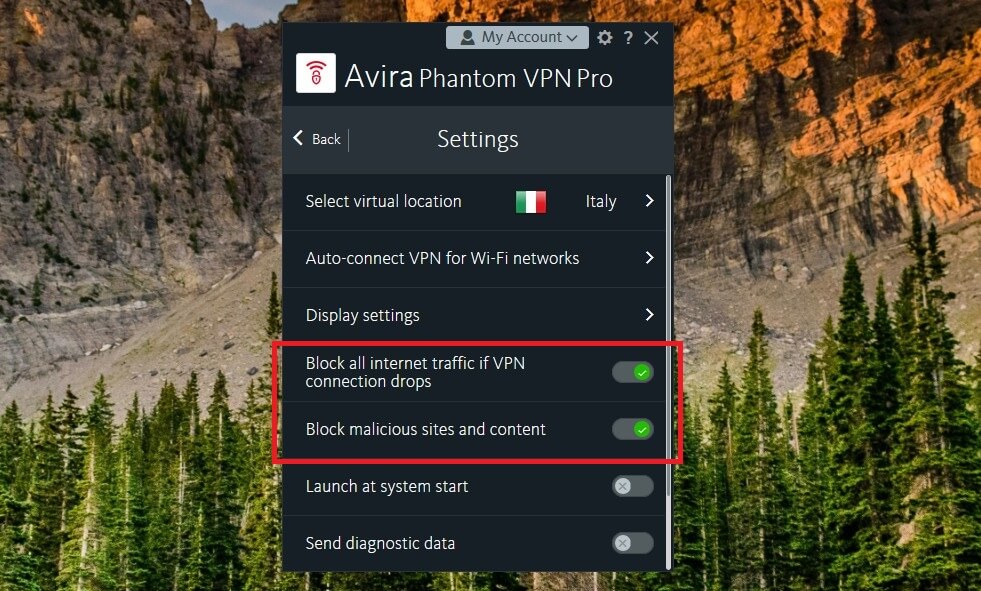
We found that there’s also a kill switch, plus the option to block malicious sites and content. The kill switch worked fine in our test but blocking malicious sites and content was a bit “flimsy”. We prefer NordVPN which we found to be superior for ad-blocking, tracker protection, and even malware removal.
Now, you might be wondering why we haven’t mentioned this VPN’s protocols.
Because this bad (literally) boy doesn’t let you select one! This doesn’t mean it doesn’t use tunneling protocols. Otherwise, it wouldn’t be called a VPN. It does but there’s only one — OpenVPN. Don’t get us wrong, though.
OpenVPN is reliable and trusted but it’s time to move on to WireGuard. Many companies have already done it and they’ve had massive success. OpenVPN is slower, for example, which we also discovered in our numerous speed tests of Avira Phantom VPN. More about them later.
As for other security features… well, there are none. It’s all barren, dry land here.
IP and DNS Leak Tests: Is Avira Phantom VPN Safe?
You don’t need cutting-edge security when it comes to IP and DNS leak protection. Avira Phantom VPN, like other providers, should have it, so we went ahead and tested the provider. Since it offers 30 or so countries, we took our time to connect to each for our tests.
It’s simple — if we detect even a single leak, it’s game over for the provider.
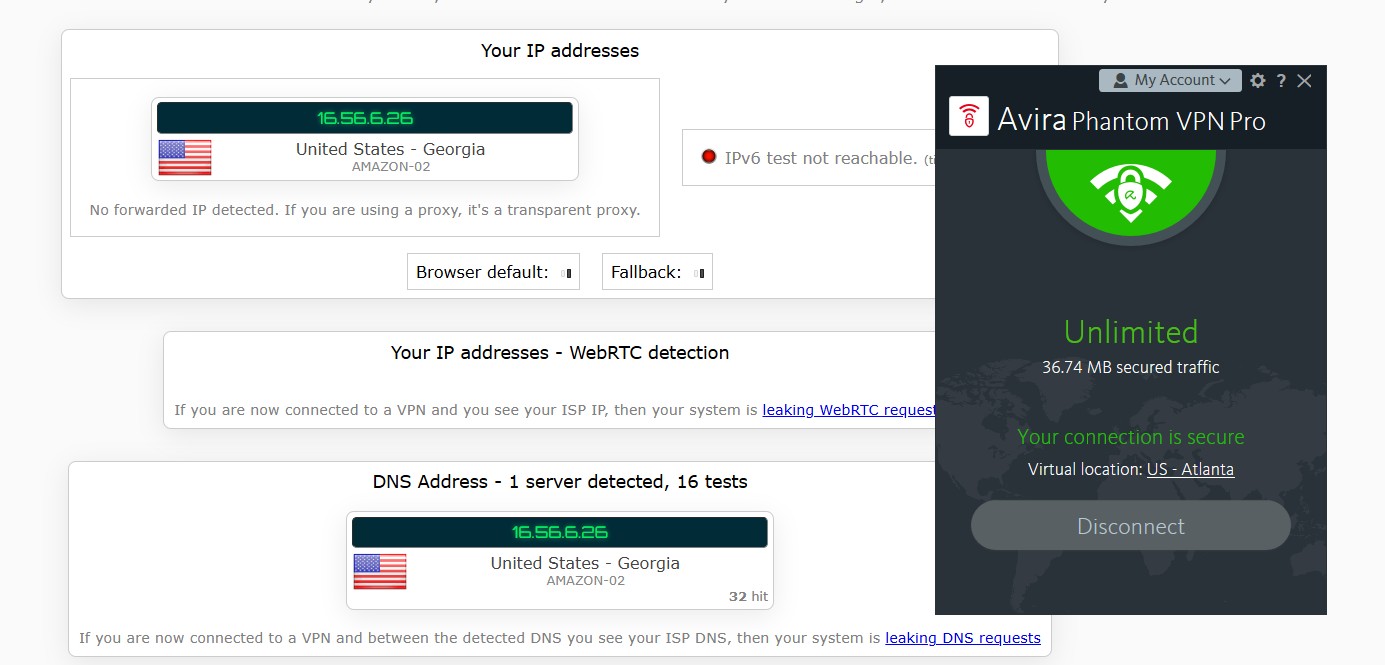
We use two websites; ipleak.net and browserleaks.com to evaluate Avira Phantom VPN and check for both IP and DNS leaks. For this review, we’ll show the results from the US server but we can assure you the same great results are repeated across all other servers as well.
Here’s the result from ipleak.net:
Now, let’s examine browserleaks.com results:

It’s clear as day that we had zero issues with data leaks in our review. This was with a disabled kill switch and we don’t doubt that built-in IP/DNS leak protection works with or without it. So far, excellent results.
Does Avira Phantom VPN Store Logs?
Avira is a German VPN company and that’s interesting because we don’t see many VPNs from Deutschland. ZenMate was a good one back in the day, but it shut down long ago. Germany is part of the EU and also belongs to the 14 Eyes alliance with 13 other countries.
Snowden once claimed that these countries collect information from their ISPs and distribute it among themselves, which spiked privacy concerns. Whether or not that’s true, we can’t verify because our writers don’t work in the CIA, FBI, and other intelligence agencies.
What we can do, however, is look at Avira Phantom VPN’s privacy policy because that’s what matters:

In the VPN section, Avira sounds pretty honest because the information it collects is abundant. There’s device data, which is benign — language, device ID, OS version, and stuff like that. But then, there’s product data, which includes some concerning things. Look closely.
You’ll see that Avira Phantom VPN automatically processes your IP address and used bandwidth among other things. On the far right side of the table, Avira claims to use this information to deliver the product and research/development for product improvement.
We have to ask them where the hell these improvements are.
The last time we used Avira Phantom VPN, it was basically the same as it is today. That’s not the case with NordVPN, which is a 100% no-log service that thrives on constant year-to-year improvements that make it so great.
What About Third-Party Security Audits?
We tested many of these antivirus services with VPNs and very few of them have third-party audits. During this Avira Phantom VPN Pro test, we couldn’t dig out any information about its audits and that’s likely because there aren’t any.
What a surprise — or is it?
Avira Phantom VPN stores and processes your IP address, which is a disqualifying parameter. Given its lack of third-party security audits, it’s hard to recommend it for privacy. We’d rather choose NordVPN or ExpressVPN to browse the internet safely and enjoy a true zero-log “treatment”.
Avira Phantom VPN Speed Tests: Is It Fast Enough?
If the previous Avira VPN test discouraged you from using it, you can close this review and go about your day. If not, you’ll witness our speed test results. Drawing from our experience, the provider is neither fast nor slow but saying it’s a speed champ would be a shameful deceit.
Before we proceed, we think it’s a good moment to reflect on our native speed test results:

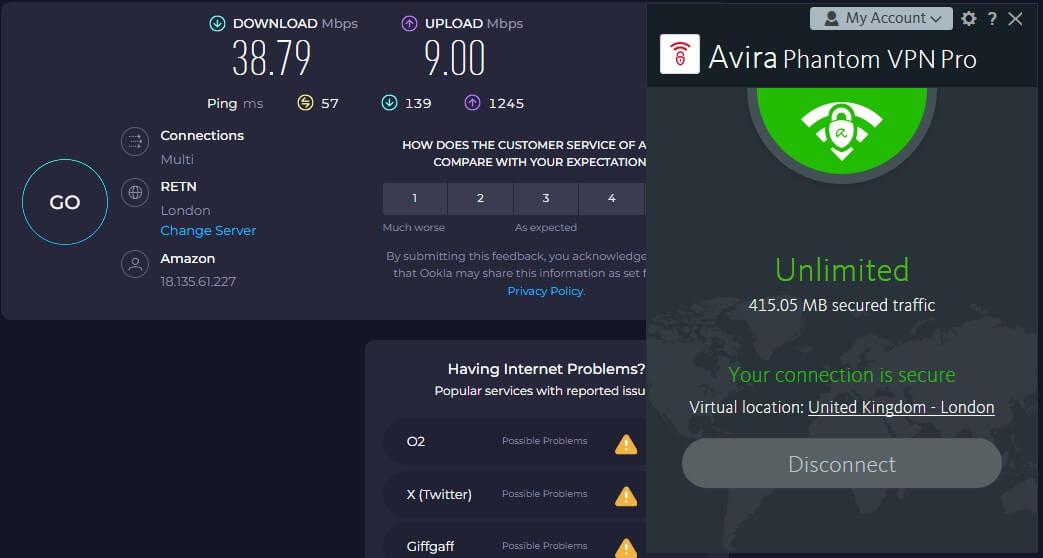
At the time of testing, we were in Europe where we tested the VPN for 3 days in a row, 3 times a day, with 3 server locations. We opted for the UK as the “close” one but also used the US and Japan as farther locations to measure Avira VPN’s speed retention rates.
As for the protocol, you know Avira doesn’t let you choose, so we stuck with what was on the table, which was OpenVPN. Finally, all tests were performed on Windows 11. Now, let’s look at the speed test results.
UK Speed Test Results
US Speed Test Results

Japan Speed Test Results

For a more comprehensive overview, here’s the table that displays speed loss percentages (download and upload) for every tested location.
| United Kingdom | United States | Japan | |
| Download Speed Loss | 22% | 43% | 70% |
| Upload Speed Loss | 9% | 31% | 82% |
We can notice that Avira Phantom VPN is an average performer and sometimes even below that, especially on farther servers. Its speed retention is poor, so don’t expect exceptional performance for bandwidth-hungry activities such as gaming, torrenting, and streaming.
By the way, you might want to use these VPNs for gaming, as they’re much faster and safer.
Streaming and Torrenting With Avira Phantom VPN
Streaming and torrenting aren’t always about speed — we’d say that’s about 50% of the equation. The other 50% is unblocking prowess for streaming and security/privacy for torrenting. As we saw in this Avira Phantom VPN review, the provider excels in neither.
Streaming — Utter Disappointment
As the subheading implies, Avira Phantom VPN performs rather poorly in this aspect.
After testing it a million times on Netflix, we found that it works only with the US library on a good day. Most of the time, it struggles to unblock Netflix libraries, producing an unlikeable error message. Other times, we get no error but we simply can’t unblock the content we want.

Is Avira Phantom VPN good for streaming on BBC iPlayer, Hulu, Disney+, and other viral streaming services? Sadly, no. It’s detected by these services and won’t work.
We noticed it works with some TV channels, so it allows watching the Tour de France online for free and light sports streaming, for example.
Just be careful because again, the provider is on the slower side, so Full HD can be choppy, let alone Ultra HD, which ends up buffering a lot. If you want a streaming-specific provider, NordVPN and ExpressVPN are far more reliable and better VPNs to use with Netflix in 2026.
Torrenting — Guess It’s Okay?
Avira Phantom VPN’s home page reveals that the VPN endorses P2P file sharing. So, if you’re frequently torrenting, this means you’ll have no obstacles. Indeed, during our evaluation, we tested around 10-15 server locations and all of them worked without a hitch.
However, it’s worth mentioning that upload speeds took a hit for some reason, so seeding wasn’t the most efficient. Downloading, on the other side, was smooth and performance was preserved mostly because we used nearby servers in Europe. But that’s how it should be.

The issue with torrenting isn’t speed. It’s okay. It’s the level of privacy, which is tainted by Avira’s intrusive logging. Since it collects your IP address, some other “unmentioned” information likely goes with it, so if you accidentally download copyrighted material, you can be detected.
We’re against this practice, to make it clear, but it’s always nice to have a safe VPN for torrenting, just in case.
Server Locations
There’s not much to speak about or analyze in this aspect. Avira Phantom VPN isn’t gigantic and offers around 1,400 servers in nearly 40 global countries. The location span is far from wide but you do get some popular locations like the UK, the USA, Italy, Spain, Japan, Switzerland, Germany, etc.

African coverage is poor and not a single country is covered. On the contrary, there are twelve US locations, while the rest of the countries have only one location. The provider doesn’t use dedicated servers and you won’t find dedicated IP addresses, which is a shame.
How does it compare to more popular competitors? Here’s how things stand:
- NordVPN has 7,400+ servers in 118 countries
- ExpressVPN has 3,000+ servers in 105 countries
- Private Internet Access has ~30,000 servers in 91 countries
There’s very little information on Avira’s website, so we don’t know if they have 10 Gbps ports or if they’re RAM-based. Based on our experience, we don’t think they’re of the highest quality because of their subpar performance.
Does Avira Phantom VPN Work in China?
No, it doesn’t and we had to learn that the hard way.
We noticed that this type of VPN, the so-called “antivirus VPN”, usually performs poorly in this country. The Great Firewall is so hard to bypass that even more reliable options, such as NordVPN and Astrill VPN, sometimes won’t connect. With Avira, that’s 100% the case.
Our testers didn’t have much leeway, either. There’s no protocol selection and you can’t toggle obfuscation, so room for wiggling is extremely small. That said, you try to connect, and if it’s working, great. If not, you sit there, stare at the blank screen, and cry in agony.
If you need a dependable VPN to use in China or overcome censorship in other countries, Avira Phantom VPN is not a good pick. Instead, choose NordVPN and rely on its Obfuscated servers, or even try Astrill VPN if you have enough money to spend.
Customer Support: Is It Efficient?
It’s not the most efficient support team we encountered. In fact, the level of support could be much better, for the VPN specifically. Avira offers a handful of security products, so the support section aims to cover all of them. The knowledge base, specifically, is there for that.
The issue with it is that it doesn’t cover all questions, so even after sifting through it, you’ll find out you need to know more. Free users can join Avira’s worldwide community and seek answers on its forum. If you pay for a product, you can use email, chat, or phone.

In that case, Avira sharpens a little and really goes out of its way to clear up everything.
But then, if you have questions before you buy the service, you’ll have to make do with the community, which isn’t always the best and fastest support means to use.
Should You Use Avira Phantom VPN in 2026?
In conclusion to our Avira Phantom VPN Pro review, we’ll say you should avoid this VPN.
It looks and sounds good on paper, with good characteristics like unlimited simultaneous connections, bank-grade encryption, a 60-day money-back guarantee, and a free plan. Unfortunately, once you get a taste of it, you’ll notice just how tasteless this “dish” is.
The VPN is untrustworthy because of its logging practices but even without them, it’s just “plain”. You don’t get to choose protocol even, let alone enjoy Double VPN connections, unblocking streaming services, having respectable speeds, and apps for “atypical” devices.
The most insulting thing about it is the price — $78/year!
At this price, which objectively isn’t high but IS for this VPN, you’d be better off with NordVPN, ExpressVPN, or even PIA VPN. All three come with less expensive monthly prices and are infinitely better and more reliable, making Avira Phantom VPN sort of pointless.