
Your phone joins more networks you don’t control than any other device you own: café Wi-Fi, airport hotspots, the guest network at a hotel. It also keeps dozens of apps active in the background, and many of them want to know where you are. A VPN on Android covers most of that, but a phone is harder on a VPN than a laptop.
The connection is slower to begin with, the app stays on all day, and every bit of battery counts. So a VPN that does well on a computer can still disappoint on a phone. To rank the best VPN for Android, we took every speed and battery result from an Android phone instead of a PC. Out of the 30+ VPNs we’ve tested, five came out on top, and here’s how they rank.
Best VPN for Android: 5 Best VPN Apps for Android
- NordVPN: Best Android VPN overall, with the smallest speed loss on the phone
- Proton VPN: Best Android VPN for privacy, with a free plan too
- ExpressVPN: Lightest on battery, and second-fastest
- Surfshark: Best for hiding your location from apps, with no device limit
- Private Internet Access: Best budget VPN for Android, with smart automation rules
Best VPN App for Android: The 5 Compared
Speed loss averages our UK, US, and Japanese servers on a 54.7 Mbps phone connection. Battery shows how much charge a 20-minute video used. With no VPN, the phone used 3%.
| NordVPN | Proton VPN | ExpressVPN | Surfshark | PIA VPN | |
| Speed loss | 20.3% | 27.0% | 22.9% | 25.9% | 28.5% |
| Battery over 20 min | 5% | 4% | 3% | 5% | 5% |
| UK ping | 46 ms | 52 ms | 43 ms | 44 ms | 48 ms |
| Start price | $3.49/mo | $2.99/mo | $2.99/mo | $2.49/mo | $2.19/mo |
| Android free trial | 3 days | Free plan instead | 3 days | 7 days | 7 days |
| Devices | 10 | 10 | 10-14 | Unlimited | Unlimited |
| Countries | 152 | 149 | 113 | 100 | 91 |
| Streaming platforms | 9 of 9 | 7 of 9 | 9 of 9 | 8 of 9 | 6 of 9 |
Best Android VPN: Detailed Top 5 List
All five are paid VPNs. If you’d rather not pay, our free VPNs for Android guide covers free alternatives.
1. NordVPN: Best Android VPN App

Pros
- Fastest on Android
- Netflix, iPlayer, and ITVX unblocked
- Tapjacking protection
- Scam call filtering
- Widest country coverage
- Six independent audits
Cons
- Heavier on battery
- Steep renewal price
NordVPN kept the most speed on Android, with a 20.3% average speed loss across our three server locations. That still left more than 40 Mbps in the UK and the US, plenty for HD streaming and video calls. Its 46 ms UK ping, the delay you’d notice in games and calls, was close behind ExpressVPN’s, and it unblocked all 9 streaming services on our list. Battery is the trade-off. In our 20-minute video test, NordVPN used 2% more battery than the phone did with no VPN.
You’d notice that over a long day of streaming, so if you stream for hours on battery, ExpressVPN is gentler on the charge. When I tapped Connect, NordVPN was ready in one to three seconds, quicker than on our Windows PC. Tapjacking Protection, found only in the Android app, warns you when an app places a fake button over a real one, for example on a permission prompt. Call Protection compares incoming numbers with known scam lists and warns you before you answer a fake call from your “bank.”
Next-gen antivirus blocks malware and trackers, and Meshnet links your own devices. Away from home, your phone can connect through your home computer, so sites that only work on your home connection still load. Six independent audits have checked its no-logging policy, its promise not to store what you do online.
Its servers cover 152 countries, ten devices can connect at once, and its UK servers unblocked ITVX for watching ITV outside the UK. NordVPN’s two-year Basic plan comes in under $3.50 a month, and Android users can try it free for three days.
2. Proton VPN: Best Android VPN for Privacy

Pros
- Second-lightest on battery
- Secure Core routing
- Open-source Android app
- NetShield ad filtering
- Large server network
- Free Android plan
Cons
- Slower on distant servers
- No post-quantum encryption
Proton VPN came second on battery. With it connected, our test video used 4% of the charge, only 1% more than with no VPN. That small saving adds up on a phone that stays in your pocket all day. Speed is the weakness. It lost 27.0% of its speed on average, and on US servers it kept about 39 Mbps. That’s enough for HD video, though large downloads take noticeably longer, so pick the closest server you can. Pluto TV and ITV were the two streaming services it couldn’t unblock.
For privacy, it’s the strongest of the five. Its Swiss base keeps it outside the intelligence-sharing deals between governments, and the Android app is open source, so security researchers can verify what it does. Secure Core passes your traffic through an extra protected server before it leaves Proton’s network, an added layer for sensitive work. Securitum audits the no-logging policy.
NetShield clears ads and trackers out of web pages, and Proton’s servers span 149 countries. There’s no Android trial. However, the free plan offers unlimited data on one device with no expiry, which works as a long trial. Its Guest Mode even lets you use Proton VPN without creating an account. The paid VPN Plus plan is under $3 a month if you commit for two years, and our NordVPN comparison sets the two side by side.
3. ExpressVPN: Lightest Android VPN on Battery
Pros
- Negligible battery cost
- Second-fastest on Android
- Lowest UK ping
- Prime Video and HBO Max unblocked
- Simple one-tap app
- Post-quantum encryption
Cons
- No Double VPN
- Steep renewal price
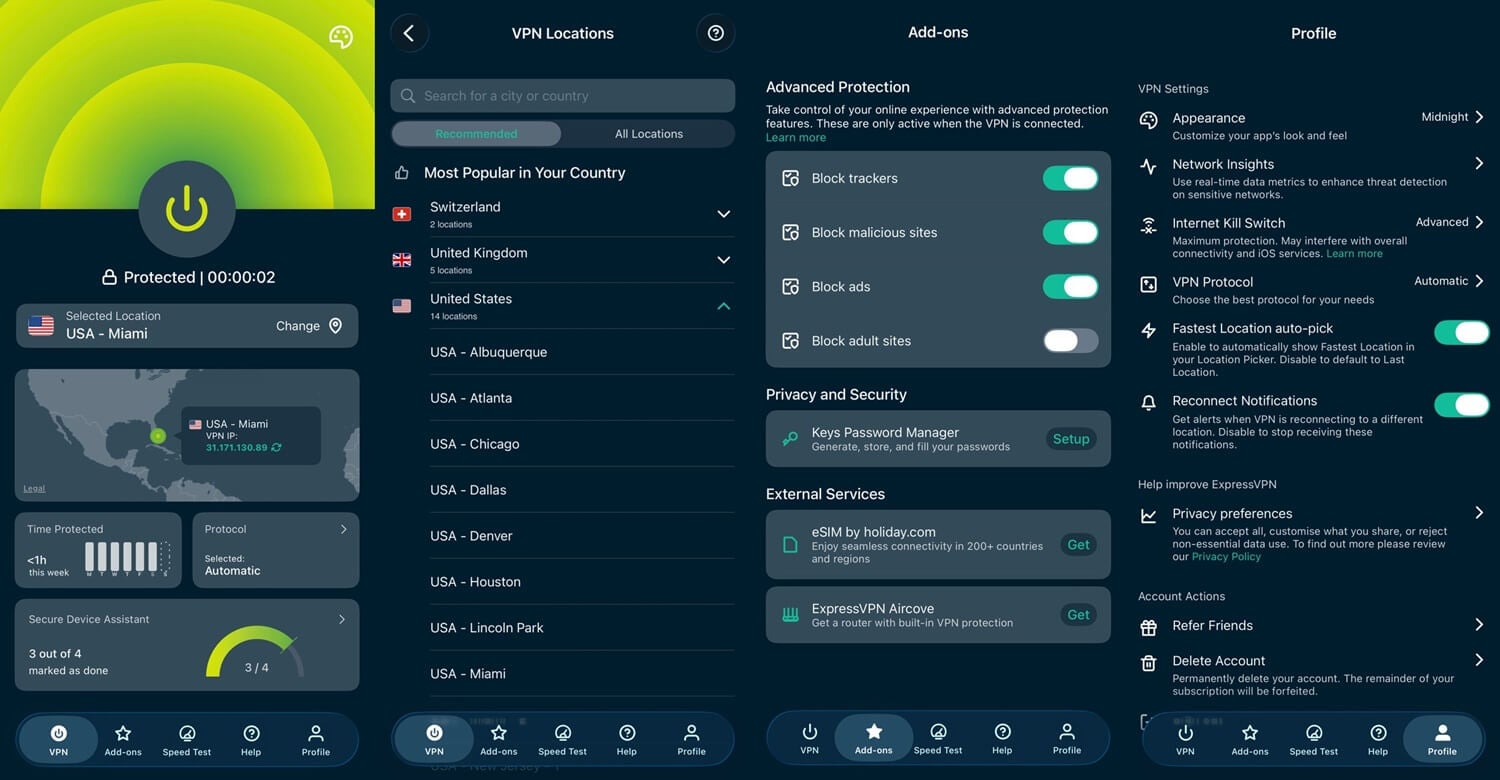
ExpressVPN had the headline result of our battery test. Over the same 20-minute video, the phone used 3% with or without it, so its drain was too small for Android’s battery meter to show. Every other VPN added 1% or 2%. Lightway, its own protocol, is built to use little power while idle. It was second-fastest too. A 22.9% average speed loss still left plenty for HD and 4K streaming on our phone connection. No VPN beat its 43 ms UK ping either. Its streaming record was perfect, 9 of 9, and it connected as quickly as the others.
The Android build mirrors the Windows app. The app includes a kill switch, which cuts your connection if the VPN drops, and split tunneling, which lets you leave a banking app outside the VPN, for example. Advanced Protection filters ads, trackers, and malicious sites. Its no-logging claim has a KPMG audit behind it, and Lightway uses post-quantum encryption, so traffic recorded today stays unreadable even to far more powerful future computers.
There’s no Double VPN, a mode that chains two VPN servers together, and I found the settings screen thinner than PIA’s, so NordVPN or PIA is better if you like to adjust things. It covers 113 countries, and its top plan allows up to 14 devices. Its Basic plan costs less than $3 a month over the longest term, and Android has a three-day trial via Google Play.
4. Surfshark: Best for Hiding Your Location From Apps

Pros
- No device limit
- GPS Override spoofing
- Second kill switch
- IP Rotator on mobile
- Antivirus in One plan
- Long Android trial
Cons
- Heavier on battery
- Slower than NordVPN
Surfshark’s Android app has more phone-specific tools than the others. GPS Override changes the location Android reports to apps, along with your IP address. Many apps read GPS instead of your connection, so with a VPN alone, a weather or delivery app still shows your actual city. A second kill switch also covers apps you’ve excluded through split tunneling. IP Rotator changes your IP address every few minutes while keeping the same country, which makes it harder for sites to follow you across a long session.
Its results were mid-table: the average speed loss was 25.9%, and about 40 Mbps remained on our phone connection, enough for streaming. Its 44 ms UK ping was close to ExpressVPN’s. ITV was its only streaming failure, so pick NordVPN or ExpressVPN if you watch it. Battery use matched NordVPN and PIA at 5% over the test video, so if battery life comes first, ExpressVPN or Proton VPN lasts longer.
There’s no device limit, so a tablet and a second phone can share the same account, while NordVPN, Proton VPN, and ExpressVPN cap you at 14 or fewer. CleanWeb filters ads and trackers, the One plan adds antivirus that works on the phone itself, and the no-logging policy has passed two Deloitte audits. It offers servers in 100 countries for about $2.50 a month, and Android has a seven-day trial.
5. Private Internet Access: Best Budget Android VPN
Pros
- Lowest entry price
- No device limit
- Automation rules
- Court-proven no-logging
- Week-long Android trial
Cons
- Slowest on Android
- Weakest streaming access
- Heavier on battery
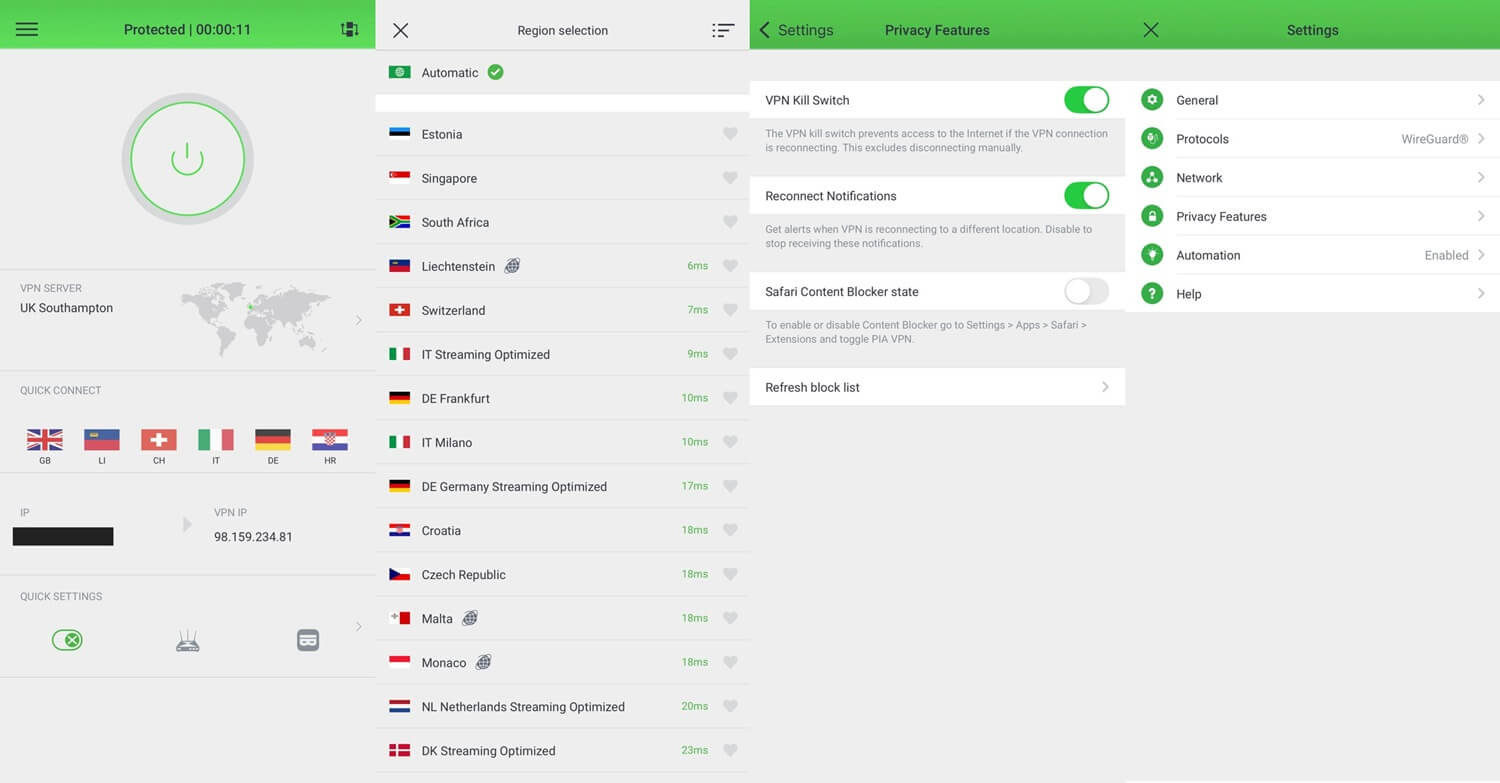
PIA costs the least and was the slowest. On WireGuard, the fast protocol most VPNs use by default, it lost 28.5% of its speed on average, the most we recorded on the phone, and its Japanese server dropped to 29.1 Mbps. Browsing and HD video still work at that speed, but big downloads take a while. It also unblocked only 6 of the 9 streaming services, though Netflix US worked on every attempt. That makes it fine for American Netflix and weaker for other catalogs.
Battery use matched NordVPN’s at 5%, so it won’t stretch your battery either. PIA does automation better than the rest. Rules let the app connect by itself on an untrusted network and stay off on home Wi-Fi, so it protects you at the café without you having to remember. Most phone users want exactly that, and few VPNs offer it. MACE removes ads and trackers. Shadowsocks obfuscation makes your VPN connection hard to tell apart from regular traffic, which helps on Wi-Fi networks that block VPNs.
China is a harder case, which our China VPN guide covers. The court record makes the privacy case: US proceedings have demanded its logs and come away with nothing, and three Deloitte audits have followed. You can connect as many devices as you like, and PIA’s servers cover 91 countries. A dedicated IP address, which no other customer shares, costs little extra, and banks are less likely to flag logins from it. At roughly $2.20 a month, with seven days free on Android, it undercuts the other four.
How We Tested These Android VPN Apps
We took every figure in our October tests from the phone itself.
- Device: Galaxy S26 Ultra on Android 16, over home Wi-Fi
- Baseline: 54.7 Mbps down, 16.5 Mbps up, 37 ms ping with no VPN
- Servers: UK, US, and Japan, with every VPN on WireGuard, NordLynx, or Lightway
- Battery: a 1440p video played for 20 minutes at full brightness on a UK server, with advanced features disabled
- Streaming: the same 9 platforms used in our desktop testing
On the phone, the same five VPNs lost two to three times as much speed as on our Windows PC, so desktop results aren’t a reliable guide for Android. Battery has one limit: Android shows charge in whole percentage points, so a 20-minute test can’t show differences below 1%. ExpressVPN’s result means its drain was below that level. It still uses some battery.
Streaming results matched our desktop tests exactly: each Android app unblocked the same services as its desktop version, so you lose nothing by watching on your phone.
Why Use a VPN on an Android Phone or Tablet?
- Public Wi-Fi. Café and airport networks are open to strangers, and your phone joins them automatically. A VPN encrypts your connection, so another device on the network can’t read it.
- App tracking. Android apps collect far more than a website does, including your location. A VPN hides your IP address, though apps with location access can still read GPS.
- Streaming abroad. Each country has its own catalog, and changing Netflix region works the same on a phone as on a laptop. Every VPN in our test unblocked at least 6 of our 9 streaming services.
- Gaming and ping. Some ISPs slow down gaming traffic, and a VPN hides what kind of traffic it is. A VPN with low ping on nearby servers, such as ExpressVPN, keeps mobile games like PUBG Mobile responsive.
Android VPN Apps to Avoid
Google Play lists far more VPN apps than the App Store, and it checks them less strictly. Many free VPNs there make money in ways that work against your privacy, such as logging and selling your data. A quick test: if the app has no paid tier, the money comes from ads or your data.
- Turbo VPN. Heavy logging, slow speeds, and tight data limits.
- Hola VPN. Its network uses idle connections from other users, so a stranger’s browsing can be traced back to your phone.
- Betternet. Logging, in-app ads, and a daily data cap.
- Urban VPN. Slow, inconsistent, and with no security features to speak of.
How to Set Up a VPN on Android
Setup takes three steps. We used NordVPN, and the other four work the same way.
Subscribe and Create an Account
Choose a plan on the VPN’s website and confirm your email. The two-year plans come with the largest discount. NordVPN’s three-day Android trial is available through Google Play, though it requires a card.
Install the App From Google Play
Search Google Play for your VPN and install it from there, never from an APK file, the Android install package, on a download site. Copies installed from outside the store have been tampered with before, and Google Play at least verifies the publisher.
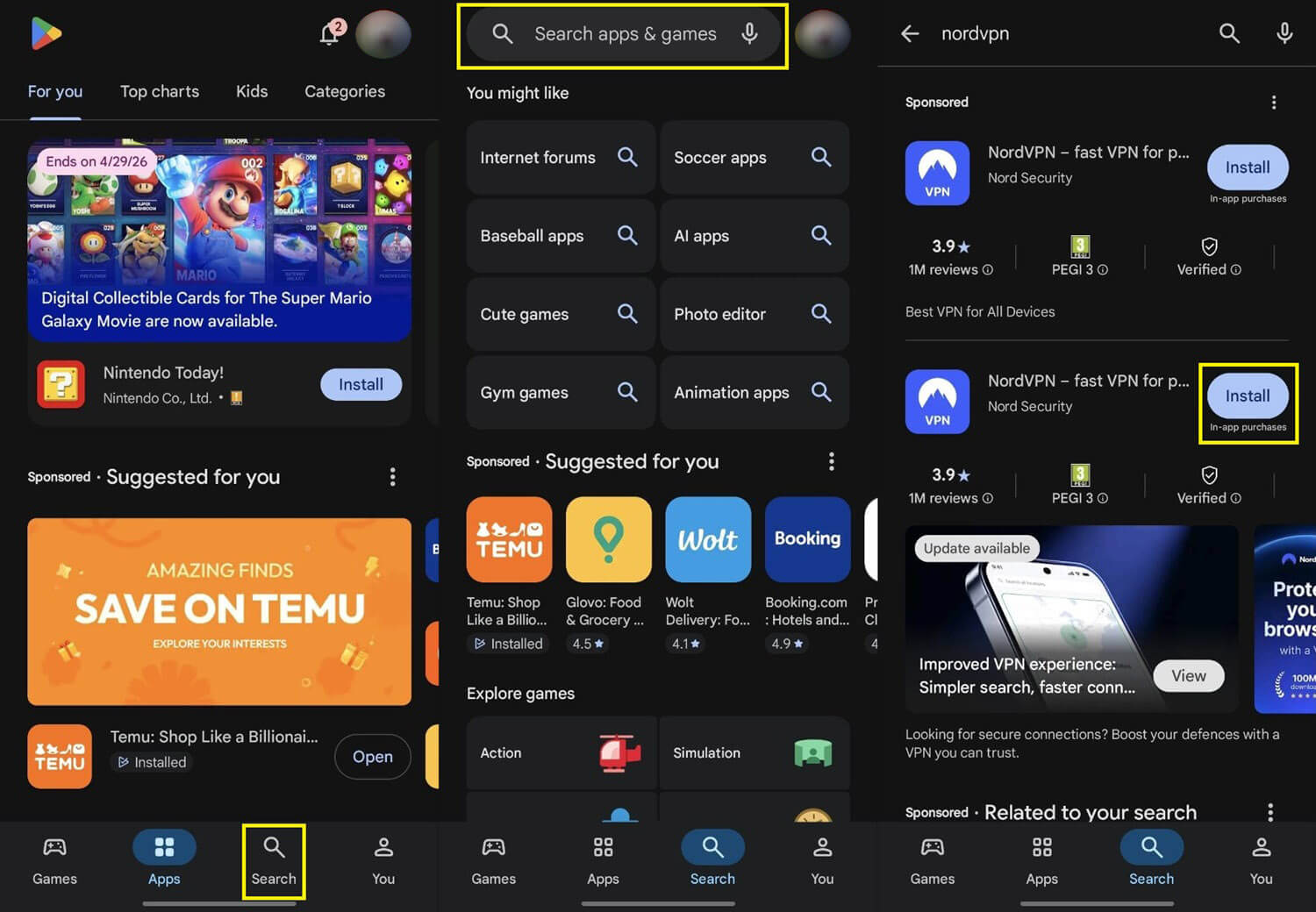
Open the app, sign in with the account you just created, and approve Android’s VPN permission prompt. You’ll see it only once.
Connect to a Server
Tap a country, or let the app pick the fastest server. A US server unblocks American catalogs, and none of the five VPNs took longer than three seconds to connect.

Which Android VPN Should You Install
On a phone, the differences between VPNs are easier to see, and NordVPN came out ahead. It kept the most speed on Android, and no streaming service in our set blocked it. Tapjacking Protection and Call Protection also guard against threats aimed at phones. The main cost is battery, where it used more than ExpressVPN and Proton VPN.
ExpressVPN added no battery drain that Android could show, so it’s the better choice if your phone spends long days away from a charger. Choose Proton VPN for privacy, Surfshark to change the location apps see, and PIA for the lowest price and the most useful automation rules. Before you commit, use a free trial or Proton VPN’s free plan to test the VPN on your own phone and connection.
Frequently Asked Questions
Which Android VPN app is the best?
The best Android VPN app is NordVPN. It unblocks Netflix, BBC iPlayer, and ITVX, filters scam calls, and adds Tapjacking Protection against malicious screen overlays.
Does a VPN drain Android battery?
Yes, slightly. A connected VPN adds a small amount of drain during video playback, and lightweight protocols such as WireGuard, NordLynx, and Lightway use less power than OpenVPN.
Is a VPN slower on a phone than a laptop?
Yes, usually. A phone encrypts traffic with less processing power than a computer, so the same VPN subscription loses more speed on Android than its desktop app does.
Do Android VPN apps work on tablets as well?
Yes. NordVPN, Proton VPN, ExpressVPN, Surfshark, and Private Internet Access install on Android tablets from Google Play, and one subscription covers a phone and a tablet.
Is a VPN APK safe to install?
No, not from an unofficial source. Tampered VPN APKs circulate on download sites, while Google Play and the VPN company's own website provide verified copies.
How quickly do Android VPN apps connect?
Within a few seconds. NordVPN, Proton VPN, ExpressVPN, Surfshark, and Private Internet Access connect almost instantly on Android, and modern protocols such as WireGuard keep the wait short.
Do apps still see my actual location behind a VPN?
Yes, often. Android apps with location permission read the phone's GPS, which a VPN doesn't change. Surfshark's GPS Override changes that, reporting a location that matches the VPN server.