Despite being a decent VPN, you may still want to know how to cancel your CyberGhost subscription for various reasons. It may not be as fast as you’d expected, or it may not offer the features you wanted. Either way, it’s not a perfect VPN, but to cancel CyberGhost and get a full refund, you must know how to do it.
Here’s the catch: not everyone qualifies for that full refund, and not all purchases are treated equally. With over 38 million users globally, CyberGhost has gained serious traction. Yet, based on real user reports, many find themselves confused about how (and when) they can actually get their money back.
If you’ve tested the waters and want out, we break down how to cancel CyberGhost and get a refund without getting stuck in a loop of canned support replies.
How to Cancel CyberGhost Subscription and Obtain a Full Refund in 2026
- Visit CyberGhost and go to My Account.
- Log in with your credentials.
- Click on your Profile icon and select Subscriptions.
- Find your plan and press Cancel Subscription.
- Contact CyberGhost’s customer support and request a refund if eligible. If you need a better VPN, consider NordVPN or ExpressVPN instead.
Who’s Eligible for a CyberGhost Refund?
CyberGhost’s refund terms sound great on the surface (14 days for monthly plans, 45 days for longer ones), but eligibility depends on how and where you signed up.
💯 Direct Website Purchases Get the Best Treatment
If you subscribed directly through CyberGhost’s official website, you’re in luck. You’ll qualify for a no-questions-asked refund during the eligible window, and you can cancel through your dashboard. Once canceled, all it takes is a quick chat with support to initiate the refund. This is the cleanest and simplest refund path.
📱 App Store Purchases Are a Different Story
Bought your subscription via Google Play or the Apple App Store? Then your refund request goes to Apple or Google, not CyberGhost, and their policies are far less predictable. Google might honor a refund within 48 hours if you ask nicely.
Apple refunds vary wildly depending on location and purchase history. In short: if you used the app store, you’re playing by their rules, not CyberGhost’s.
❌ Crypto and Third-Party Purchases aren’t Covered
If you paid using cryptocurrency, CyberGhost’s policy is crystal clear, and those payments are non-refundable. The only exception is if the service was genuinely broken or unusable, but even then, you’re unlikely to see the money again.
The same applies if you bought a CyberGhost subscription through a third-party vendor like Amazon or StackSocial. You’ll need to contact the original seller to ask about a refund. CyberGhost has no power to reverse those sales.
⚠️ Abuse Prevention Clauses Do Exist
CyberGhost reserves the right to deny refunds if it suspects misuse of the system, such as repeatedly signing up, canceling, and requesting refunds to keep using it for free. They might also push back if your usage during the trial period was excessive.
These edge cases aren’t common, but they’re written clearly into the terms and conditions, and the support team will enforce them when needed.
How to Cancel CyberGhost Subscription
Canceling CyberGhost is usually straightforward if you bought it directly. But the steps can vary widely depending on where and how you signed up.
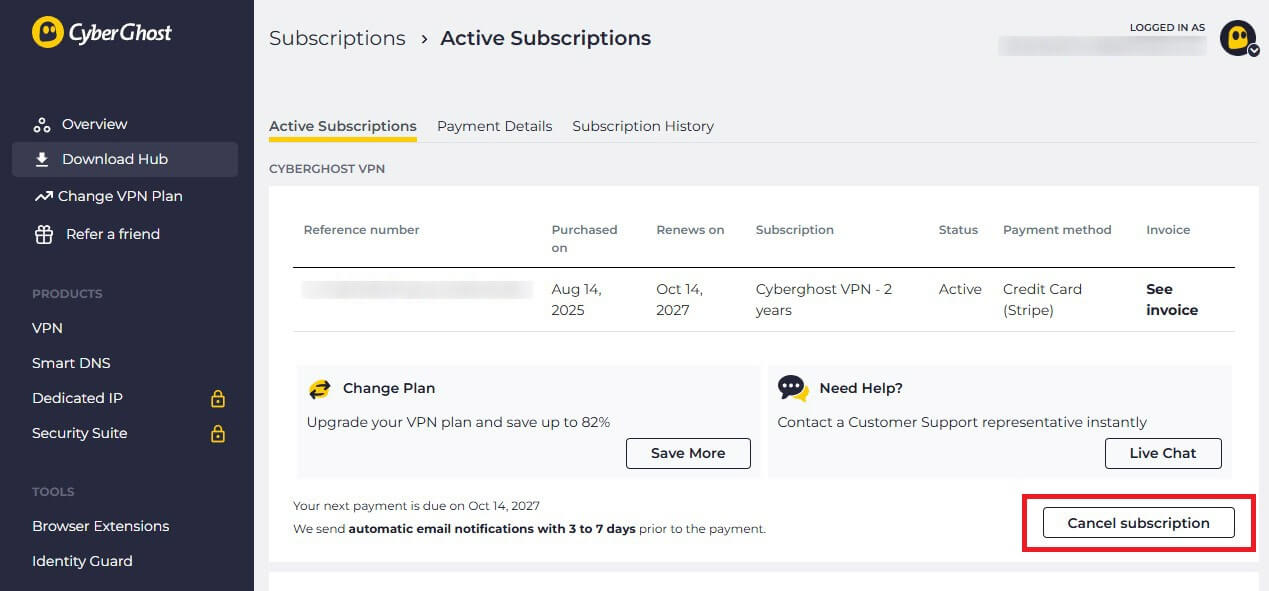
🖥️ On Desktop (Website)
If you subscribed through the website, log in at my.cyberghostvpn.com, navigate to Subscriptions, and click Cancel Subscription. Follow the prompts, including selecting a reason for cancellation and confirming your choice. This turns off auto-renewal, but it doesn’t issue a refund automatically.
To get your money back, you’ll still need to contact CyberGhost’s support team. The fastest way is via live chat on their website. Just mention that you’ve canceled and would like a refund on your purchase.
If you’re within the 14-day (monthly plan) or 45-day (longer plans) window and bought directly from CyberGhost, your request is approved in a few minutes.
🤖 On Android (Google Play)
If you bought CyberGhost via the Google Play Store, you’ll need to cancel directly in your Play Store account by following these easy steps:
- Open the Google Play Store.
- Tap your profile icon → Payments & subscriptions → Subscriptions.
- Find CyberGhost and tap Cancel Subscription.
Refunds must be requested from Google directly. Sometimes they’re automatic if you cancel right away; other times, you’ll need to request a refund via play.google.com or the Help section in your account.
🍏 On iOS (App Store)
For iPhone or iPad users:
- Open Settings → Tap your name → Subscriptions.
- Select CyberGhost VPN, then tap Cancel Subscription.
CyberGhost doesn’t handle refunds on Apple devices at all. Visit reportaproblem.apple.com, sign in, and choose Request a Refund. Whether Apple approves it depends on your history and how long ago you bought the plan.
Manual Third-Party Cancellations
If you got CyberGhost through Amazon, StackSocial, or any other deal site, you’ll need to cancel using their platform. Most of these platforms don’t auto-renew, but if they do, cancel via your account settings on that specific vendor’s site.
As for refunds? Those will also go through the original seller, not CyberGhost. Their support team may help you contact the reseller, but they can’t issue refunds on third-party sales.
How to Request a CyberGhost Refund
You’ve canceled your subscription; now it’s time to get your money back. If you’re still within the refund window (14 days for monthly plans, 45 days for longer ones), you’re good to go. But the refund isn’t automatic, and you’ll need to ask for it.
💬 Live Chat: Fastest Method With Pre-Filled Options
CyberGhost’s 24/7 live chat is the quickest and cleanest way to start the refund process. Just head to the CyberGhost support page, click the chat bubble in the bottom-right corner, and type refund. You’ll get a dropdown of pre-filled options, and a real agent usually joins within 30 seconds, which is pretty fast.
No need to explain much, just say you’re canceling and would like your refund. If you’re eligible, it’s usually approved in under five minutes, and you’re set.
📧 Email: When You Want Written Proof
If you prefer something more formal (or want a written trail), email [email protected] with your refund request. Include your account email and order number. You might wait a bit longer (up to 24 hours), but email is still a solid backup if live chat stalls out or if you’re dealing with a third-party purchase.
What You’ll Need to Provide
- Email address tied to your CyberGhost account
- Your order or transaction ID (check your inbox or billing history)
- A short reason (optional, but they’ll ask, so say you no longer need the VPN)
How Long Does It Typically Take
Once approved, refunds usually arrive within 3–10 business days, depending on your bank or payment provider. PayPal tends to be the fastest, but credit cards can take a bit longer. Crypto payments are not refundable, and purchases made via third-party sellers must go through them directly.
Tried Everything But Still Not Happy?
Sometimes users report refund issues, usually when the refund window has expired or the purchase was made via a reseller. Here’s what you can do about that.
⛔ Refunds Denied: What to Do Next
If CyberGhost declines your refund and you believe it’s a mistake:
- Re-contact support and escalate politely. If you’re only a day or two past the refund window, a supervisor may override a denial.
- If you used a credit card, you can initiate a chargeback with your bank. Just be aware that this may block you from signing up again with CyberGhost.
⚖️ Can You Get Partial Refunds?
Generally, no. CyberGhost doesn’t do partial refunds unless it’s a multi-year plan and you cancel within the first 45 days. After that, even if you only used it for a week, you won’t get any money back.
Best Alternatives to CyberGhost VPN
If CyberGhost didn’t live up to the hype, or you’re just not feeling the fit, here are three standout VPNs that might check more of your boxes.



 9200 servers
 128 covered countries
 30 days money-back guarantee
 10 simultaneous connections
9.4 /10

20396 servers
148 covered countries
30 days money-back guarantee
10 simultaneous connections
9.2 /10

3000 servers
105 covered countries
30 days money-back guarantee
10 simultaneous connections
9.1 /10
1. NordVPN: Best for Speed, Privacy, and Global Access
NordVPN delivers on what CyberGhost aims for, but with much better execution. Based on our tests, it’s the best alternative to CyberGhost in 2026. It has servers in 130 countries, and they’re consistently fast, even during peak hours. That makes it incredibly reliable for streaming, gaming, and general browsing.
NordVPN’s RAM-only infrastructure keeps things tight. The NordLynx protocol is a major speed upgrade over OpenVPN and helps maintain stable connections on crowded networks. But what really sets NordVPN apart are the extras you’ll use. Threat Protection Pro blocks trackers, ads, and malware.
It even works when the VPN is disconnected. You also get Double VPN servers that double your encryption and make you untraceable. Finally, there are obfuscated servers to conceal your VPN use, which CyberGhost still lacks. It’s fast, reliable, and backed by a 30-day money-back guarantee if you’re switching over.
2. ExpressVPN: A Fast Premium VPN

ExpressVPN is ideal if you want simplicity without sacrificing power. It’s especially great for streaming, with reliable access to Netflix, Hulu+, and BBC iPlayer, even from restrictive networks. The Lightway Turbo protocol makes connection times almost instant and keeps speeds high across desktop and mobile alike.
If CyberGhost felt sluggish, this would feel like a breath of fresh air. It also shines regarding device compatibility. There’s a native app for everything, including routers, Fire TV, Apple TV, and gaming consoles, so setup is never a hassle. With RAM-only servers and a no-log policy, ExpressVPN doubles down on privacy.
Best of all, it’s actually nearly as affordable as CyberGhost, with the biennial Basic plan at around $2.45 per month for two years. That said, it’s worth a shot.
3. Private Internet Access: Tons of Customization and Control
PIA is the go-to choice for users who like having knobs to turn. Its interface offers deep customization, from choosing encryption levels and ports to enabling multi-hop routing or split tunneling by app. Because it has servers in all 50 US states, it’s a favorite for streaming regional sports and local news.
PIA effortlessly avoids those annoying “not available in your area” messages. Even better, Private Internet Access supports unlimited devices, making it a great deal for families or power users running VPNs on everything from laptops to smart TVs. You also get built-in ad and tracker blocking via MACE.
The VPN is fully transparent with its open-source apps. While not the flashiest VPN around, it’s flexible, safe, and reasonably fast for a budget price of $2 per month.
Try Private Internet Access Now
Final Thoughts
CyberGhost’s 45-day refund policy is one of the most generous in the industry, but it only counts if you subscribed directly through its website. If you went through Google Play, the App Store, or a third-party reseller, you might not be eligible for a refund. The VPN itself is pretty good and very reliable.
However, it can feel bloated or slow compared to more nimble options like NordVPN or even ExpressVPN. That said, when you cancel your CyberGhost subscription, you may want to consider them as alternatives. Pick NordVPN as the best overall choice or ExpressVPN as the fastest, more beginner-friendly alternative.
Also consider Private Internet Access, which takes the title of the best cheap VPN, edging out CyberGhost, Surfshark, and other fierce rivals in 2026.
Frequently Asked Questions
What is the CyberGhost money-back guarantee?
CyberGhost’s money-back guarantee is 45 days for long-term plans and 14 days for the one and only monthly plan. If you miss a day, you can’t get your money back.
Can I get money back on CyberGhost?
Yes, you can, but only if you request a refund within the given period. For long-term plans, it’s 45 days, and for the monthly plan, you have 14 days for that.
Can I get a CyberGhost refund twice?
No, you can’t. CyberGhost closely monitors the system and doesn’t allow users to frequently buy and cancel it, as it’s an abuse. When you cancel CyberGhost and get a refund, you must wait for at least a few months to get it and do the same.