In this Brave VPN review, we’re taking a fresh look at the browser giant’s VPN add-on to see whether it’s grown into a serious contender in 2026. The short answer: not quite. Privacy and security held up well in our testing, and the built-in firewall is a nice touch, but speeds lagged behind the competition and device compatibility remains limited. The VPN does what it advertises, with servers in over 40 locations.
The trouble is the price. For a premium subscription, you can get faster, more complete services elsewhere, and we’ll point you to a few of them later in this review. First, let’s see how it performed in this re-test.
Brave VPN
Brave VPN's higher price and the lack of essential VPN features make it all but a compelling offer. While safe and secure, the VPN lacks the performance, security features, and streaming prowess of more popular and less expensive VPNs.
Pros
- Easy to use
- Audited no-logging policy
- Works for torrenting
Cons
- Basic app with no features
- Underwhelming speeds
- Barely works for streaming
- Limited compatibility
- Expensive
Quick Look at Brave VPN
| 💸 Starting price | $99 per year |
| 🔖 Money-back guarantee | No |
| 🌐 Protocols | WireGuard, IKEv2/IPSec |
| 🥸 No-log policy | Yes, audited |
| 💾 Servers | 300+ in 40+ locations |
| ⏸️ Double VPN/Multi-hop | No |
| 🦠 Ad and tracker protection | Yes (93% efficiency) |
| 📺 Streaming performance | Poor |
| 🔁 Torrenting | Allowed on all servers |
| ⚡ Speed | Middling (40% avg. loss in DL speed) |
| ⚙️ Ease of use | Great for beginners |
| 💻 Supported platforms | Windows, iOS, Android, and macOS |
| #️⃣ Simultaneous connections | 10 |
| ☎️ Customer support | Email, community, and help center |
Brave VPN Isn’t Affordable: The Biggest Issue
Brave VPN doesn’t have tiered plans. It also doesn’t offer much in terms of flexibility. When you first subscribe, you’ll start a 7-day trial, so the company won’t charge you immediately. You’ll first have to choose between the two subscription plans: monthly or annual. Brave VPN costs $9.99 monthly, but if you pay annually, the price drops to $99.99. That’s approximately $8.34 per month, very, very expensive.
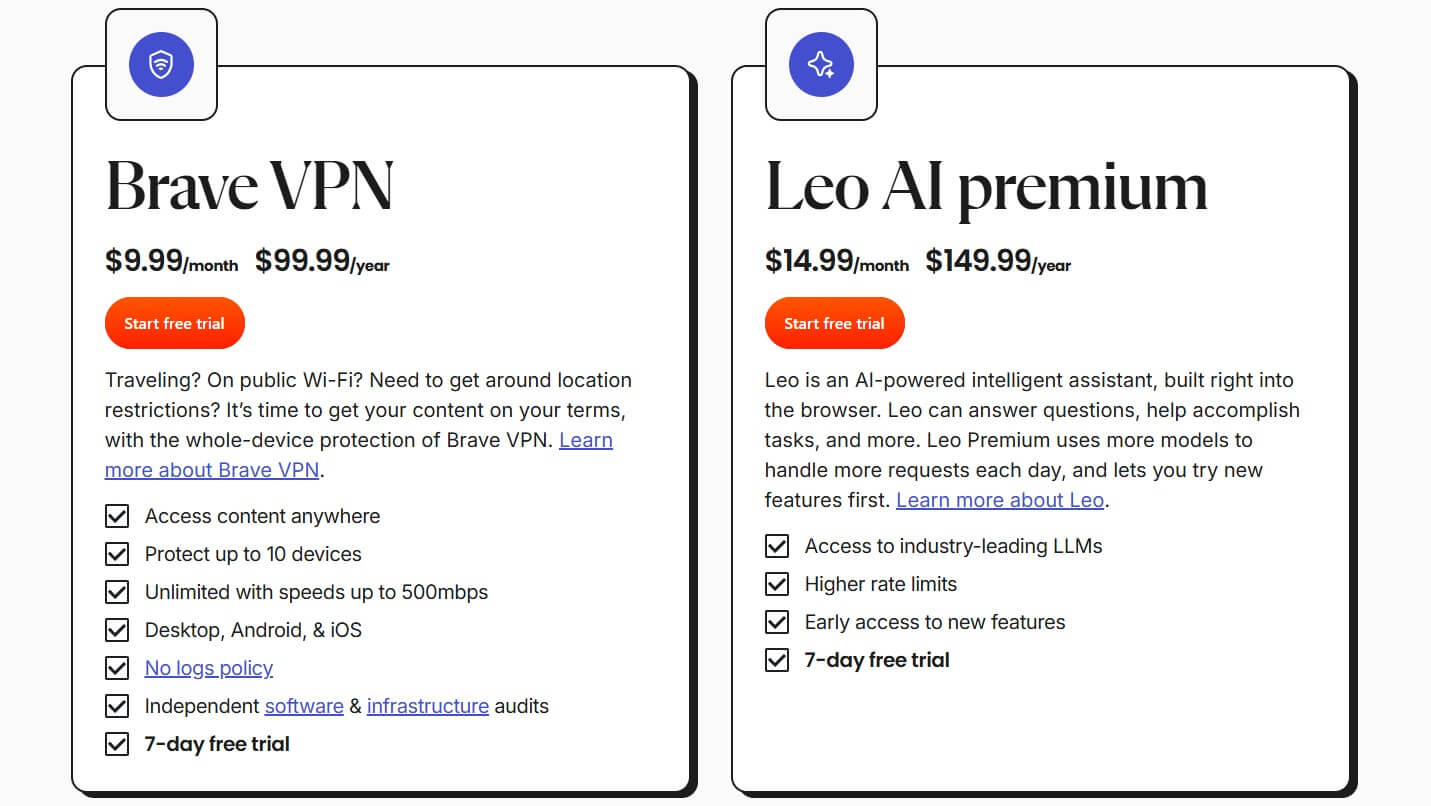
Let’s draw parallels to other VPNs. NordVPN’s introductory offer is under $96 for the first 27 months (two years with three free months). ExpressVPN costs under $70 for the first 28 months, yet it offers superior speeds, security, and everything else, as outlined in this ExpressVPN vs Brave VPN duel. Brave VPN’s free trial is welcome, but you need a credit card. Forget to cancel it, Brave VPN won’t hesitate to charge you.
Plus, since there’s no defined refund policy, chances are it won’t issue a refund unless you have an insurmountable issue that even the support team can’t fix.
Limited Compatibility, Solid Ease of Use: My Experience
This provider offers applications for all major platforms, and that’s commendable. However, major platforms don’t mean all platforms. During our Brave VPN assessment, we tested it on macOS, Windows, iOS, and Android. That’s where the story ends. The VPN doesn’t work on Linux. We also tried to install it on a Fire TV Stick, but sideloading wouldn’t work because Brave VPN is an in-browser VPN.
That means you have to use a device that supports the Brave Browser. When you enable the VPN inside the browser, it doesn’t work like a proxy, which we’ve seen in Opera VPN. Instead, it protects all traffic, even outside the browser, which we confirmed in our tests. This alone makes it safer than VPN extensions.
Is It Easy to Use? Hands-on Tests
So, how do you even use Brave VPN? Download the Brave Browser, click on the small Shield icon up top, and launch it. If you don’t have an account, you’ll initiate the trial, and off you go. The app looks like this, and we won’t lie: it’s extremely basic. The app comprises two elements: a connection button and a server list.

The Gear icon launches settings, where you’ll find virtually nothing, except smart proxy routing, customer support, and the option to manage your subscription. To make things worse, the trend continues on iOS and Android. We tested the service mostly on Android and expected at least a dedicated app.

Brave VPN was again tucked into the browser and offered nothing significant. At least, our entire devices were protected, but that’s what you can do with a VPN for Firefox, Chrome, Edge, and other browsers. Brave VPN is straightforward, and we can’t complain. However, it’s more a consequence of the lack of features, rather than a clever design choice. The provider offers 10 simultaneous connections, which honestly could’ve been higher for the price.
Brave VPN is Safe: Here’s My Take on its Security
Having a VPN in one’s product makes you expect all the essential features, such as encryption, a kill switch, split tunneling, protocol selection, and God knows what. Well, Brave VPN offers only a fraction. During our Brave VPN review, we found these features and tested them personally to see if they hold up.
- Kill switch. An iOS exclusive, which blocks the internet connection if the VPN connection breaks, preventing IP and other data leaks. I tested it by unplugging my LAN cable, and it activated immediately. Check. ✅
- Firewall. Brave’s addition to the VPN, which blocks ads, trackers, and malware, ensures optimal browsing without interruptions. I ran a test on AdBlock Turtlecute, and the result of 94% was very impressive. Check. ✅
- Smart proxy routing. It helps access blocked apps and sites when the VPN connection is blocked (i.e., in censored regions). My partner in Shenzhen tested it on a trip, and Brave VPN failed to work in China. Fail. 👎
- WireGuard protocol. It’s used by default, although Brave VPN also uses IKEv2 in specific scenarios and on specific systems (iOS). In my tests, WireGuard was stable, but I suffered heavy speed losses even on nearby servers. Fail. 👎
- 256-bit encryption. A gold standard in the VPN industry that all the best VPNs use. A powerful tool, but nothing you won’t find elsewhere. I’d say I expected this since even the lowest-quality VPN have it. Okay. ⚖️
Is Brave VPN worth this much with a few, more or less standard features? We’d say no, when NordVPN, which costs less, offers Double VPN servers, obfuscation, malware protection, Onion over VPN servers, etc.
I Had No IP/DNS Leaks When Testing Brave
We tested Brave VPN for IP (IPv6) and DNS leaks. We tested Brave VPN in the USA, New York, so naturally, we connected to a foreign server. We picked a server in New Zealand and went to ipleak.net and then browserleaks.com to see if our native IP or DNS address would appear. First, we have ipleak.net tests:
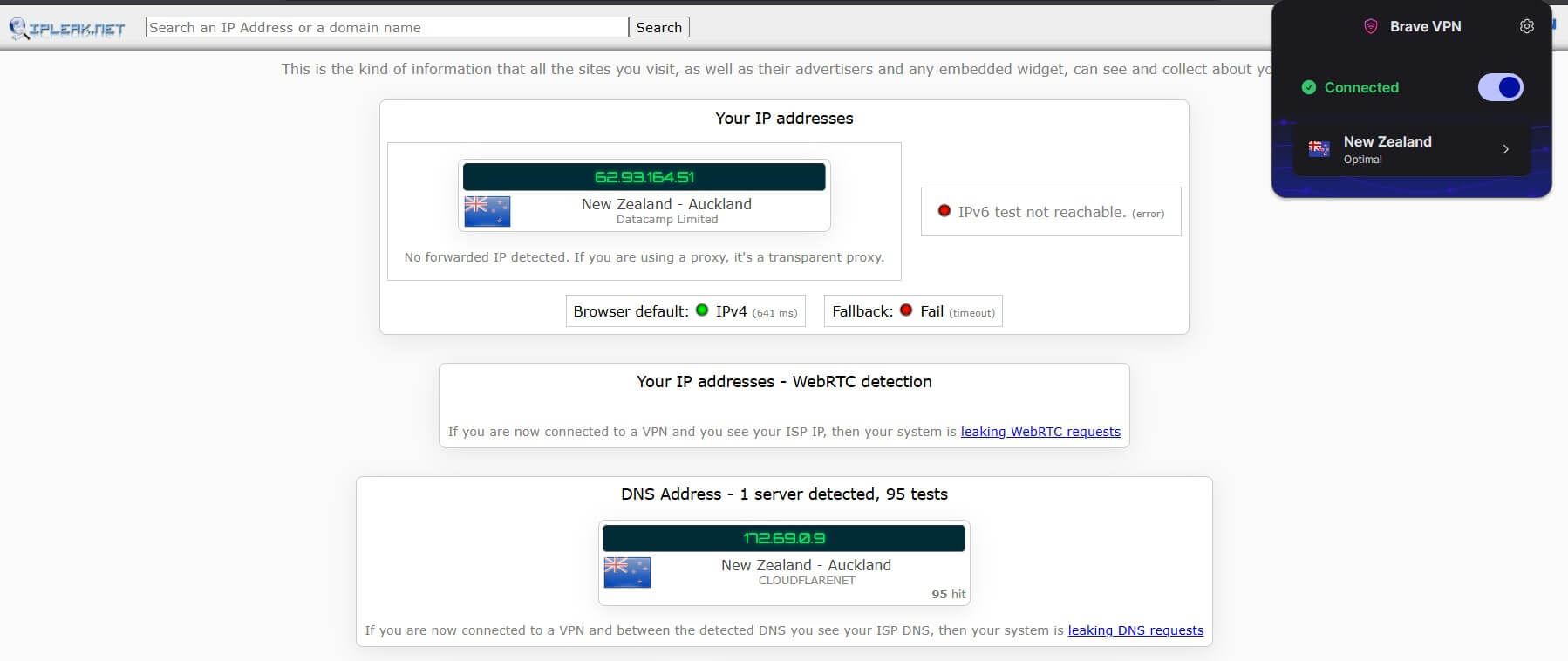
Excellent results. The provider showed no signs of leaking.
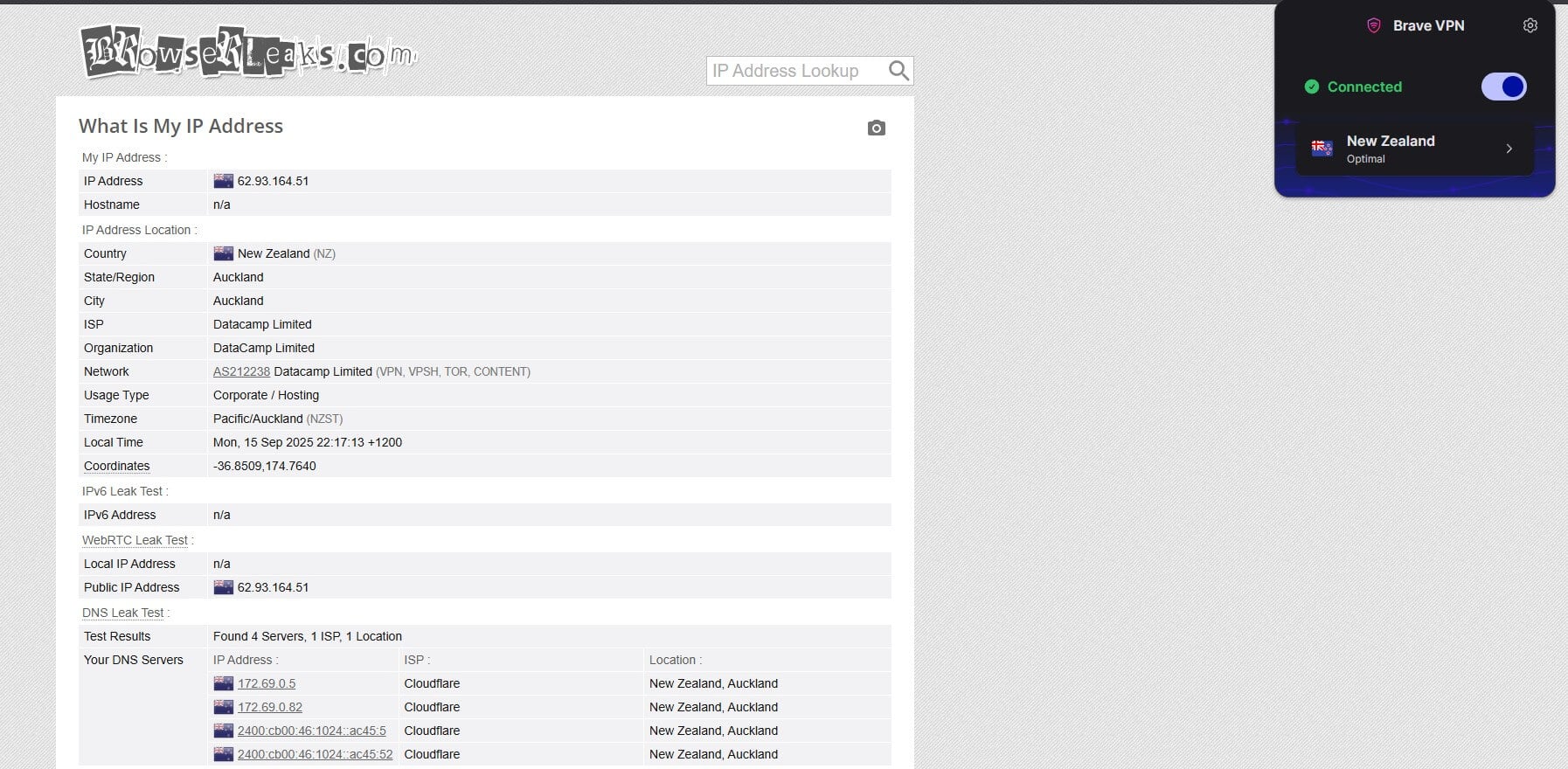
Browserleaks.com sings the same song of glory. No IP and DNS leaks to speak of. We didn’t hang up only on this New Zealand VPN server. Instead, we tested many more, including the USA, Singapore, and Germany, and were satisfied to find no data leaks. Good job on this one, Brave VPN.
Brave VPN Doesn’t Store Logs (It’s Also Been Audited)
Brave VPN is based in the USA, which may not sound exciting, considering the 5 Eyes story. But in my experience, it really matters little. Many US-based and Canada-based VPNs are among the safest overall options you can pick. Brave VPN is likely one of them. Here’s what the privacy policy says:
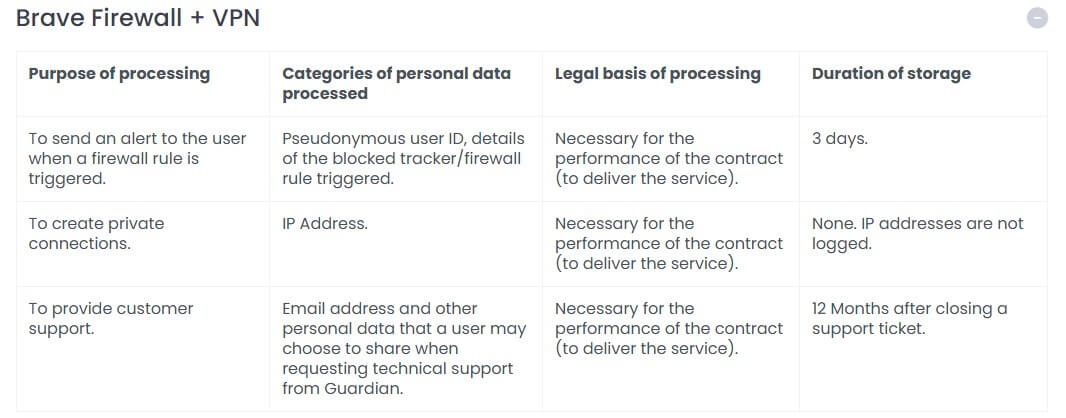
It’s relatively short and succinct, with the most important parts immediately displayed. Brave Firewall + VPN is powered by Guardian, and the service processes a minimal amount of data to function, such as:
- User ID (pseudonymous)
- IP address
- Email address
At first, I was baffled to see the dreaded IP address, but Brave VPN actually uses it only for, as it says, service delivery. While your ID is stored for 3 days, and your email is stored for 12 months after closing a ticket, your IP address IS NOT LOGGED. You know I don’t trust just any VPN, so I looked it up, and Brave found that it was actually audited. The company Assured, a very, very credible auditor, did this.
Brave VPN underwent two audits: One security audit and one no-log policy audit. That’s how I know I can trust it. Plus, the audits were performed recently, in 2024, actually briefly after the company established its VPN service.
Speed Tests: Brave VPN Still Isn’t Very Fast
Speeds up to 500 Mbps immediately caught my attention on the site, and, I mean, Brave was at least honest. I still tested it since my network is only ~50 Mbps, so I had a lot of legroom. My tests were performed in Europe (I was traveling at the time), and I used a VPN on my Windows 11 laptop with a stable LAN connection in the hotel, using the newest version of my OS and my network adapter driver.

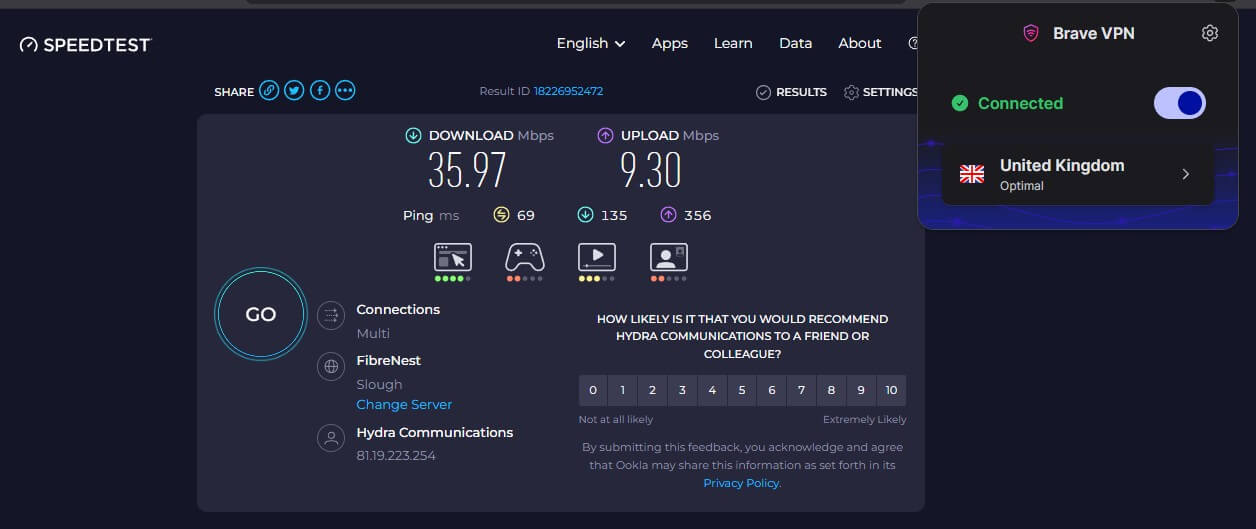
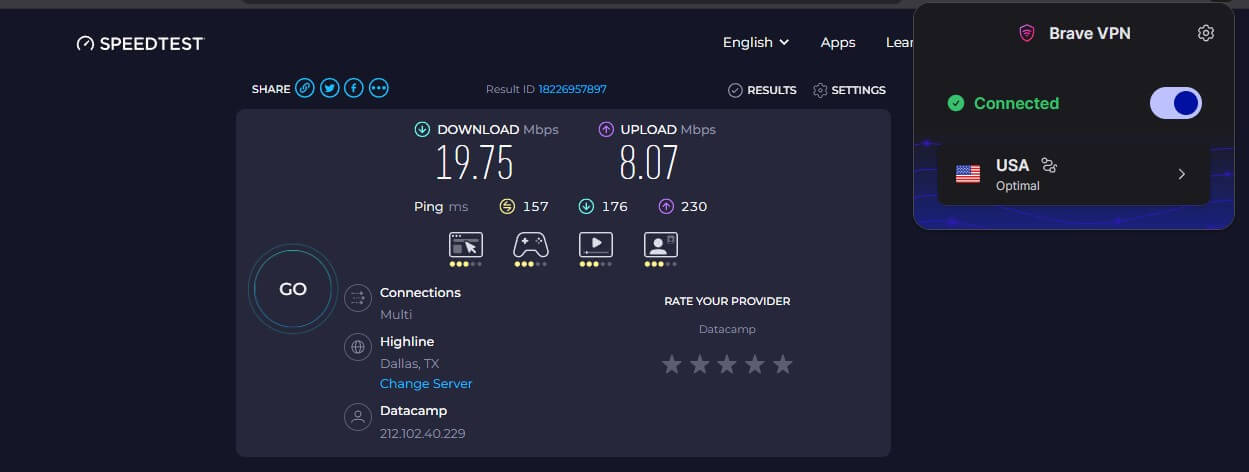
We tested Brave VPN for 3 days, 3 times a day, using 3 server locations. We prioritized distant servers, so we decided on the UK, the USA, and Japan. Also, we performed our speed tests using Speedtest.net. Here are the results:
UK Server Test Results:
US Server Test Results:
Japan Server Test Results:
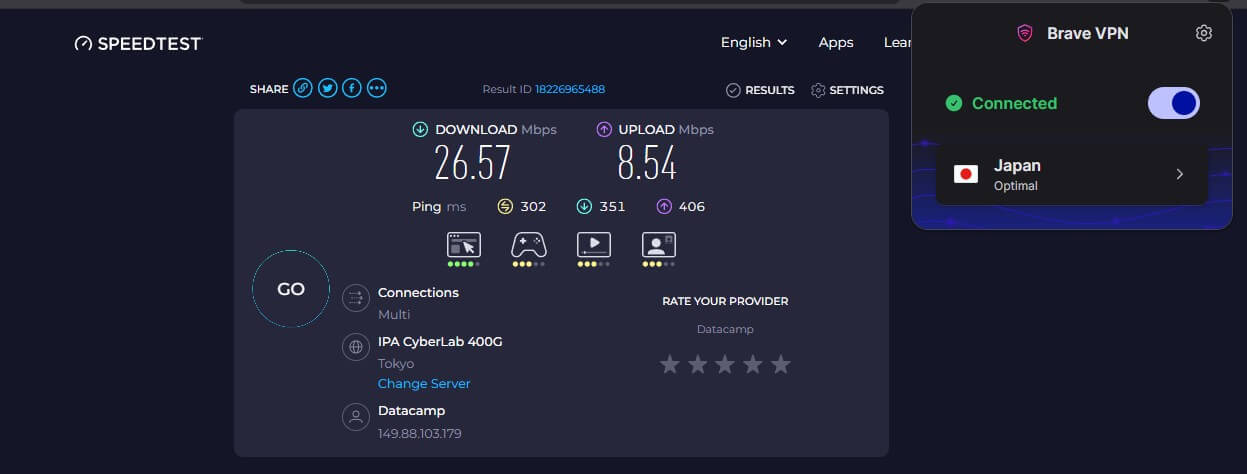
Brave VPN suffered from serious speed reductions, with the lowest on the US server. Its latency went up drastically and peaked at 406 ms for upload latency on the Japanese server. Here are Brave VPN’s average speed retention rates across 3 locations, compared to some of the best VPNs we tested:
| Brave VPN | NordVPN | ExpressVPN | PIA VPN | |
| DL Speed Retention | 60% | 82% | 76% | 74% |
| UL Speed Retention | 76% | 93% | 91% | 76% |
Brave VPN is slower than all 3, being only close to Private Internet Access. If you want a faster VPN, you know which one to get: the three above will work.
Brave VPN Performs Poorly for Streaming
Brave VPN doesn’t openly advertise streaming, so we decided to take matters into our own hands and test it for you. We first tested BBC iPlayer, so after connecting to the UK server, we went straight for it:
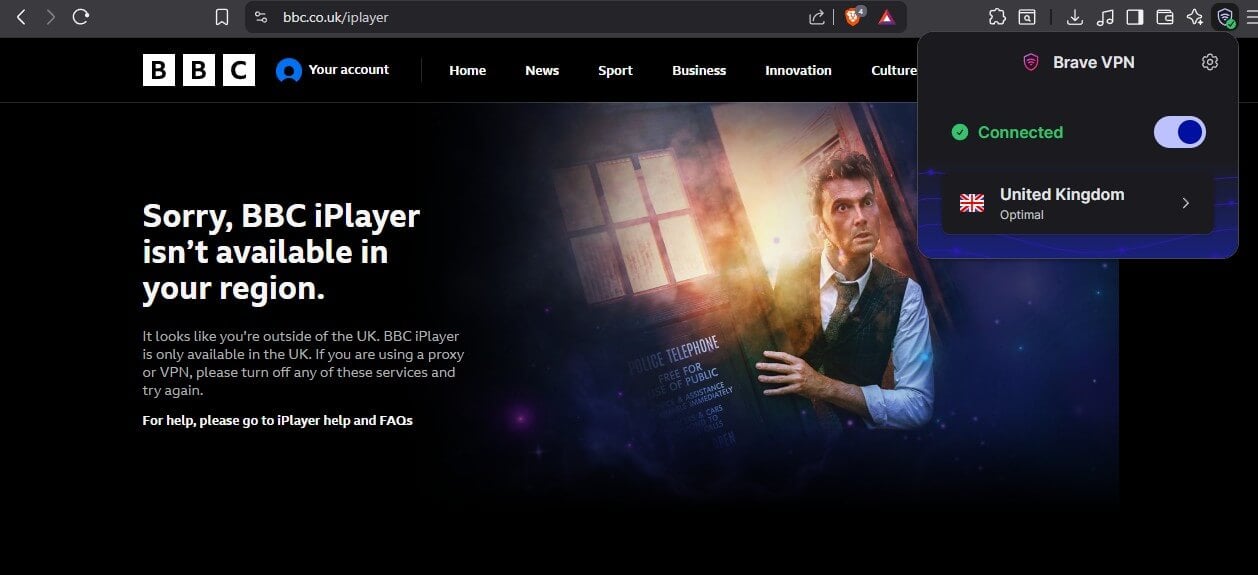
The platform blocked our access immediately, so we thought, “Okay, let’s try another browser!” We opened Edge and got the same result. After that, we launched our browsers in Incognito mode, but BBC iPlayer still wouldn’t budge. Finally, we switched to another server only to see the same. Next was Netflix, and Brave VPN was off to a promising start, as it worked properly. However, after searching for a title exclusive to the US catalog that we tried to unblock, it didn’t appear.
This means the VPN did not work with Netflix. Other streaming platforms were a no-go. We tested at least five more without success. Brave VPN works with some TV channels, but they’re typically easy to unblock and don’t have anti-VPN measures. However, even after accessing them, we noticed more than occasional stuttering in Full HD due to Brave VPN’s unreliable connection speeds.
So, can you use it for streaming? Only on rare occasions. You’re better off with an appropriate streaming VPN like NordVPN or Proton VPN.
Brave VPN is Good for Torrenting: Safe, but Not Fast
Brave VPN may open up in your browser, but it’s actually not a glorified proxy like Opera VPN. I tested it for torrenting through qBitTorrent, and rechecked if my IP address was actually the one from the VPN. It was.
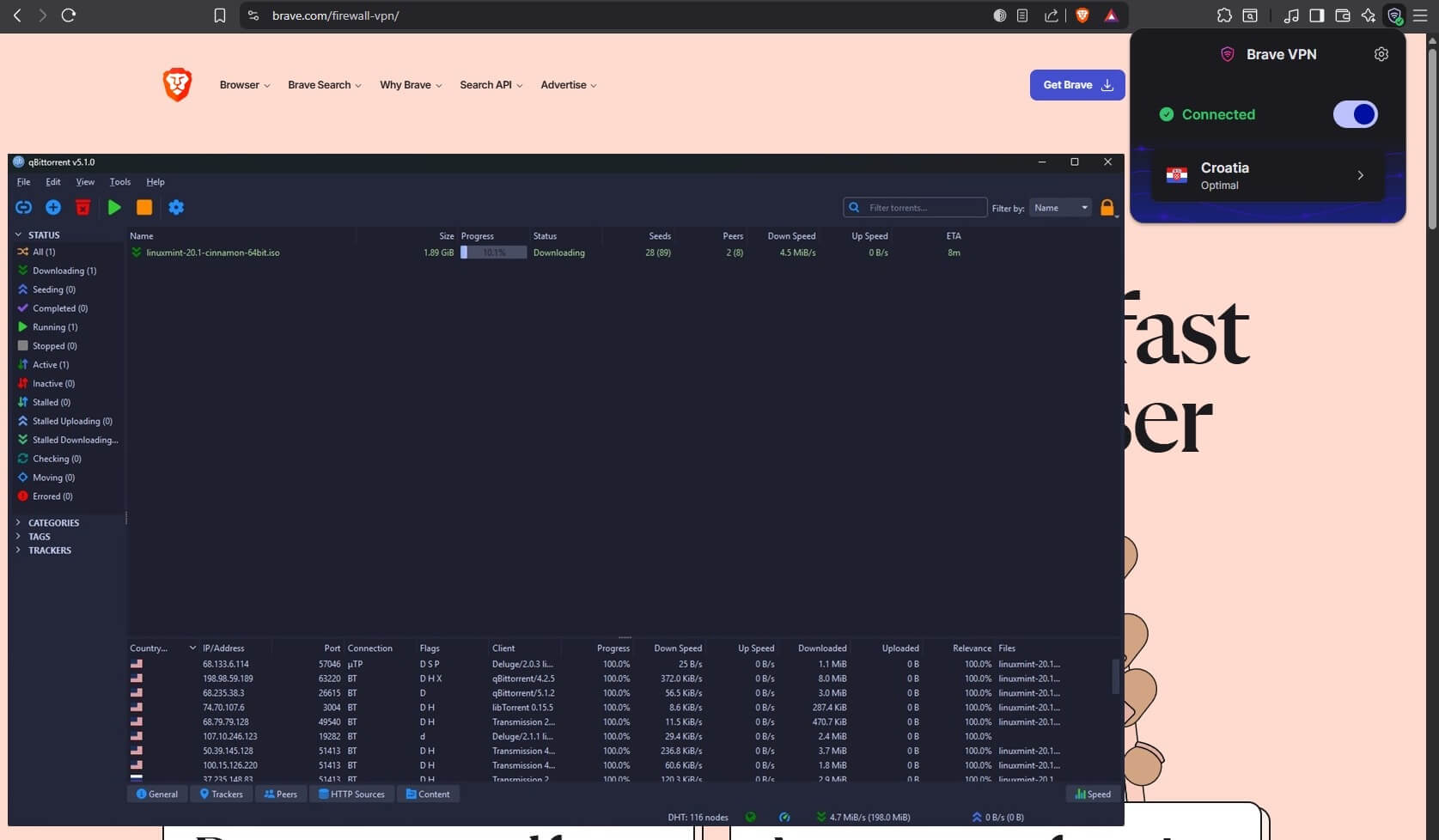
Brave VPN’s weaker performance may influence download speeds, so we advise using a nearby server. For this Brave VPN review, we used a server in Croatia (I was in Europe at the time), and as you see above, our performance drop was mild. The VPN allows torrenting on all servers, so pick any and enjoy.
Brave VPN Servers: Very Limited and Congested
Brave VPN currently has over 300 servers in 40+ regions, but the total number of countries is above 20. Unimpressive numbers, particularly since NordVPN and Proton VPN, cheaper alternatives, offer multiple times more. For reference, Proton VPN offers over 20,000 servers in 148 countries for $2.99 per month. But server distribution is at least okay. Nothing more than that.
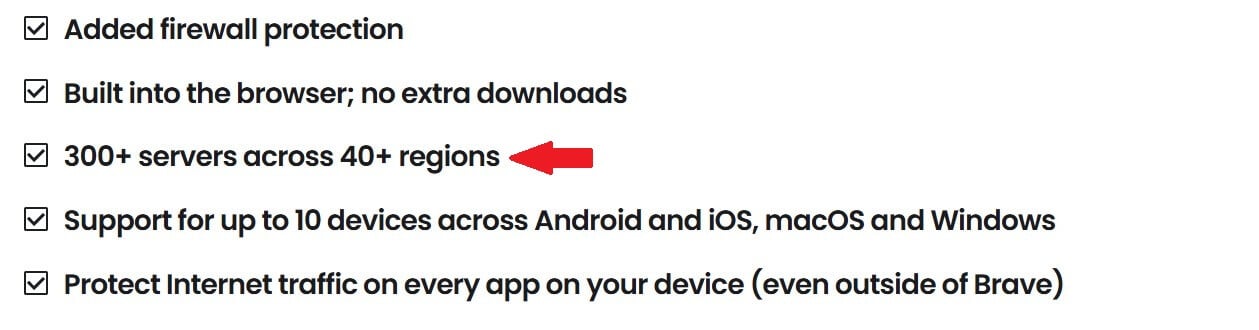
Most servers are in Europe and North America, with exceptions like Brazil, Australia, Mexico, Singapore, and Japan. The VPN uses physical servers, so it can’t provide virtual IP addresses in India, Turkey, Russia, and censored regions. The VPN claims to have an uplink speed of 10 Gbps on most servers, but provides speeds of up to 500 Mbps. It also doesn’t rely on RAM-based servers like most flagship VPNs.
Customer Support: No Live Chat, Limited Contact Options
Brave VPN’s customer support is basic but functional if you don’t mind longer waiting times. You can reach support within the app. Click the VPN icon, go to Settings, and press Contact Technical Support. A support ticket will open, where you’ll provide your email, choose a subject, and provide more insight into the problem. Once the ticket is sent, Brave will contact you back in a few hours.
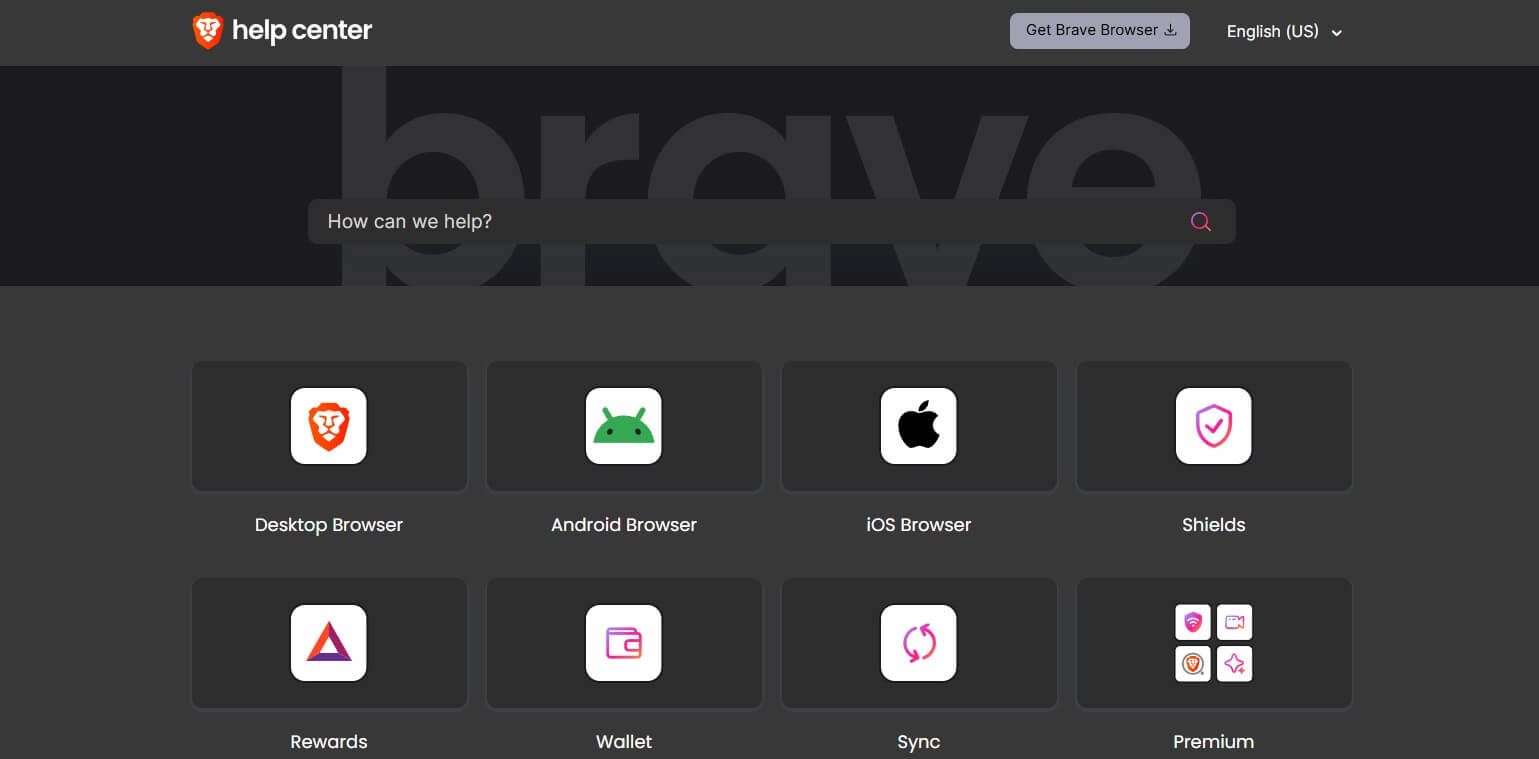
The VPN doesn’t have live chat support, and while ticketing support is slower, the support team is eager enough to fix the present issue or answer a question. Brave’s Help Center is top-notch, with solid articles on different issues. FAQs are there, and Brave’s community is active. You won’t have to rely chiefly on Brave VPN to solve the issue when community members can and will inevitably help faster.
Brave VPN vs ExpressVPN: How Do They Compare?
We also ran Brave VPN against ExpressVPN across 8 categories, on the same connection and with the same testing method. ExpressVPN won 7 of them, and the eighth, privacy, ended in a draw. Brave VPN’s anonymous sign-up token is genuinely strong privacy engineering, while ExpressVPN counters with a British Virgin Islands jurisdiction and more than 20 independent audits.
| 🏆 ExpressVPN | Brave VPN | |
| Cost over 28 months 🤑 | $83.72 | $233.31 |
| Money-back guarantee 🪙 | 30 days | None |
| Protocol selection 🌐 | Lightway, WireGuard, OpenVPN, IKEv2 | No (WireGuard by default) |
| Kill switch 🛑 | All platforms | iOS only |
| Download speed retention ⚡ | 76% | 60% |
| Countries 🏠 | 113 | ~20 |
| Netflix catalogs 📺 | 15+ | None |
| Works in China 🧱 | About half the time | No |
The gap is widest on price and streaming. ExpressVPN’s two-year plan costs about a third of what Brave VPN charges over the same 28 months, and at renewal the two land at almost the same yearly price. ExpressVPN was also 113% faster on our US server and unblocked every platform Brave VPN failed on, from BBC iPlayer to Max.
Brave VPN keeps a real edge in one place: its payment token proves you have an active subscription without ever linking it to your connections. If you already live in the Brave browser and only need device-wide protection with ad blocking, that’s a fair reason to pick it. For everything else, ExpressVPN costs less and does more.
Try ExpressVPN for 30 Days Risk-Free
Brave VPN Review Verdict: Still Not Worth Your Money
Let’s wrap up this Brave VPN review with the verdict. Based on our testing, Brave VPN still feels half-baked. It works, and it does what it promises, but at this price, “it works” is the bare minimum. Think of it as paying steakhouse prices for a decent sandwich. Nothing wrong with the sandwich, but you know what else that money buys. At $100 annually, you’re getting a basic app, middling speeds, subpar streaming support, a small server network, and no advanced security features.
This service should cost half as much, and even then, it wouldn’t crack our best cheap VPN list. So no, we don’t recommend Brave VPN. Not at this price. Instead, save over 70% on NordVPN or grab Proton VPN at 70% off, spend under $3.5 monthly, and get world-class speeds, security, and privacy. As a long-time Brave user (5 years now), I really wanted this VPN to be good, but maybe one day, I’ll live to see it true.