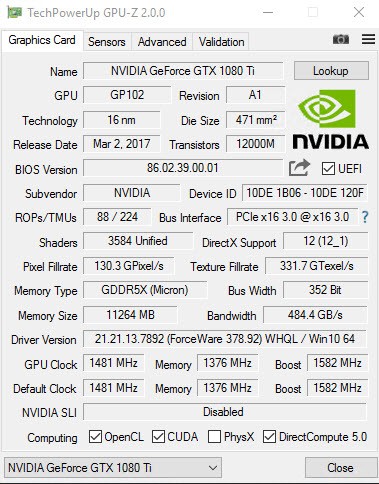
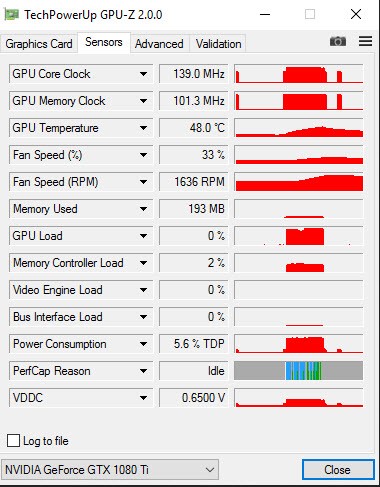
GPU-Z is a small utility that delivers all the important data about your graphics card and GPU in one place. Aimed at gamers and overclockers, it provides detailed information about your graphics hardware beyond basic specifications, displaying GPU load, temperature readings, clock speeds, and memory usage in real time. TechPowerUp created this application to be fast and lightweight, presenting extensive information without using much system memory.
GPU-Z pulls specific details directly from your GPU, including manufacturer data, BIOS version, memory type, shader count, and installed driver version. This gives you a clear picture of both your card's specifications and its current performance state. GPU-Z is worth keeping on your system because its monitoring features let you check temperatures during gaming sessions and compare GPU specs when considering an upgrade.
The straightforwardness of GPU-Z is one of its greatest strengths. It does not overwhelm you with extra features or a complicated interface. The program opens immediately and presents the most important GPU details on a single screen, with every value clearly labeled. You can access all the GPU metrics you need without any extra effort.
Why Should I Download GPU-Z?
Downloading GPU-Z is the right move for anyone who wants to understand what their graphics card is doing and how it is performing. The software provides essential hardware information through a simple interface that makes GPU monitoring accessible to anyone.
Real-time monitoring is one of the most important functions that make GPU-Z worth having. The utility displays not just GPU specifications but live readings of temperature, clock speeds, fan activity, and power consumption as they change. These monitoring capabilities are especially valuable for users who push their hardware hard, since they reveal temperature problems and voltage spikes before they can cause damage. GPU-Z gives you a clear picture of how your GPU handles your current workload.
The tool is also useful for diagnosing hardware problems. If your PC is running hot or games are lagging, GPU-Z gives you precise real-time data to identify the cause. Accurate live readings make it easier to detect thermal spikes and clock speed fluctuations and trace them back to the source. Rather than guessing at what might be wrong, GPU-Z shows you exactly what your GPU is doing at any given moment.
Tracking driver versions and BIOS information is another good reason to use this tool. GPU-Z tells you exactly what is installed, so outdated drivers cannot quietly hold back your GPU's performance without you knowing. The detailed information the software provides also helps when troubleshooting compatibility problems or deciding whether a driver update might improve things.
The portability of GPU-Z is another practical convenience. There is no installation required. Download the executable and run it immediately without leaving anything behind on your system. It works smoothly on any system without a complex setup and causes no slowdown, making it useful for users at every level. It is a small, efficient tool that does exactly what it sets out to do without unnecessary complications.
Is GPU-Z Free?
GPU-Z is completely free to use. TechPowerUp provides it as freeware with no premium version and no paid features. Voluntary donations are accepted to support ongoing development, but there is no requirement to pay anything. Every function is available to all users at no cost.
What Operating Systems Are Compatible with GPU-Z?
GPU-Z supports Windows 7 through Windows 11 and works on both 32-bit and 64-bit systems, covering everything from older workstations to current gaming machines. The application uses very few system resources and runs without causing any performance reduction or stability issues, regardless of the age of the hardware.
What Are the Alternatives to GPU-Z?
CPU-Z, also from TechPowerUp, focuses on the processor and system hardware rather than the graphics card. It provides detailed information about your CPU, motherboard, and memory, including clock speeds, memory timings, and chipset details. Used alongside GPU-Z, it covers the full picture of your system's core hardware. For users who want to monitor their entire machine rather than just the graphics card, CPU-Z is the natural companion tool.
Belarc Advisor takes a broader approach and generates a comprehensive profile of your entire computer in one report. It covers hardware components, installed software, license keys, security update status, and network configuration. IT administrators and users who need a full system audit find it particularly useful. Unlike GPU-Z, it does not provide real-time performance monitoring, but the depth of information it produces about your overall system setup and software inventory makes it a strong complement to more focused tools like GPU-Z.
CrystalDiskInfo focuses on storage devices rather than graphics hardware. It monitors the health, performance, and temperature of hard drives and SSDs, giving you an overview of drive condition that can flag potential failures before they become serious problems. It will not tell you anything about your GPU, but for keeping track of your storage components and their long-term reliability, it is an essential utility. Used alongside GPU-Z, the two tools between them cover both your graphics performance and the health of your drives.