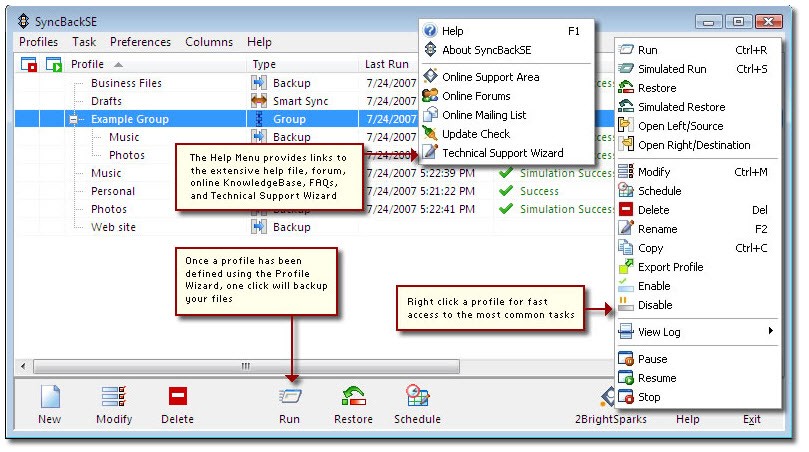
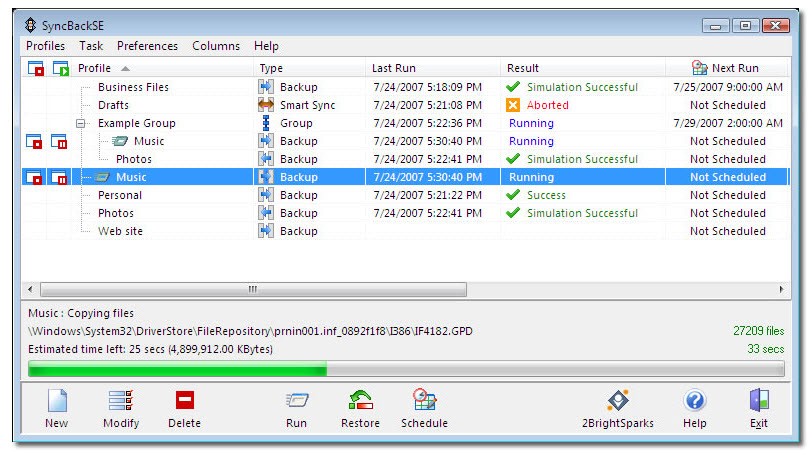
SyncBackFree provides a cost-free backup software that enables users to protect their files beyond complex system requirements. The program functions as a reliable solution for data management and copy operations between local folders and various network locations. This tool works perfectly for backing up photographs in addition to document delivery synchronization and protecting work file storage systems. The program has a simple interface with a focus on efficiency.
The fundamental purpose of SyncBackFree is to prevent file loss. The system follows the instructions you provide. The tool allows you to select monitored folders, determine backup destination locations, and adjust check frequencies. Operational abilities enable this tool to run automatically in the background or on command.
Regular users and small business owners select SyncBackFree because this software does its job effectively and has a clean interface. The software has a basic structure and allows users to maintain full authority over their files.
Why Should I Download SyncBackFree?
The software offers full backup and sync functionality free of charge. SyncBackFree provides two backup methods, allowing users to control backup scheduling as they wish. The software starts operating without interruptions as soon as it is configured, thus enhancing the user experience. The program neither interrupts nor pesters users with upgrade demands. It’s all about solid backup and syncing.
SyncBackFree serves as a solution for maintaining organizational control over important files stored across internal drives, external devices, and directories. The software allows users to create separate profiles for various operation categories such as photos, documents, and work files, enabling unique configuration settings. The technical setup requires some adjustment, but you will grow accustomed to it. The program presents its tools in a basic and uncluttered interface, giving users straightforward access to its functions.
The reliability of SyncBackFree is among the core reasons why many users continue to choose it. The program previews all backup and synchronization tasks before executing them. The preview feature shows you what changes will happen, keeping you protected from accidental mistakes when backing up. The level of program visibility that SyncBackFree provides makes it stand out among other free backup solutions. As a result, it is widely considered a trustworthy tool by users.
You can review operation histories of the software through its logging feature. The program generates warning alerts when system problems occur. SyncBackFree is suitable for basic users who use their computers daily, as well as professionals handling data management on behalf of others. This software operates without interference and doesn’t take up system resources until explicitly instructed. Anyone who has ever suffered through an erased hard drive or missed updates can now protect their data through the secure system of SyncBackFree.
Is SyncBackFree Free?
You can download SyncBackFree completely free of charge. Users do not need to worry about any sort of payment because SyncBackFree is a completely free service.
If you need more advanced functionalities, SyncBack is also available in two other paid versions. These versions have all the features of SyncBackFree with the addition of more advanced features like cloud backup, FTP and FTPS, compression and encryption, incremental and differential backups, HTTP download, scripting, and more. These are available as one-time purchase licenses.
What Operating Systems Are Compatible with SyncBackFree?
The design of SyncBackFree specifically targets Windows computers. Users can download SyncBackFree on Windows running versions 7, 8, 10, and 11, regardless of whether their operating system is 32-bit or 64-bit. Users should expect a fast setup followed by smooth operation on contemporary machines, with no additional equipment or complex configuration.
Windows users can run SyncBackFree without issues, but it does not work with macOS or Linux operating systems. The software operates successfully on outdated PCs along with other budget and secondhand computing systems, which is advantageous for users looking for cost-effective backup solutions.
What Are the Alternatives to SyncBackFree?
Users who need Windows file backup features can turn towards other tools besides SyncBackFree, depending on their unique requirements.
Users who need to transfer their files quickly with added data protection can utilize TeraCopy. TeraCopy serves users who need to streamline error-resistant large file transfer operations rather than back up files or synchronize profiles. Users can track how transfers progress in real-time, and the system verifies that data stays intact during the process.
FastCopy provides users with control and speed in a single package. At first glance, TeraCopy appears basic, but it operates very efficiently. Power users like FastCopy because this program provides management tools for operating large file transfers by setting specific rules and filters with additional flags. The raw control FastCopy provides comes with the drawback of a steep learning curve. The system serves users who require quick, adaptable file copying capabilities for efficient file management.
Ultracopier unites elements from the previous tools, offering a pleasant interface with different levels of control. The user interface is simple and uncluttered. Users can start and stop file transfers at any point in the transfer process. The software manages errors with elegance and keeps a record of all transfer events. Users running any of the main operating systems, from Windows through macOS to Linux, can access Ultracopier. The program caters to individuals who want advanced control during their file operations but prefer a simpler interface.