The Netflix sharing ban started in 2023, when the company pulled the plug on the persistent account sharing around the world. The first countries that got struck were New Zealand, the US, and Canada. In October 2026, the Netflix household ban is strictly enforced in all of the available countries.
Essentially, you can no longer share your Netflix account, and to add a new member, you must pay at least $7.99 (the price of an ad-supported plan). But here’s a way to bypass the Netflix password ban, still effective in 2026. I recommend Meshnet from NordVPN (it’s free), which I explain in this tutorial.
Bypass Netflix Sharing Ban in October 2026: Quick Steps That Work
- Download and install NordVPN on your device.
- Open NordVPN and sign up for a free account.
- Enable Meshnet in the app.
- Link the device of the Netflix owner (they also must have NordVPN installed and Meshnet enabled) and enable Traffic Routing.
- Once the device is linked, use Traffic Routing in Meshnet to direct your traffic through the Netflix account owner’s IP address.
- Go to Netflix, log in, and use the account without restrictions.
Other methods of avoiding the Netflix sharing ban are using non-streaming devices (phones, tablets, laptops, …) and logging in to the account using the owner’s WiFi network. All is explained in this guide.
Netflix Household Sharing Ban Explained
Our quick verdict explains how to bypass the Netflix family ban using Meshnet. But let us explain what it actually is and why it’s so detrimental to Netflix’s loyal users. This password-sharing ban limits each account to four simultaneous streaming devices. All four devices must be inside the same household. If that is the case, all four devices can use the same Netflix account without additional charges.
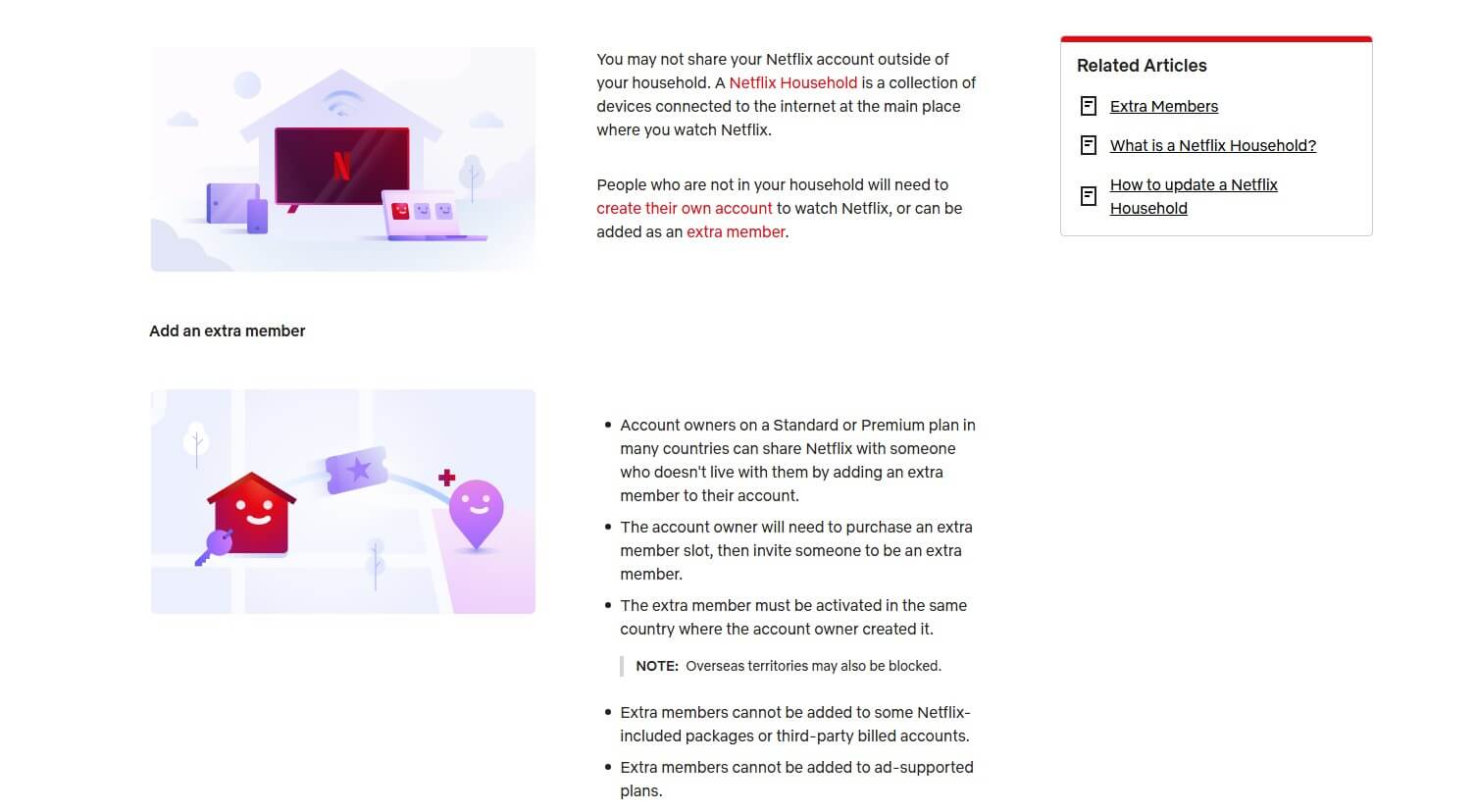
All devices outside the given household must be assigned a sub-account. However, this sub-account costs $7.99 a month, roughly $84 annually. Now, Netflix password sharing doesn’t apply to sharing the subscription with your friends. If the person outside of the household tries to log in, they must enter a 4-digit code that Netflix sends to the primary email/phone number tied to the account.
The person outside the household needs to enter this code within 15 minutes to verify their household presence. Failing will result in the person’s attempt being blocked because they can’t prove the location within the household. If you’re a primary account owner, no verification is required unless you’re outside the household for an extended period.
How Does Netflix Define a Household?
To ensure streaming devices, such as Smart TVs, are within the same household, Netflix has to store some data. Its policy defines a household as “you and the people you live with“, which means all devices need to have the same IP address. If this is fulfilled, you can watch Netflix even with a VPN if you want, on up to 4 devices or fewer, which is defined by your Netflix subscription tier.
The problem arises when the IP address of the device is different than the IP of your primary WiFi network, which triggers the Netflix sharing ban. Enforcing the password-sharing ban requires a bit of surveillance on Netflix’s side. It must monitor your IP address, collect your device’s ID, and your home location. For this reason, people often use a VPN, which applies encryption and keeps them private.
NordVPN is people’s favorite for unblocking Netflix, and conveniently, it offers Meshnet to help you bypass the Netflix household sharing ban. While NordVPN is a premium VPN, the Meshnet feature is entirely free.
How to Bypass Netflix Sharing Ban: Full Tutorial
We’ll use Meshnet as the best method. It routes your traffic through a device’s IP address, where you’ll have the same IP as that device. With an IP from the primary household, you can log in to Netflix and watch movies and series without any restrictions. Meshnet is NordVPN’s feature that allows you to connect up to 60 devices and enable file sharing, remote access, and traffic routing. All three are safe.
Meshnet is based on the NordLynx protocol that uses bank-grade 256-bit AES encryption. It’s free and will work without NordVPN’s paid subscription, but you need to download NordVPN’s app from the site. When you do this without subscribing to NordVPN, you’ll only be able to use Meshnet. The solution is to use the IP address of the account owner and log in to the Netflix account.
This works even if you’re on the other side of the globe. If the primary account owner is in Australia and you’re in Asia, you can still bypass the Netflix sharing ban.
Bypassing Netflix Household Sharing Ban: A Detailed Guide
To be clear, NordVPN Meshnet is completely FREE. You still need an account, which you can create as you go. If you want, you can get NordVPN and receive Meshnet either way, but with the benefits of the VPN. You decide.
- If you want to use Meshnet for free, download it through this page. If you want NordVPN, click the button above to claim its 75% discount for the 2-year plan. Make sure Meshnet is installed on the Netflix account owner’s device too!
- Once downloaded, open NordVPN’s app and sign up if you don’t have an account. Meshnet works on all devices, including phones and tablets.
- In NordVPN’s app, click the Meshnet icon displayed below.
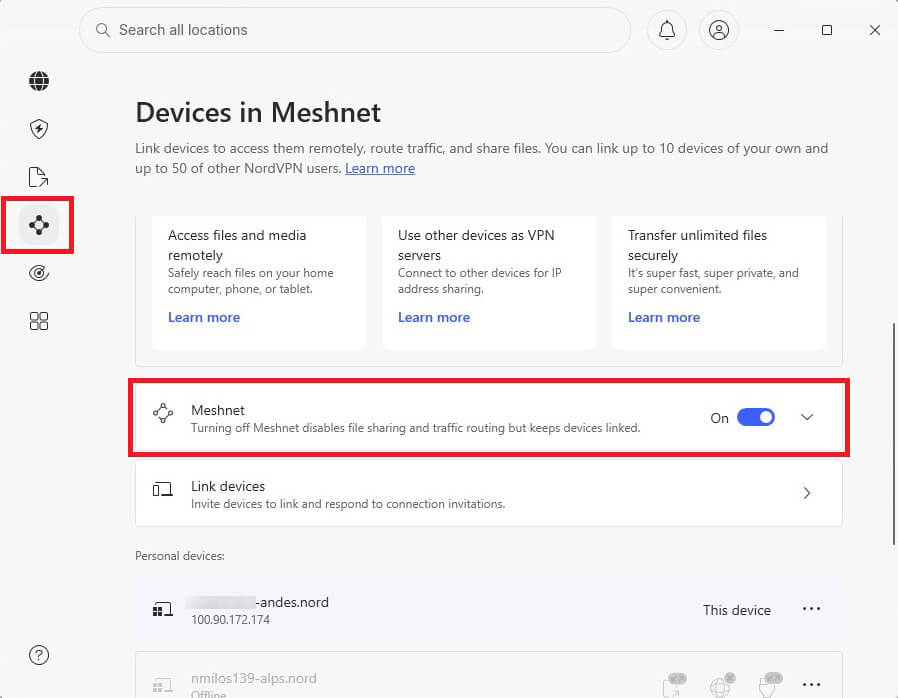
© Gizmodo - Turn Meshnet ON.
- Press Link Devices and then choose Link External Device.
- Now, provide the email address of the Netflix account owner and enable Traffic Routing. Optionally, turn on Allow Local Network Access if you want to allow that device to route its traffic through your IP address (if you’re an account owner).
- Press Send Invitation.
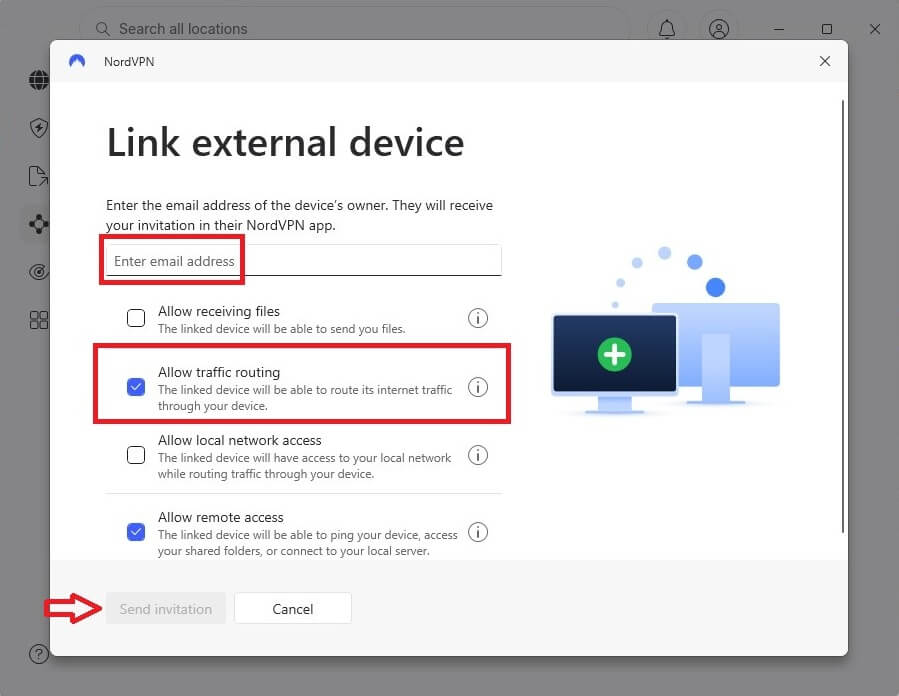
© Gizmodo - The owner of the email you provided will need to accept the invitation in the Meshnet app, after which the linked device of the owner will appear in the External Devices.
- In NordVPN Meshnet, select Route Traffic and find the newly linked device.
- Simply click on the device and your traffic will be routed through it, in which process, you’ll assume the IP address of the device.
- Go to Netflix and sign in with the account owner’s credentials. Now that you have an IP address from the account owner’s household, everything should work.
Get Over Netflix Password Sharing Ban With Meshnet
Other Ways to Bypass Netflix Password Sharing Ban
If NordVPN’s Meshnet is too much of a hassle (though I really don’t see why it would be), you can try these Netflix sharing ban workarounds:
Use the Owner’s Wi-Fi to Log In
If you’re looking for a quick solution to avoid the Netflix household ban, it’s best to log in to Netflix using the account owner’s Wi-Fi. This is a pretty good option, but a short-term one because you’ll eventually change your IP address. Today, you can log in with the household’s IP address, but tomorrow, when you log in on your network, you’ll be banned. What if the account owner is away from home?
You surely aren’t going to travel that far. The only viable solution is to use Traffic Routing from NordVPN Meshnet. This way, you can assume the IP address of the account owner even if you’re thousands of miles away. You’re basically using an IP address of its domestic WiFi network from afar.
Don’t Use Streaming Devices and TVs
All laws and policies have holes in them. The circumvention of the Netflix household ban is possible outside streaming devices and TVs. Netflix’s policy tells us that you can watch it on up to 4 Smart TVs or streaming devices. Well, this means using a phone, laptop, computer, or tablet is allowed. Grab your phone, open the Netflix app, and sign in: No restrictions and other hoops to jump through.
We know watching Netflix is better on a large screen, and your phone is 20 times smaller. But what if we told you that you can mirror your phone’s screen to the Smart TV? You can do the same with an HDMI cable from your PC to a Smart TV, bypass the Netflix sharing ban, and still enjoy high-quality streams.
Can a VPN Still Unblock Different Netflix Libraries?
Yes, you can, which is why we recommend NordVPN’s subscription and not only Meshnet. Meshnet lets you bypass the Netflix sharing ban, but NordVPN changes your IP address to over 137 countries. This will allow you to unblock more Netflix catalogs. Connecting to a server in America lets you access the full US Netflix library. When you combine NordVPN and Meshnet, you get the best results.
Besides, a VPN like this can access other geo-restricted content. Handy if you’re subscribed to other streaming services you can’t access in your location when traveling abroad, for example. Accessing HBO Max abroad, watching Paramount+, and enjoying live sports on ESPN Select will be a breeze.
Unblock Netflix Libraries With NordVPN
How Many Devices Can I Use on My Netflix Account?
You can use as many as you want if we’re talking about:
- Windows, macOS, and Linux computers and laptops
- Android and iOS smartphones and tablets
However, when talking about TVs and streaming devices, things are quite different. The list below shows you the so-called supported devices.
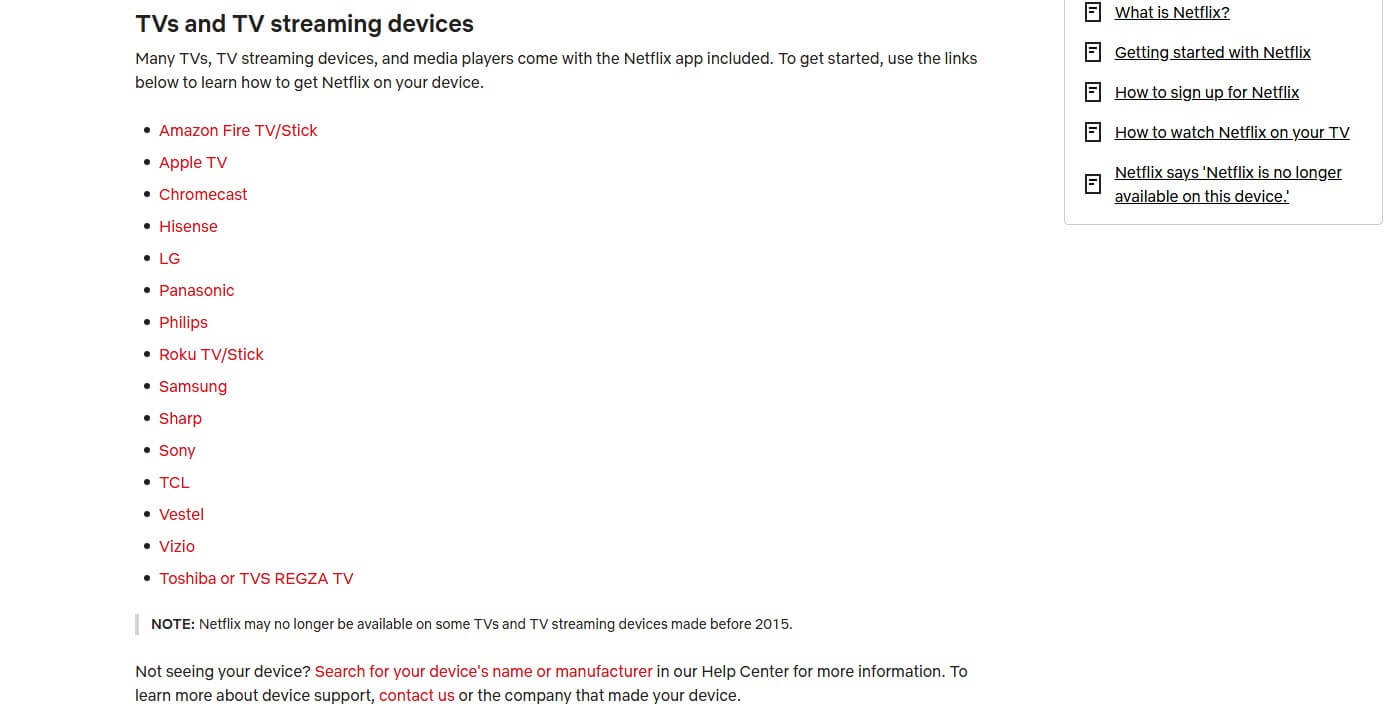
You can see Firestick and Apple TV, TVs from Vizio, Philips, Samsung, LG, Hisense, Sharp, etc. The Netflix password-sharing ban applies to these devices, and you’re limited to no more than 4, depending on your plan. The Standard With Ads plan supports 2. We then have the Standard plan with 2 devices without ads. The Premium plan supports 4 devices, 4K HDR streaming, and Netflix Spatial Audio.
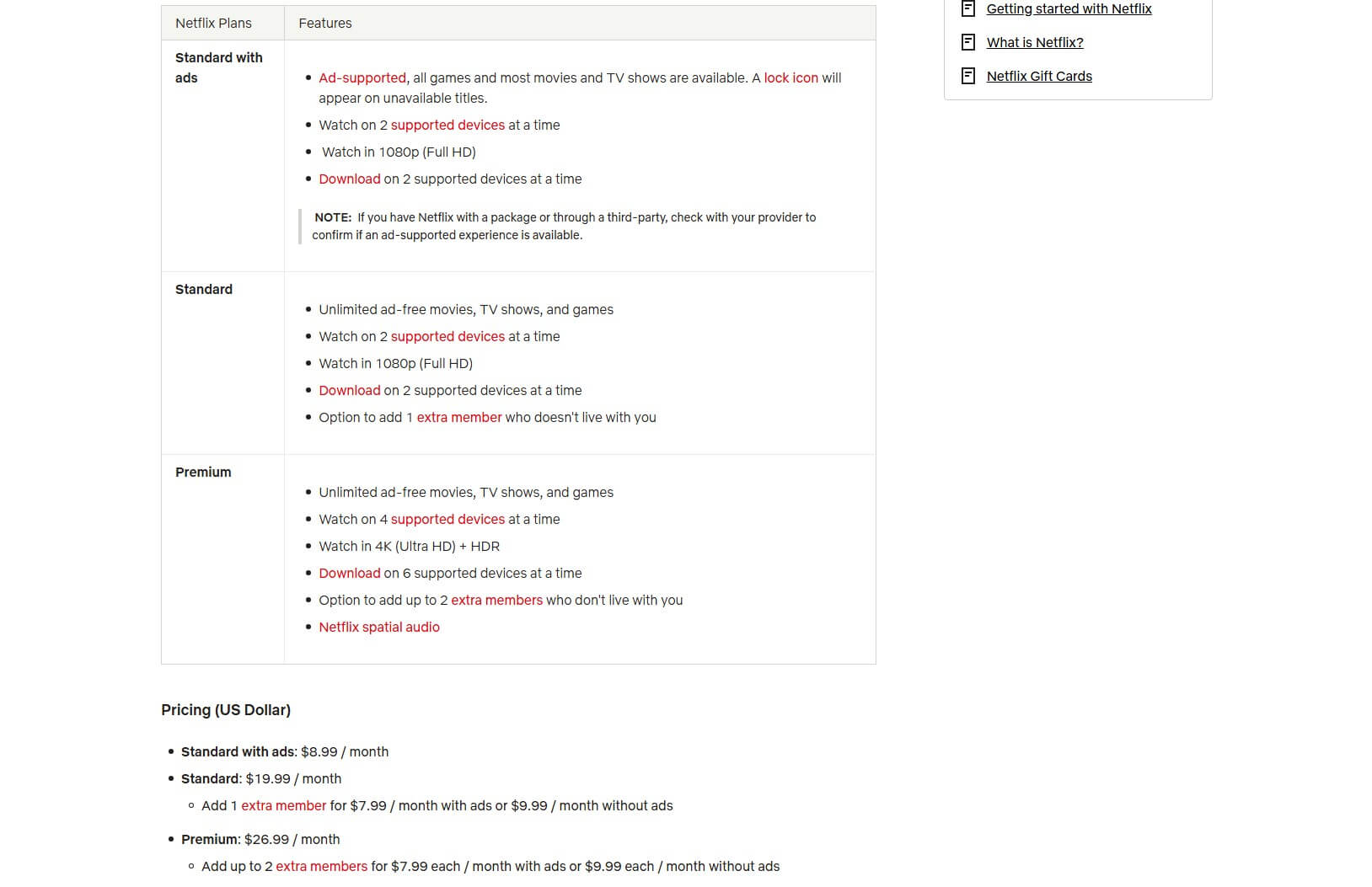
The “Standard With Ads” plan doesn’t support additional devices. Opting for the Standard plan lets you add 1 extra member who doesn’t live with you at $7.99/mo. The Premium plan lets you add 2 extra members outside the household at the same price. You can bypass this Netflix sharing ban with Meshnet by pretending you’re in the owner’s household by using the household’s IP address.
Is Sharing Your Netflix Account Illegal?
This is tricky. We need to touch on the VPN portion. A VPN will be legal almost everywhere, but if you use it for Netflix, things steer in the grey area. Netflix is clear when it comes to VPNs: It doesn’t want you to use them. Period! In the same fashion, sharing your Netflix account is considered illegal in the United States and the United Kingdom. They deem it illegal because it breaches copyright law.
How many people have been arrested for Netflix password sharing? Zero. Bypassing the Netflix sharing ban is common. Thousands, if not millions of people, are doing it one way or another. Netflix would have to spend years in court and sue thousands of people to enforce its policy. It’s estimated that the company loses about half a billion dollars yearly due to people avoiding the Netflix household ban.
Yet, the company reacts only by modifying its policy and placing new restrictions to prevent you from sharing your account, nothing too alarming.
Netflix Password Ban Bypass: Final Recommendations
Despite Netflix’s formidable efforts to limit account sharing, people have found new and creative ways to fight back. Using Meshnet and its Traffic Routing is the top option to bypass the Netflix account-sharing ban in 2026, no matter your or the account owner’s location. You can simply re-route your traffic through the owner’s IP address and pretend to be in their household.
Another method is to avoid using streaming devices and TVs, and instead, watch movies and series on a smaller phone, tablet, laptop, or computer screen. While logging in on the owner’s WiFi network is sometimes impossible, one solution is buying a sub-account at $7.99/mo. People who want to be on Netflix’s friendly side can comply and go with the flow if their budget is flexible enough.