Buying a VPN you’ve never used can feel like a gamble, especially when you’re relying on it for a trip, an airport network, or a show that won’t play abroad. A VPN encrypts your connection and hides your IP address, but that only helps if the app works well on your own devices.
ExpressVPN doesn’t have a permanent free account, so most people start by looking for an ExpressVPN free trial. It has two ways to test the VPN, and they differ in length, price, and the devices they cover. Here’s how to test the VPN risk-free.
ExpressVPN Free Trial Steps for 2026
- Go to Google Play or the App Store on your phone.
- Install ExpressVPN from the store.
- Choose the annual or monthly plan that includes the free trial.
- Confirm the trial with your Apple or Google payment method. Nothing is charged during the first 3 days.
- Cancel in your phone’s subscription settings at least 24 hours before the trial ends if you don’t want to continue.
For a 30-day test, or for a TV or router, subscribe on the ExpressVPN website and request a refund within 30 days. The two options don’t combine: the 30-day guarantee doesn’t cover purchases made through the App Store or Google Play.
How to Start the 3-Day Mobile Trial
The 3-day trial is the only ExpressVPN offer that costs nothing upfront. It starts on iPhone and Android only, because Apple and Google handle the billing, and an account can use it once. In my test, the trial account also signed in on a computer.
The App Store or Google Play screen shows the trial period and billing date before anything is confirmed. For comparison, the NordVPN free trial guide explains how a second VPN handles its trial. Here’s how to start the ExpressVPN one:
- Go to either Google Play or the App Store, depending on your phone.
- Search for ExpressVPN and install the app.
- Open the app and tap Get ExpressVPN.
- Choose the 3-Day Free Trial on the annual or monthly plan.
- Tap Subscribe and confirm with your Apple or Google payment method.
- Connect to a server and start testing.
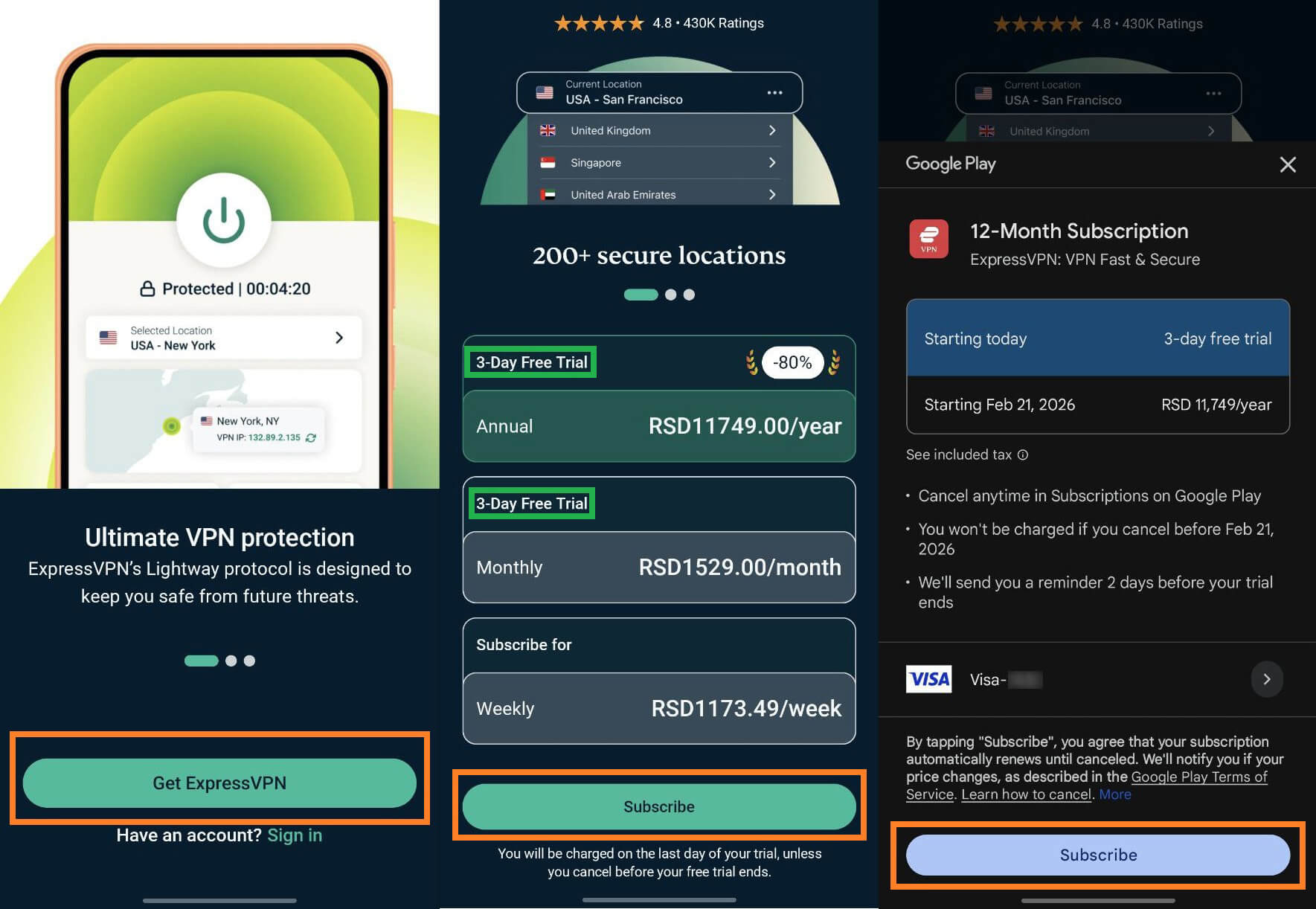
Cancel at least 24 hours before the trial ends to avoid charges. After day 3, Apple or Google bills the plan you chose, and ExpressVPN’s 30-day guarantee doesn’t cover that purchase. Refund requests for it go to Apple or Google.
How the 30-Day ExpressVPN Trial Works
The 30-day option is ExpressVPN’s money-back guarantee. Subscribe on the ExpressVPN website, test the VPN on a phone, computer, TV, or router, and request a full refund within 30 days if it doesn’t suit you.
The guarantee is limited to first-time customers, and customers who have already received a refund aren’t eligible. Plans bought through the App Store or Google Play fall outside it, so subscribe on the website. On the two-year Basic plan, ExpressVPN costs about $3 a month for 28 months.
A shorter term lowers the upfront payment, a sensible choice when a refund is the goal. The NordVPN vs PIA comparison shows how two other VPNs price their plans.
Get ExpressVPN With the 30-Day Guarantee
The sign-up takes seven steps:
- Visit the ExpressVPN website or use the button above.
- Select a plan. Each one comes with the 30-day money-back guarantee.
- Enter your email address and choose a payment method.
- Confirm the payment.
- Download ExpressVPN for your device from the website and install it.
- Open the app and sign in with your email or the activation code.
- Connect to a server and check what ExpressVPN offers on your own devices.
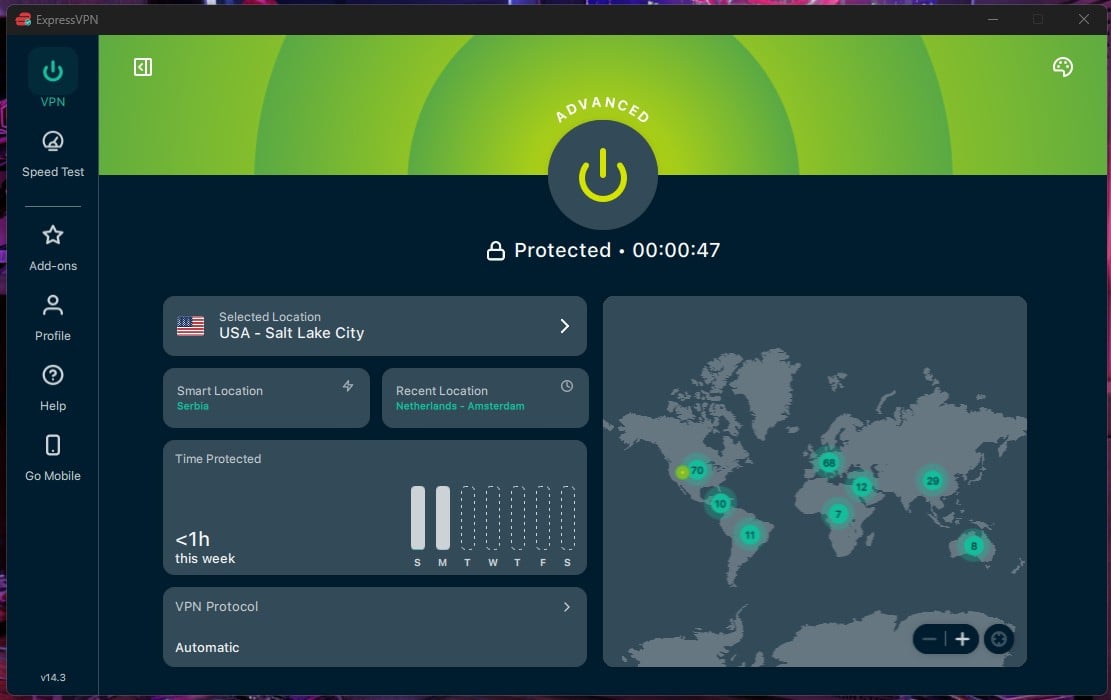
The 30 days count from the moment of purchase, so send the refund request before the final day.
Free ExpressVPN Accounts and Activation Codes
ExpressVPN has no permanent free account. Every account starts with a subscription, and the trial and the refund window are the only ways to test the VPN without a lasting commitment. A free VPN exists from other companies, but most cap data or limit server choice.
An activation code works the same way. It’s created once a subscription starts; it appears in the account dashboard on the ExpressVPN website, and the app accepts it at sign-in. Code lists and generators promising free access are bait, and cracked apps can steal logins or install malware.
Download the app only from the official app store or ExpressVPN’s website. Proton VPN has a permanent free plan with no data cap, but it offers fewer server locations than a paid plan.
Can You Get the ExpressVPN Trial Without a Credit Card?
Not for the 3-day trial. The App Store and Google Play require a payment method on the account before the trial starts, and Apple or Google bills it after day 3. The 30-day guarantee is more flexible.
The ExpressVPN website accepts cards, PayPal, and cryptocurrency, so a bank card isn’t the only way to pay. Refund eligibility can vary by purchase method, so check the terms shown at checkout before paying.
How to Cancel Your ExpressVPN Trial
Where to cancel depends on who bills the subscription. Apple or Google bills a trial started in the app, and ExpressVPN bills a plan bought on its website. Either way, cancel at least 24 hours before the trial ends. The subscription renews automatically after that.
To cancel a trial started in the App Store or Google Play:
- iPhone: open Settings, tap your name, select Subscriptions, choose ExpressVPN, and tap Cancel.
- Android: open Google Play, tap your profile icon, go to Payments & subscriptions, select Subscriptions, choose ExpressVPN, and tap Cancel subscription.
The trial remains active until its last day, even after canceling. To cancel a plan bought on the ExpressVPN website:
- Sign in to ExpressVPN’s website and click My Account in the upper-right corner.
- Open Account & Billing.
- Select Manage Subscriptions.
- Find the subscription and click Cancel Subscription.
- Confirm your choice if asked.
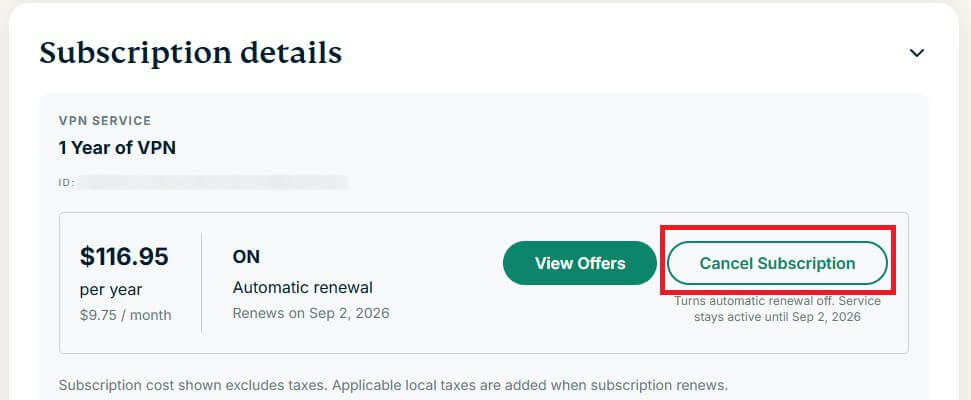
A trial canceled in time costs nothing, so there’s no refund to request. For a plan bought on the website, the 30-day guarantee works through live chat:
- Open the live chat widget on the ExpressVPN website.
- Ask the support agent for a refund under the 30-day guarantee.
- Follow the agent’s steps while ExpressVPN checks eligibility.
What You Can Test During the Trial
Both options include the full ExpressVPN app, with the same tools that paying subscribers use. These are the main ones to try while the trial lasts.
Security Tools
ExpressVPN uses 256-bit encryption, so an ISP or a public Wi-Fi owner can’t read what you send. Network Lock, its kill switch, blocks all traffic if the VPN connection drops, so nothing leaks while hotel Wi-Fi reconnects. Threat Manager blocks ads, trackers, and malicious sites.
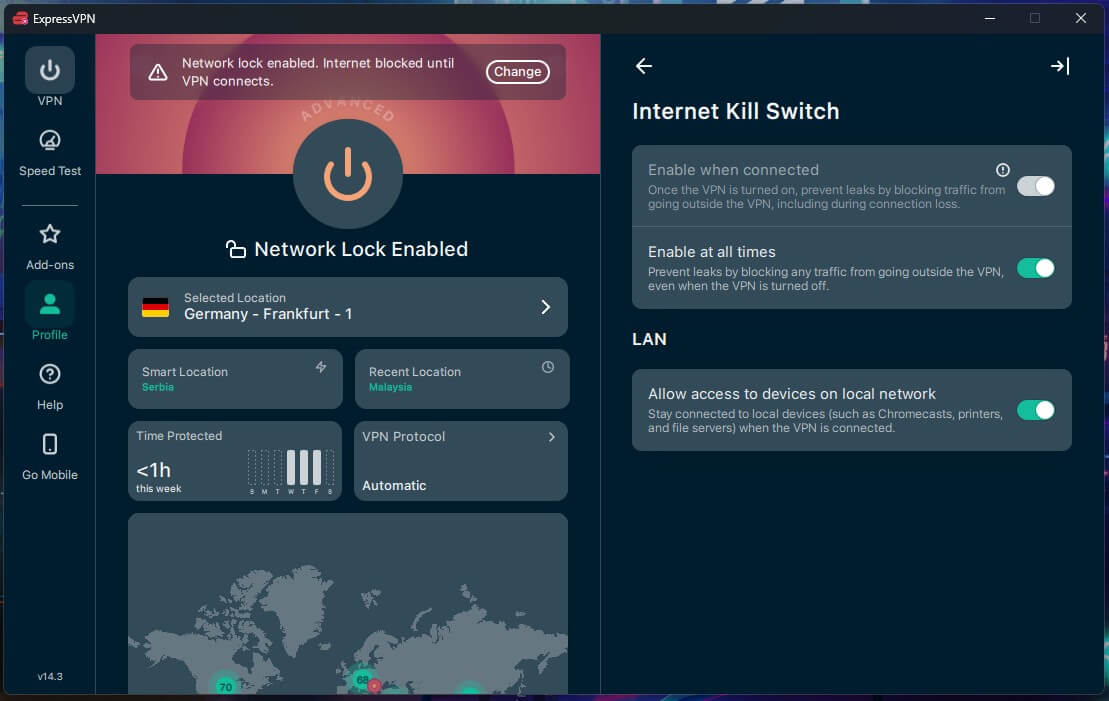
Split tunneling, parental controls, and IPv6 leak protection are included too. With split tunneling, a banking app can use your normal connection while the browser uses the VPN.
Depending on the plan, ExpressVPN also adds a password manager, MailGuard (an email relay that hides your real email address), and ExpressAI, a privacy-focused AI assistant.
Audited No-Logs Policy
ExpressVPN is a solid VPN for privacy: it keeps no logs of browsing activity, and independent audits have confirmed the policy. Its servers operate on RAM only, so every restart wipes the data, and the company is based in the British Virgin Islands. With no browsing history stored, there’s nothing to hand over if a legal request arrives.
Streaming and Torrenting
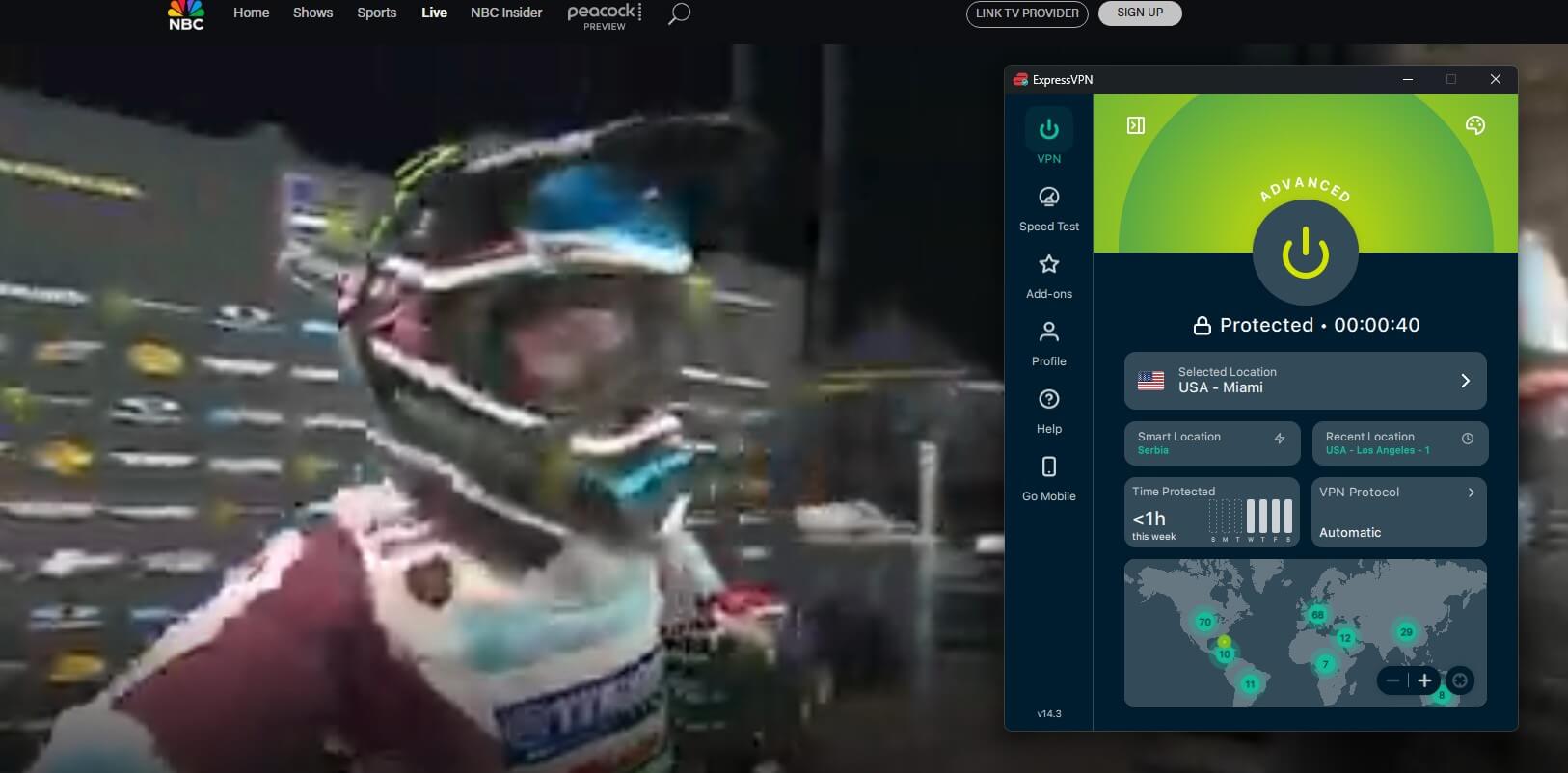
Every server location supports streaming and P2P, so there’s no list of special servers to look for first. In our tests, ExpressVPN unblocked BBC iPlayer from a UK server, a quick check of whether it works for the shows you actually watch. Torrenting is supported in all locations too.
Speed
In our tests, ExpressVPN lost about 8% of its speed, which you won’t notice while streaming or on video calls. Lightway Turbo, the faster connection mode, made no measurable difference, and it turns off split tunneling while it’s active. Keep Lightway Turbo off when split tunneling is required.
Final Thoughts
The question was whether ExpressVPN can be tested without risking a long subscription, and it can. The 3-day mobile trial costs nothing when it’s canceled in time, but it can only be started on a phone, and its refunds depend on Apple or Google.
The 30-day guarantee works on every device and goes through ExpressVPN’s support, so it’s the better test for a TV or router. Neither option works as a free account, because they start with a subscription.
If ExpressVPN isn’t the right fit after testing, these ExpressVPN alternatives are the next ones to try. For a TV or router, start the 30-day guarantee on the website and send the refund request before day 30 ends.
FAQ About ExpressVPN Free Trial
Does ExpressVPN have a free trial?
Yes, on iPhone and Android, through the App Store or Google Play, with a trial account that also signs in on a computer. TVs and routers use the 30-day money-back guarantee.
Can ExpressVPN be used for free permanently?
No, ExpressVPN has no permanent free plan. Access requires a paid subscription, with a trial or refund window for testing. Proton VPN offers a free plan for long-term use.
Where is the ExpressVPN activation code found?
The code appears in the account dashboard on the ExpressVPN website after a subscription starts. Free code lists and generators online are bait, and cracked apps can steal logins or install malware.
Does ExpressVPN charge after the free trial ends?
Yes, unless the trial is canceled at least 24 hours before it ends. Apple or Google bills the subscription automatically, and cancellation happens in the phone's subscription settings.
Does the money-back guarantee cover App Store purchases?
No, the 30-day guarantee covers purchases made on ExpressVPN's website. Subscriptions billed through Apple or Google follow those stores' refund rules, and refunds are decided at their discretion.
Can the ExpressVPN free trial be used twice?
No, the free trial can be used once per account, and the 30-day guarantee is limited to first-time customers who haven't received a refund before.
Can ExpressVPN be paid for with cryptocurrency?
Yes, the ExpressVPN website accepts cryptocurrency along with cards and PayPal. Refund eligibility can vary by purchase method, so the terms shown at checkout apply.