Unblock WhatsApp in Iran with a VPN that offers obfuscated servers. As of October 2026, that is still the only method that works reliably. WhatsApp remains blocked nationwide, and it is not on the government’s reinstatement list. NordVPN got through in our most recent checks. The one exception: during a full internet blackout, no VPN can help. The past eighteen months have been chaotic.
Iran lifted its two-year WhatsApp ban in December 2024, told citizens to delete the app in June 2025, then took the entire country offline for much of early 2026. If you’re confused about what works right now, that’s fair. This guide covers the current status, the setup that gets you connected, and what to do when it fails.
Unblock WhatsApp in Iran: Quick Steps
- Get a VPN that works in Iran. We recommend NordVPN.
- Install the VPN on your device.
- Open the VPN and log in to your account.
- Connect to a server abroad. We recommend an obfuscated server that hides your VPN activity and helps bypass censorship in Iran.
- Download and use WhatsApp normally in Iran. Both chatting and calling should now work without restrictions.
Is WhatsApp Working in Iran Today?
No. As of October 2026, WhatsApp is blocked by all Iranian ISPs and mobile networks. It works only through a VPN or similar circumvention tool. Here’s how we got here. Iran restored access to WhatsApp in December 2024, ending a two-year ban imposed during the 2022 protests. That opening lasted barely 6 months. In June 2025, during the 12-day conflict with Israel, state television urged Iranians to delete WhatsApp, claiming the app was passing user data to Israel.
Meta rejected the allegation. The block came back anyway. Then 2026 made everything worse. On January 8, amid nationwide protests, authorities imposed a near-total internet blackout, one of the most severe government shutdowns ever recorded. Connectivity came and went for months. By some counts, Iran spent roughly a third of 2026 offline. Partial access returned on May 26.
But under a tiered system: a small whitelisted group gets the open internet, everyone else gets a filtered version. WhatsApp, Instagram, Telegram, and YouTube remain blocked, and officials have said they are not under consideration for reinstatement. The practical takeaway splits in two. When Iran’s internet is up (as it is now), a VPN with obfuscation gets you into WhatsApp. When the government pulls the plug, nothing does: not a VPN, not Tor, not a proxy.
How to Unblock WhatsApp in Iran Using NordVPN
Here’s the setup, verified to work in October 2026:
1. Sign Up for NordVPN
Visit NordVPN and pick a plan. Do this before entering Iran. NordVPN’s site, the App Store, and Google Play are blocked inside the country, and since the 2026 crackdowns, getting a VPN installed in Iran has become difficult.
2. Download the NordVPN App
Install the app on every device you’ll bring on the trip. If you’re already in Iran, you’ll need a working circumvention tool just to reach the download page. Setting up before you travel avoids that trap.
3. Log in and Connect to an Obfuscated Server
From the specialty servers list, pick Obfuscated Servers and choose a nearby country. Turkey and the UAE are the usual picks for speed, stability, and low latency. Israel worked well in our last check.
4. Use WhatsApp in Iran: Calls and Texting Unblocked
Once connected, WhatsApp should load normally: messages, calls, and media all work. Keep the VPN running the entire time the app is open.
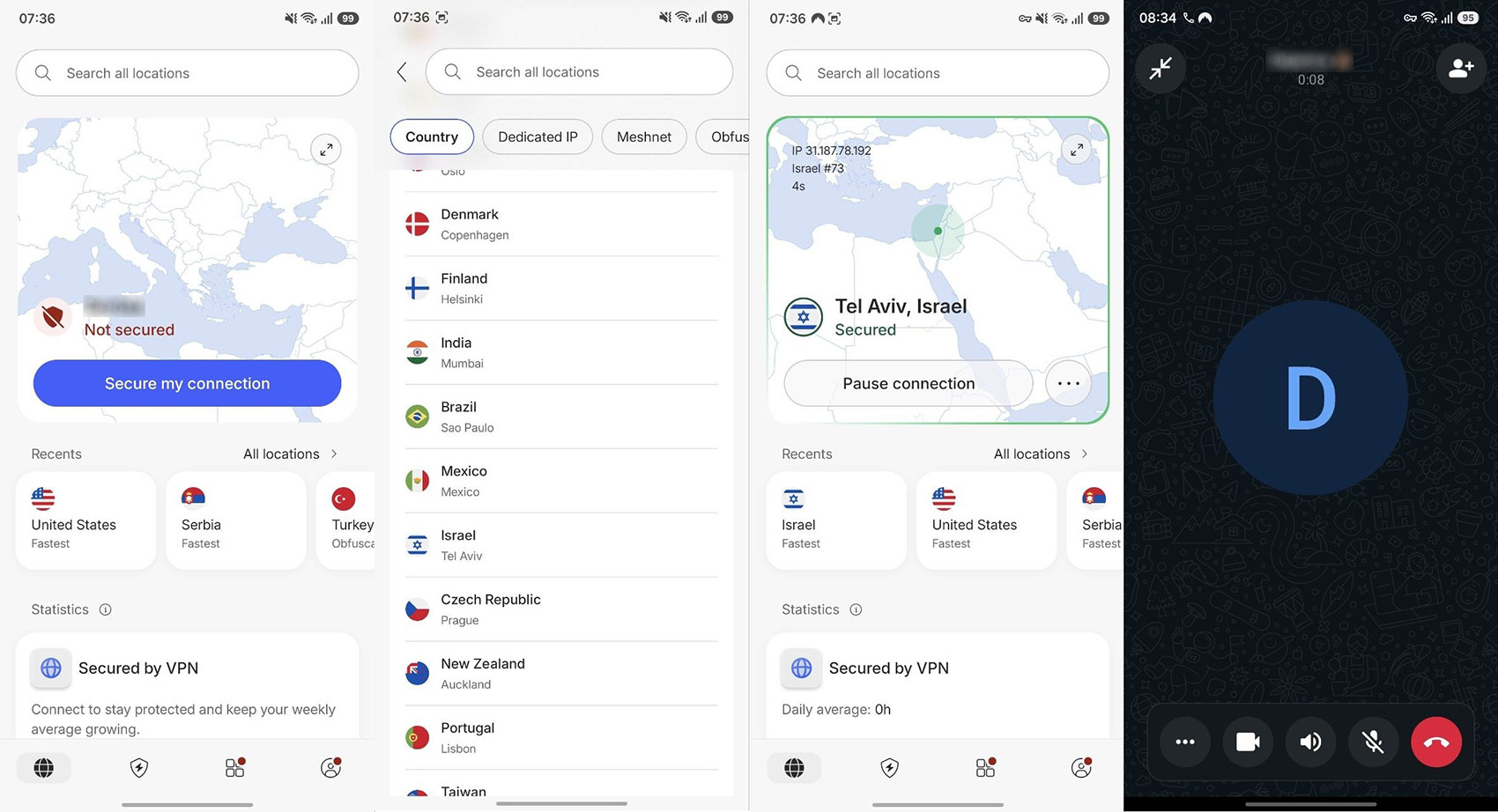
✅ Verified October 2026. Given how fast Iran’s filtering changes, we re-check this page more often than most.
WhatsApp Not Working in Iran? Do This to Fix It
Connections fail in Iran. Often. Work through this list in order:
- Confirm you’re on an obfuscated server. A standard server will connect and then die within minutes. Obfuscation is the way to go.
- Switch servers, then switch countries. Individual server IPs get flagged. If two Turkish servers fail, try Georgia, Iran, or the UAE before giving up.
- Try a different network. Mobile data and fixed-line ISPs in Iran filter differently. A connection that fails on Wi-Fi sometimes works on mobile data, and vice versa.
- Check whether Iran is in a blackout. If nothing loads at all, not just WhatsApp, the problem probably isn’t your VPN. During the January to May 2026 shutdowns, connectivity dropped to a fraction of normal levels and no tool could route around it. Monitoring services like NetBlocks report these events in near real time. Check from a working connection or ask a contact abroad.
- Contact support via live chat from whatever connection you have. NordVPN’s support can point you to servers currently working for users in Iran.
If you bought a subscription specifically for this trip and can’t get it working, the 30-day money-back guarantee from the VPN covers you.
Best VPN to Unblock WhatsApp in Iran: NordVPN
NordVPN is the best VPN for Iran, which is why we recommend it for accessing WhatsApp or any other blocked service. You can read our NordVPN review for the complete breakdown. It held up in our latest round of checks against Iran’s filtering. Its no-logs policy also passed its sixth independent audit (Deloitte, February 2026), which matters more in a country where VPN traffic is monitored.
The feature that matters most is obfuscation. NordVPN’s obfuscated servers disguise VPN traffic as ordinary HTTPS. It gets you past deep packet inspection, the technology Iran uses to detect VPN connections. Without obfuscation, most VPNs connect for a few minutes and then drop. This is also what makes NordVPN the best VPN for Dubai, where similar VPN detection is in place.
Pros
- Many obfuscated servers
- Fast speeds for WA calling
- Double VPN routing
- Malware/tracker blocking
- Audited no-logs policy
- Apps for all devices
Cons
- No free plan
- Complex UI for beginners
➡️ Robust Security for Safe Access
NordVPN pairs 256-bit AES encryption with a kill switch that cuts off internet access if the VPN connection drops unexpectedly to prevent data leaks. In Iran, a dropped VPN connection that keeps transmitting exposes your real traffic to your ISP. Turn the kill switch on before you connect. Threat Protection blocks ads and flags unsafe sites as you browse. Useful, though secondary here.
➡️ Fast and Reliable Connection
NordVPN’s NordLynx protocol, built on WireGuard, keeps speeds high enough for voice and video calls. In our tests, nearby servers in Turkey, the UAE, and Georgia handled WhatsApp calls with minimal delay. We test from outside Iran. Speeds on the ground depend heavily on how throttled the local network is on a given day.
➡️ Wide Server Network
NordVPN runs 9,500+ servers in 149 countries, so you have plenty of fallback options when a server gets flagged. Connecting to a nearby country (Turkey, Georgia, the UAE) gives you the best latency for calls. The network also lets you unblock other restricted services, including Instagram, Facebook, YouTube, and streaming platforms like Netflix.
➡️ Affordable and Easy to Use
NordVPN’s 2-year plan starts at $3.49 per month, covers 10 devices simultaneously, and comes with a 30-day money-back guarantee plus a 3-day free trial on Android. That refund window is genuinely useful here. If you can’t get a working connection from inside Iran, you get your money back.
Tips for Using WhatsApp Securely in Iran in 2026
- Set everything up before you arrive. This is the single most important tip. App stores, VPN websites, and even many mirror download links are unreachable from inside Iran.
- Enable the kill switch. It prevents your traffic from leaking to the local ISP if the VPN drops, which happens occasionally in Iran.
- Pick servers close to Iran. Turkey, Georgia, and the UAE give you the lowest latency for voice and video calls. If these fail, use more distant servers known to work, like Israel, which worked for us.
- Use obfuscated servers, always. Standard VPN connections are detected and cut. Obfuscation is not optional here.
- Avoid public Wi-Fi. Hotel and café networks add another party who can observe your connection attempts. Stick to networks you trust.
- Know the legal situation. Iran formally outlawed unauthorized VPN use in February 2024, and enforcement has tightened since the 2026 protests. Travelers who use VPNs discreetly have not been a prosecution target, but residents face real risk. See the legality FAQ below.
Alternative Methods to Use WhatsApp in Iran
A VPN is the most reliable option. The alternatives all fall short:
- Proxy servers: no encryption, and Iranian filtering blocks them fast. A bad trade in a country this heavily monitored. Everything you send through one stays readable to your ISP, and by extension to anyone watching the network.
- Tor Browser: works with bridges configured, but far too slow for calls, and Tor traffic itself draws attention.
- International SIM or eSIM: expensive, and traffic on Iranian towers still gets filtered.
- WhatsApp Web through a VPN on your PC: fine as a companion, but your phone needs a connection too.
Conclusion on Using WhatsApp in Iran
WhatsApp is blocked in Iran; the block is not going away. A VPN with obfuscated servers is the one method that consistently gets through. NordVPN is our top pick: its obfuscation survives Iran’s deep packet inspection, its audited no-logs policy holds up where it matters, and its server network gives you fallbacks when individual IPs get flagged. Two vital things to remember.
Install everything before you cross the border. If Iran goes into another full blackout, as it has done repeatedly in 2026, no VPN will help until connectivity returns. With NordVPN’s 30-day money-back guarantee, you can at least test it against current conditions risk-free, and, if it’s not working, be refunded.
Frequently Asked Questions
📞 Does WhatsApp work in Iran?
No. WhatsApp has been blocked nationwide since June 2025, and Iranian officials have said it is not being considered for reinstatement. It works only through a VPN with obfuscated servers, and only when Iran's internet is not in a full blackout.
📥 Can I download WhatsApp in Iran?
No. The Google Play Store and Apple App Store are restricted in Iran, so download WhatsApp and your VPN before entering the country. If you're already inside, you'll need a working VPN connection just to reach the stores.
🌐 Does WhatsApp Web work in Iran with a VPN?
Yes, WhatsApp Web works in Iran with a VPN active on your PC. Your phone also needs a connection to sync, so both devices need to be behind the VPN.
⚠️ Is using a VPN in Iran legal?
Unauthorized VPN use has been formally outlawed in Iran since a February 2024 decree, and enforcement has hardened since the 2026 protests. Travelers using a VPN for personal messaging have not been a focus. Residents face the greater risk. Use obfuscated servers to keep your VPN traffic from being detected, and check the current situation before you rely on any of this.