A VPN blocker shows up in one of two ways. On a work, school, or hotel network, the VPN app keeps trying to connect and never succeeds. On a streaming site or a banking login, the VPN connects without trouble, and then the page shows a VPN or proxy warning.
The two blocks work differently, so the fix for one does nothing for the other. A network inspects the traffic itself, while a website judges the IP address the traffic comes from. Once you know which one stopped you, it’s much easier to bypass VPN blocks of either kind.
Four Fixes for a Blocked VPN in 2026
- Get a NordVPN subscription and install the app on the blocked device.
- Leave the protocol on Automatic, so the app switches to NordWhisper when a network blocks VPN traffic.
- Connect to another server when a website shows a VPN or proxy warning.
- Install the NordVPN browser extension for streaming sites that compare the browser’s location with the IP address.
What Is a VPN Blocker?

A VPN blocker is any system that detects a VPN connection and stops it. Networks such as office, school, and hotel Wi-Fi block the connection itself, so the VPN app can’t connect. Websites such as streaming services and banks accept the connection and block the VPN’s IP address instead, usually with a VPN or proxy warning.
| Detection method | Used by | Workaround |
|---|---|---|
| Port and protocol blocks | Office, school, and hotel Wi-Fi | A TCP connection on port 443 |
| Deep packet inspection | National firewalls, strict corporate networks | Obfuscated protocols |
| IP address databases | Streaming services, banks, websites | Another server or a dedicated IP address |
| Location checks | Streaming services | Leak protection and location spoofing |
| TLS fingerprinting | Advanced firewalls | Obfuscation that imitates HTTPS |
How to Bypass VPN Blocks on Wi-Fi
Start with the automatic protocol setting. Many network blocks target UDP, the type of traffic that WireGuard-based protocols such as NordLynx use. When UDP fails, an automatic setting moves to a TCP connection or a disguised protocol on its own. If the app still won’t connect, these three methods work on most filtered networks:
- Obfuscation disguises VPN traffic as ordinary encrypted web traffic, so a network that inspects packets can’t recognize it. NordVPN calls its version NordWhisper, Proton VPN calls it Stealth, and ExpressVPN applies it to every connection. National firewalls use the same inspection, and that’s why a VPN for China requires obfuscation.
- Port 443 is the port for ordinary HTTPS traffic, so networks rarely block a TCP connection there.
- Mobile data avoids the Wi-Fi network completely, which helps when the network blocks every VPN protocol.
Before connecting, check the network’s rules. School and office networks often prohibit VPN use, and our school VPN guide covers campus networks in more detail.
Three VPNs Tested on a Blocked Network
In November, we blocked all outbound UDP traffic except DNS in Windows Defender Firewall on a Windows 11 PC in Europe, then connected each VPN to a UK server. Speed loss compares each result with the same connection without a VPN.
| VPN | Result | Time to connect | Protocol | Speed loss |
|---|---|---|---|---|
| NordVPN | Switched protocol on its own | About 90 seconds | NordWhisper | 13.8% |
| Proton VPN | Switched protocol on its own | Under 10 seconds | WireGuard (TCP) | 49.2% |
| Proton VPN, Stealth | Connected when selected by hand | Manual selection | Stealth | 42.7% |
| ExpressVPN | Error message, then connected | About 40 seconds | Not shown in the app | 55.9% |
NordVPN: Best for Speed on a Blocked Network
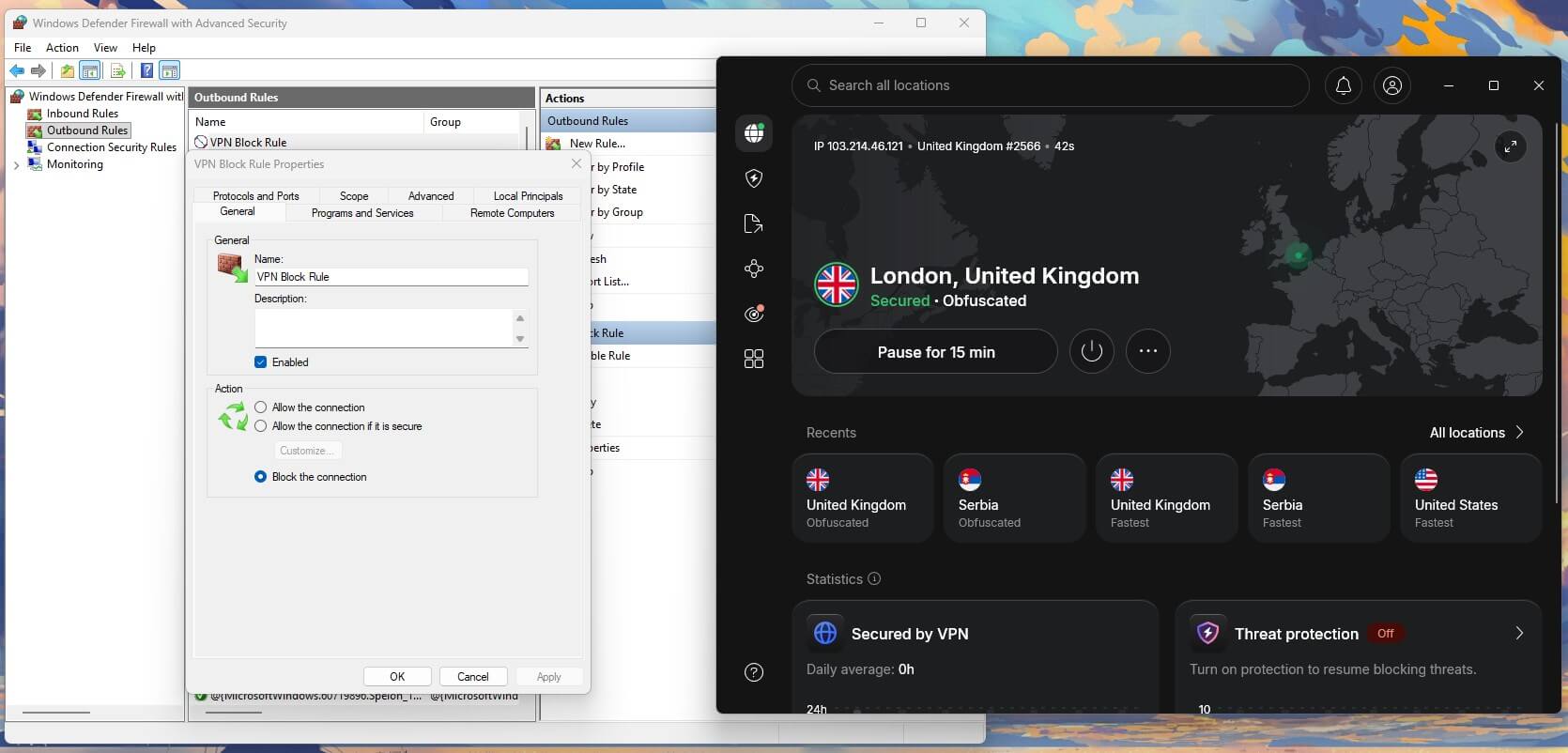
NordVPN lost only 13.8% of its speed on our blocked network, a much smaller drop than Proton VPN or ExpressVPN recorded. Its Automatic setting started on NordLynx, which the firewall blocked, then moved to NordWhisper by itself.
However, that switch took about 90 seconds. On a network you already know blocks VPNs, select NordWhisper in the protocol settings before connecting, and the wait disappears.
Proton VPN: Best for Fast Reconnection
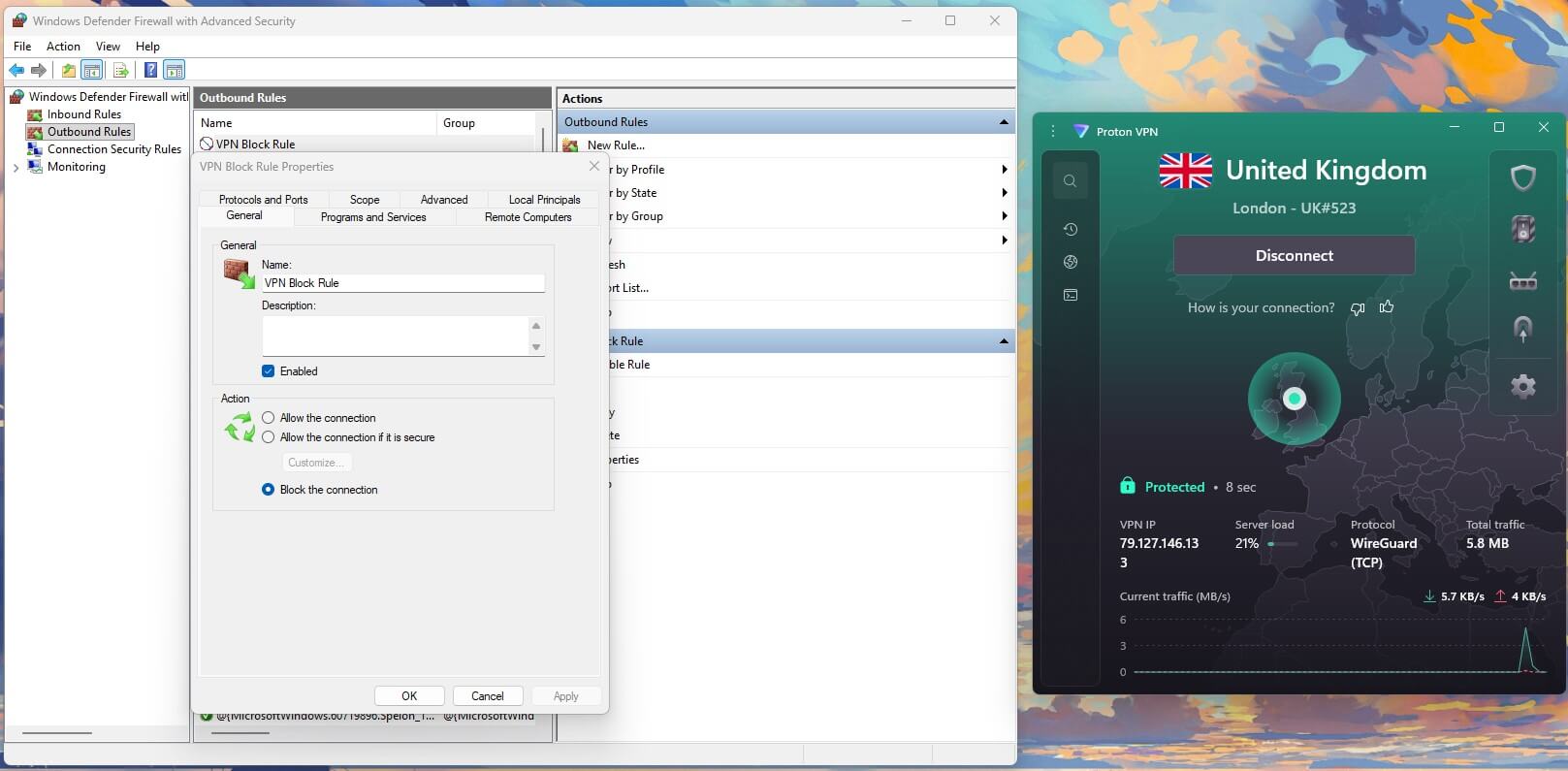
Proton VPN recovered fastest. When the firewall blocked UDP, it switched to WireGuard over TCP in under 10 seconds, without a prompt. The trade-off was speed, since it lost about half of it on that fallback. Its Stealth protocol hides the VPN connection inside the encryption HTTPS websites use, and it works on every Proton VPN server.
Selected by hand, Stealth lost slightly less speed than the fallback. For messaging and browsing on a strict network, the fast reconnection is a clear advantage, and the lower speed has little effect on those tasks.
ExpressVPN: Best for Obfuscation With No Setup
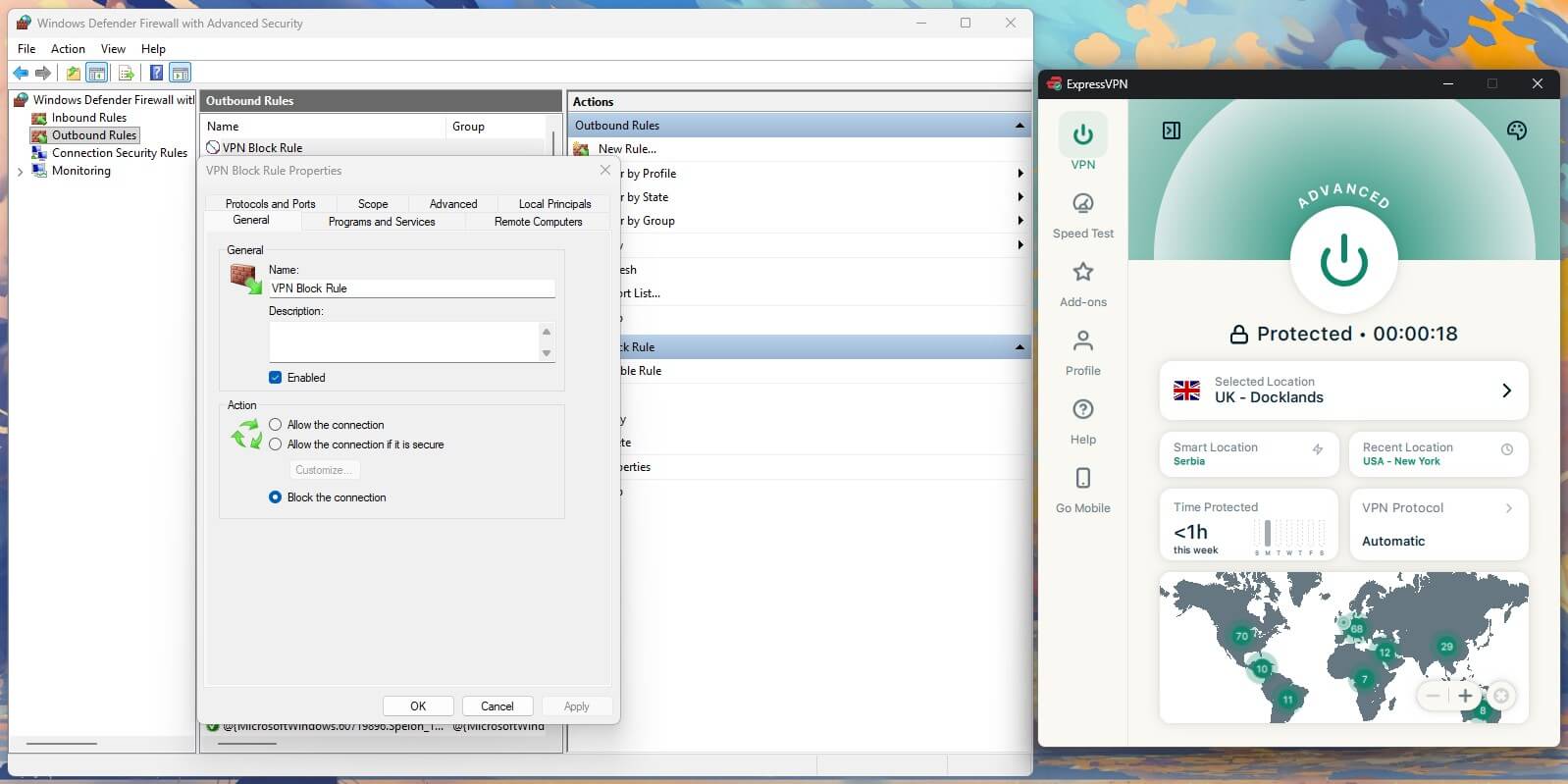
ExpressVPN obfuscates every connection, so there’s nothing to change before you join a filtered network. Under our UDP block, its Automatic setting first showed a connection error, then connected on its own after about 40 seconds.
If you see that error, wait a minute before switching servers. Speed suffered most. ExpressVPN lost more than half of its speed under the block, compared with almost none on an open network, where it ranks among the fastest VPNs we’ve tested.
Can Websites Tell You’re Using a VPN?
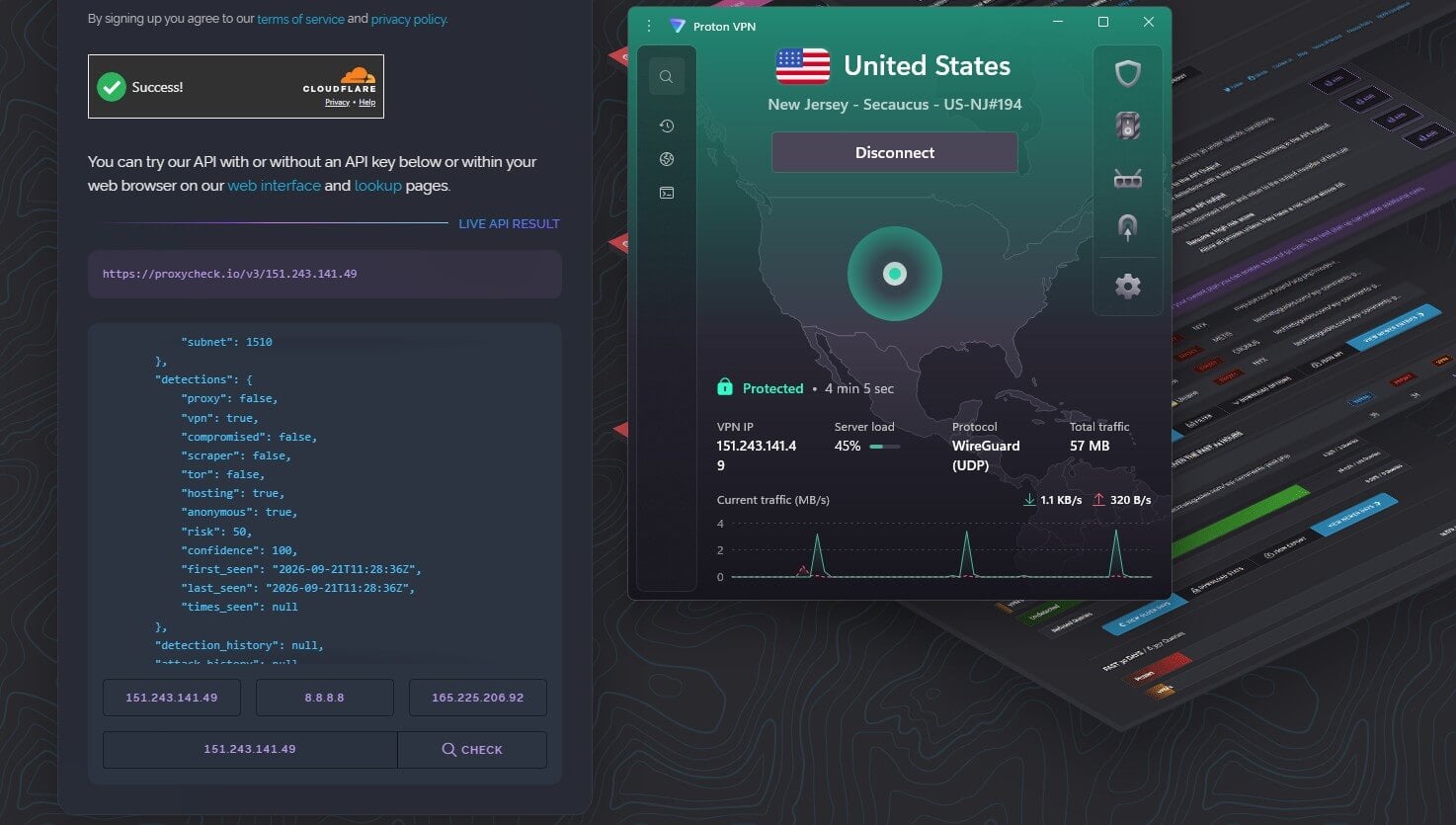
Yes. In November, we entered the US server IP address of each VPN into three IP lookup sites: whatismyipaddress.com, Scamalytics, and proxycheck.io. Every lookup identified the IP address as a VPN.
| VPN | whatismyipaddress | Scamalytics fraud score | proxycheck |
|---|---|---|---|
| NordVPN | VPN Server | 41, medium risk | VPN, risk 50 |
| Proton VPN | VPN Server | 56, medium risk | VPN, risk 50 |
| ExpressVPN | VPN Server | 79, high risk | VPN, risk 64 |
ProxyCheck had no record of the Proton VPN and ExpressVPN IP addresses before our lookup, yet it flagged both as VPNs with 100% confidence.
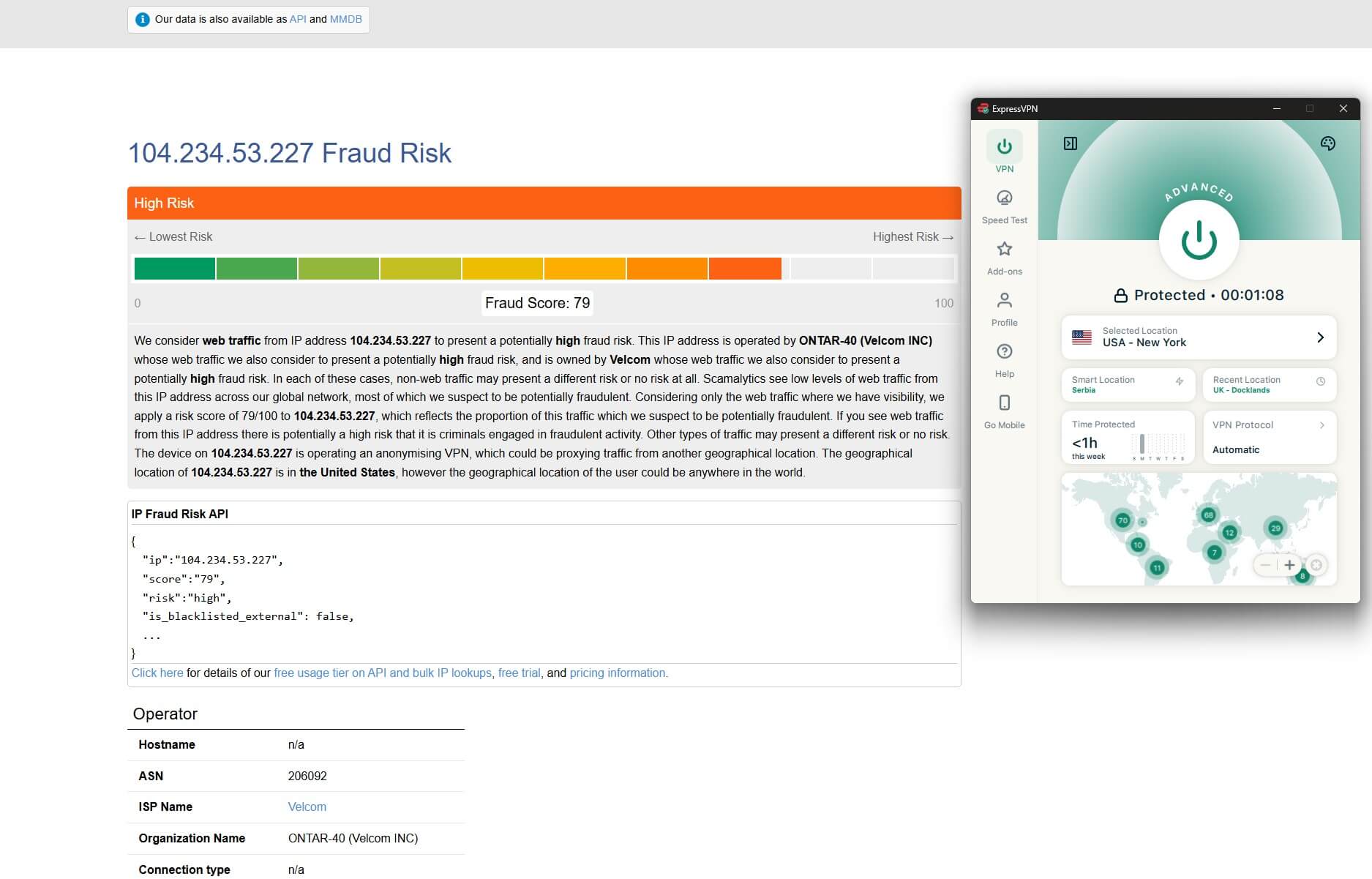
The databases appear to judge an IP address by the company that owns its range. As a result, a new server IP address is flagged from the start.
How to Bypass VPN Detection on Websites
Connect to a different server first. Websites block VPN IP addresses in batches, and a server outside the latest batch often works. If the VPN or proxy warning remains, try these next:
- A dedicated IP address belongs to one user, so blocks triggered by other people’s traffic on a shared server, such as CAPTCHA loops and fraud checks, don’t apply. NordVPN sells one as a paid add-on.
- A browser extension can match the browser’s time zone and location to the server, and NordVPN’s extension does it automatically. That helps on streaming sites that compare both with the IP address.
- Split tunneling sends a banking app outside the VPN when the bank blocks VPN logins, while the rest of the device remains protected.
When a site blocks the VPN’s whole IP range, another server from the same VPN won’t help, so switch to a VPN the site hasn’t listed. Sites can also read your country from stored cookies, DNS requests, or a phone’s GPS, the same signals geo-blocking relies on.
Streaming services keep the strictest lists. In our streaming tests, ITVX and Prime Video detected most VPNs. Netflix, for its part, shows a proxy error, and our Netflix VPN troubleshooting guide explains how to clear it.
Final Thoughts
The symptom tells you which block you’re facing. If the app won’t connect, the network is filtering VPN traffic, and an obfuscated protocol is the fix.
If the app connects but a site shows a warning, the site has flagged the IP address. In that case, a new server, a dedicated IP address, or a different VPN solves it. One practical tip: install the VPN and sign in before you join a restricted network.
A network that filters VPN traffic can also block VPN websites and app downloads, which leaves you without a way to set one up.
VPN Blocker FAQs
Why do websites block VPNs?
Websites block VPNs to enforce licensing by country, prevent fraud, and limit abuse such as fake accounts. A VPN IP address hides the visitor's real location, which those checks depend on.
Can a VPN be undetectable?
No, not to websites. VPN IP addresses belong to ranges that lookup databases flag. Obfuscation can still hide VPN traffic from network filters on Wi-Fi and in countries that censor the internet.
Is it legal to bypass a VPN block?
Yes, in most countries, but it can break a school's, employer's, or website's rules. China and the UAE restrict VPN use itself, so the law there covers the tool.
Why does my VPN connect but websites won't load?
Usually, the website has flagged the VPN's IP address. A VPN's own ad blocker or DNS settings can also stop pages loading, so switching servers or pausing the blocker shows the cause.
Can a free VPN bypass a VPN blocker?
Yes, on filtered networks. Proton VPN, Windscribe, and PrivadoVPN include obfuscation on their free plans, but streaming sites detect free VPN IP addresses easily.