CyberGhost is the VPN a lot of people end up trying because of the price. It costs about as much as a coffee a month, and at that price, it’s natural to wonder what’s missing. I wanted to find out whether a VPN this cheap is actually good, or just cheap.
So I used it for the things most people buy a VPN for: streaming, everyday browsing, and staying protected when the connection drops. The answer depends on what you need it for, and there’s one area where the low price shows. Here’s my quick verdict first, then the full story.
CyberGhost VPN
CyberGhost is an easy, low-cost VPN I’d recommend for streaming and everyday browsing on nearby servers, and its server lists sorted by task make picking a server simple. Its kill switch leaked when my PC restarted, though, and with no way to disguise VPN traffic, I’d choose a different VPN for countries that block VPNs.
Pros
- Fast on nearby servers
- Fast NoSpy privacy servers
- Long money-back guarantee
- Free desktop trial without a card
- Servers grouped by task
- Audited by Deloitte
- App connects reliably
Cons
- No traffic obfuscation
- Low device limit
- Limited ad and tracker blocking
- Kill switch leaked on PC restart
CyberGhost Review: Quick Look
| Starting price | $2.19 per month, $56.94 for 26 months |
| Renewal | $56.94 a year, so $4.75 per month |
| Money-back guarantee | 45 days, or 14 days on the monthly plan |
| Protocols | WireGuard, OpenVPN TCP and UDP, IKEv2 |
| No-log policy | Yes, audited by Deloitte and backed by quarterly transparency reports |
| Countries | 100, counted in the app |
| Download speed loss | 13.3% averaged across my three server locations |
| Upload speed loss | 8.4% averaged |
| Obfuscation | None |
| Streaming | 11 of the 14 streaming services I tested |
| Port forwarding | No |
| Ad and tracker blocking | Block Content, 68% on d3ward’s test |
| Simultaneous connections | 7 |
| Supported devices | Windows, macOS, Linux, iOS, Android, Fire TV, Android TV, routers, browsers |
| Customer support | 24/7 live chat, email, help center |
CyberGhost Speed Test Results
For my October tests, I used a Windows 11 PC in Europe on a wired 190.36 Mbps connection and checked each server location with Speedtest at three times of day over three days. Protocols are the methods VPNs use to build their connections, and I kept CyberGhost on WireGuard, a modern one.
| Server | Download | Upload | Ping | Download loss |
| No VPN | 190.36 Mbps | 19.37 Mbps | 10 ms | n/a |
| UK | 178.95 Mbps | 18.25 Mbps | 39 ms | 6.0% |
| US | 166.23 Mbps | 17.76 Mbps | 139 ms | 12.7% |
| Japan | 149.74 Mbps | 17.20 Mbps | 288 ms | 21.3% |
| Average | 164.97 Mbps | 17.74 Mbps | 8.4% upload loss | 13.3% |
CyberGhost is at its best on nearby servers. Its UK ping of 39 ms, the delay before a server responds, is the lowest UK ping I’ve recorded from any VPN, and a 6.0% speed loss on that server is too small to notice while browsing or streaming. Distance costs it more. On the Japanese server, it lost 21.3% of its speed, and the 288 ms ping makes fast-paced online games feel laggy. Even so, 149.74 Mbps is more than enough for 4K streaming.
NoSpy and Gaming Servers Tested
I tested two of CyberGhost’s specialty server types against a standard server in Frankfurt.
| Server | Download | Upload | Ping |
| NoSpy, Bucharest | 183.00 Mbps | 18.63 Mbps | 30 ms |
| Standard, Frankfurt | 185.73 Mbps | 18.66 Mbps | 30 ms |
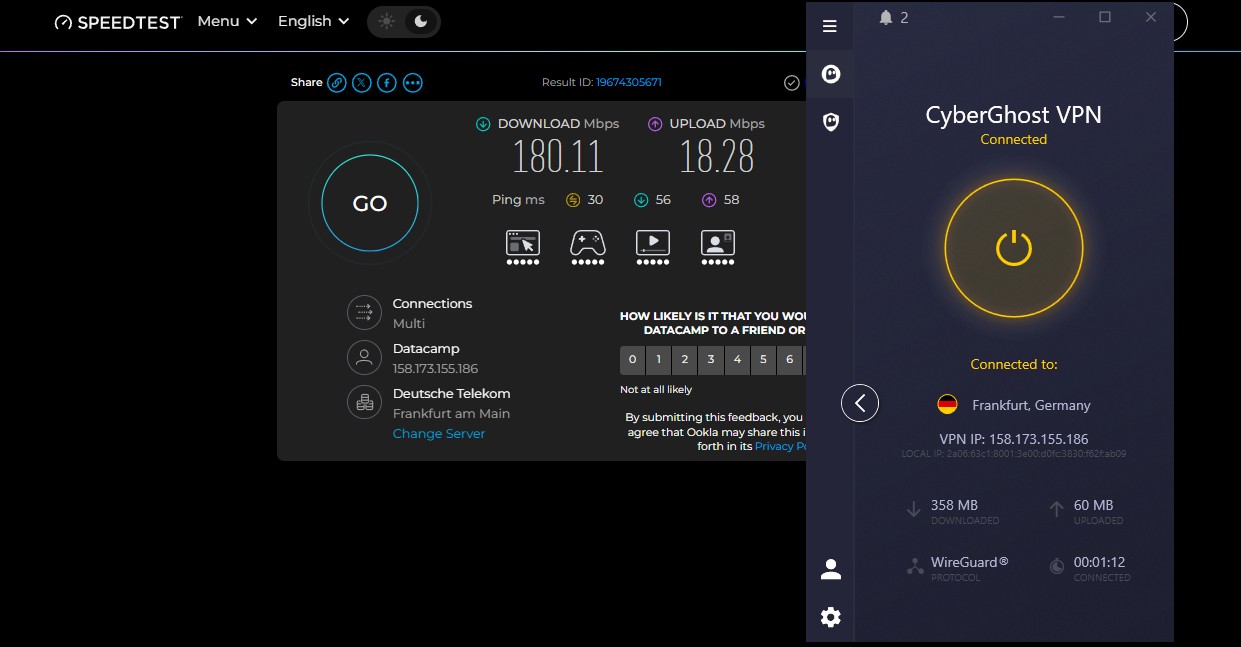
| Gaming, Frankfurt | 180.11 Mbps | 18.28 Mbps | 30 ms |
The gaming server was 5.62 Mbps slower than the standard server in the same city, at the same ping. Even under load, ping on the two servers differed by only 4 ms, too little for a player to feel. That’s disappointing for a server marketed for gaming.
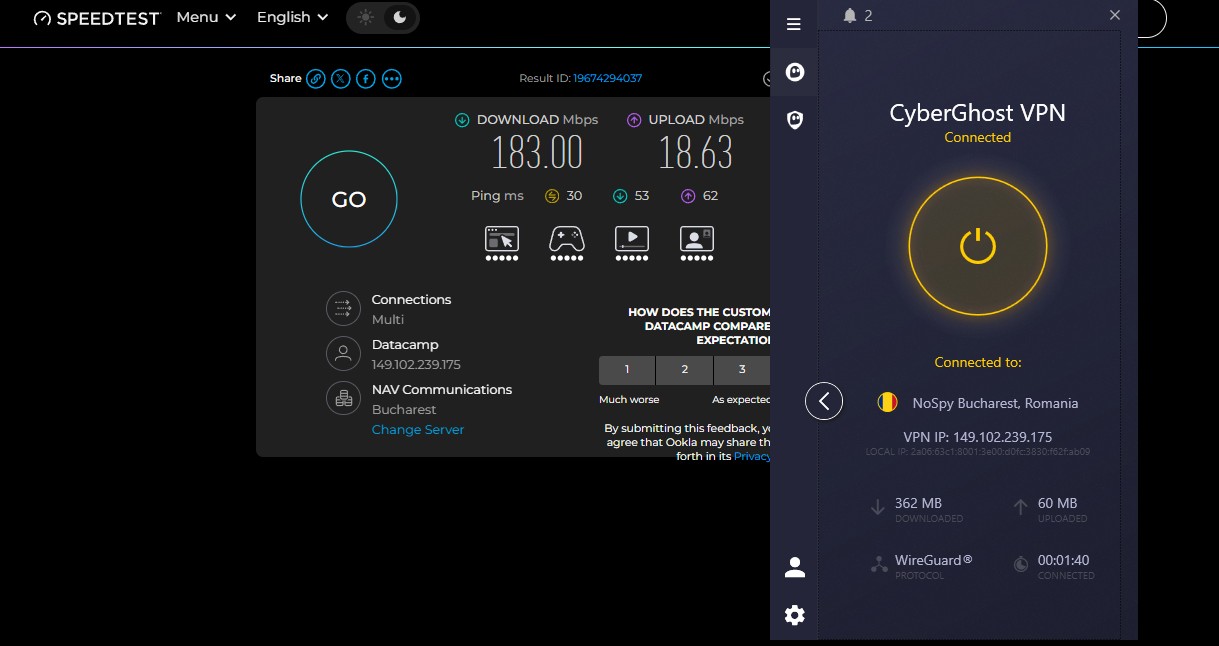
If you play online, a regular server close to you works just as well. NoSpy servers did better. These servers are in a data center CyberGhost owns and staffs in Romania, so no outside hosting company has physical access to them. At 183 Mbps and 30 ms, the privacy upgrade cost me 3.9% of my speed, small enough that you won’t notice it day to day.
CyberGhost Price and Plans
The two-year plan, with two extra months, costs about $2.20 a month, paid up front for the full 26 months. After that, it renews at about $57 a year, or under $5 a month, a gentler increase than most VPNs apply. The six-month plan costs about $7 a month, and the monthly plan about $13, so the two-year plan is the best value by far.
Two add-ons appear at checkout. The Security Suite for Windows adds antivirus and a security updater for about $1 a month, and a dedicated IP address, one only you use, costs about $2.50 a month. Both are discounted with the main plan. That pricing puts CyberGhost near the bottom of the market, and the low-cost ranking compares it with similar VPNs. Current deals are on the CyberGhost coupons page.
Refunds and Free Trials
The 45-day money-back guarantee on the two-year and six-month plans is the longest in the category, where 30 days is the norm. The monthly plan allows 14 days.
The free trials are unusually generous: 24 hours on Windows and macOS with no card required, 3 days on Android, and 7 days on iOS. Most VPNs require payment details before a desktop trial, and CyberGhost doesn’t. That means a full day on your computer before you pay, then 45 days to change your mind once you do.
CyberGhost Security Review
CyberGhost covers the security basics well on Windows 11, but it lacks advanced protection such as obfuscation.
The Kill Switch Leaked on Restart
A kill switch blocks your internet if the VPN connection drops, so your own IP address stays hidden. I tested CyberGhost’s on Windows 11 in three ways, with a continuous ping open. No traffic escaped when I pulled the Ethernet cable mid-session or when I killed the app process in Task Manager. A PC restart was different: traffic leaked before the app reconnected, and CyberGhost offers no stricter kill switch mode to prevent it.
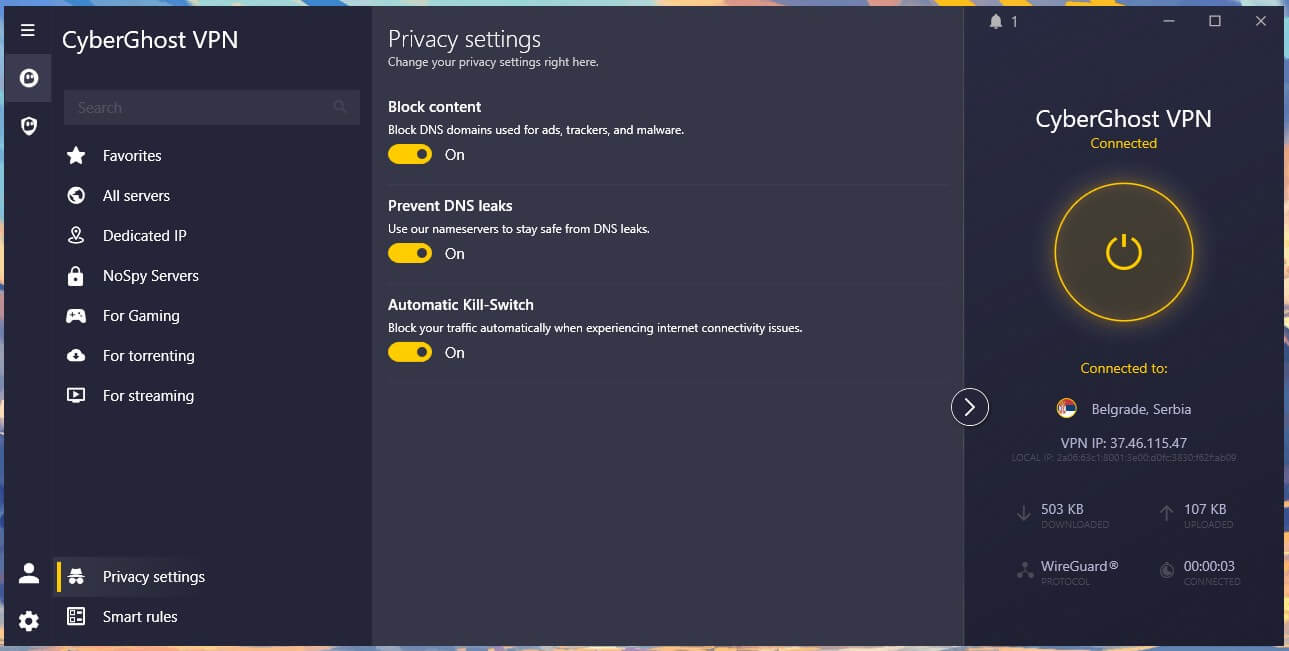
After a restart, wait for CyberGhost to show it’s connected before you open your browser or email. On macOS and mobile, the kill switch works automatically, with no toggle to forget. The kill switch guide explains what each version protects.
Block Content Scored 68%
Block Content stops your device from looking up domains used for ads, trackers, and malware, a method known as DNS filtering. On d3ward’s blocklist test, it stopped 92 of 135 domains, or 68%. Here’s how the other ad blockers I’ve tested the same way scored:
| Blocker | Domains blocked |
| PIA MACE | 96% |
| Proton VPN NetShield | 93% |
| Surfshark CleanWeb | 79% |
| NordVPN next-gen antivirus | 76% |
| CyberGhost Block Content | 68% |
Letting 43 domains through is enough to notice on an ad-heavy news site, and the app shows no counter for what it stopped. Treat it as a light filter and keep a browser ad blocker installed.
No Obfuscation, and What That Rules Out
CyberGhost offers no obfuscation, the technique that makes VPN connections look like regular internet traffic. There’s no stealth protocol, no Shadowsocks, and no other way to disguise VPN traffic. On a network that inspects traffic closely, plain WireGuard or OpenVPN is easy to identify and block.
That rules out China and makes Russia, Iran, and the UAE unreliable, and CyberGhost says as much on its own site. If you’re traveling to one of those countries, use a VPN with obfuscation, such as NordVPN or Proton VPN. For school and workplace filtering, where the blocking is simpler, plain WireGuard unblocked every site I tried.
Smart Rules and Split Tunneling
Smart Rules is CyberGhost’s automation panel. It includes Wi-Fi Protection, which connects automatically on open networks, App Rules that connect when a chosen app launches, and Exceptions, which keep chosen websites outside the VPN. App Rules worked in my tests, connecting to the server I’d set each time the paired app started. For example, you could have it connect to a US server every time you start a streaming app.
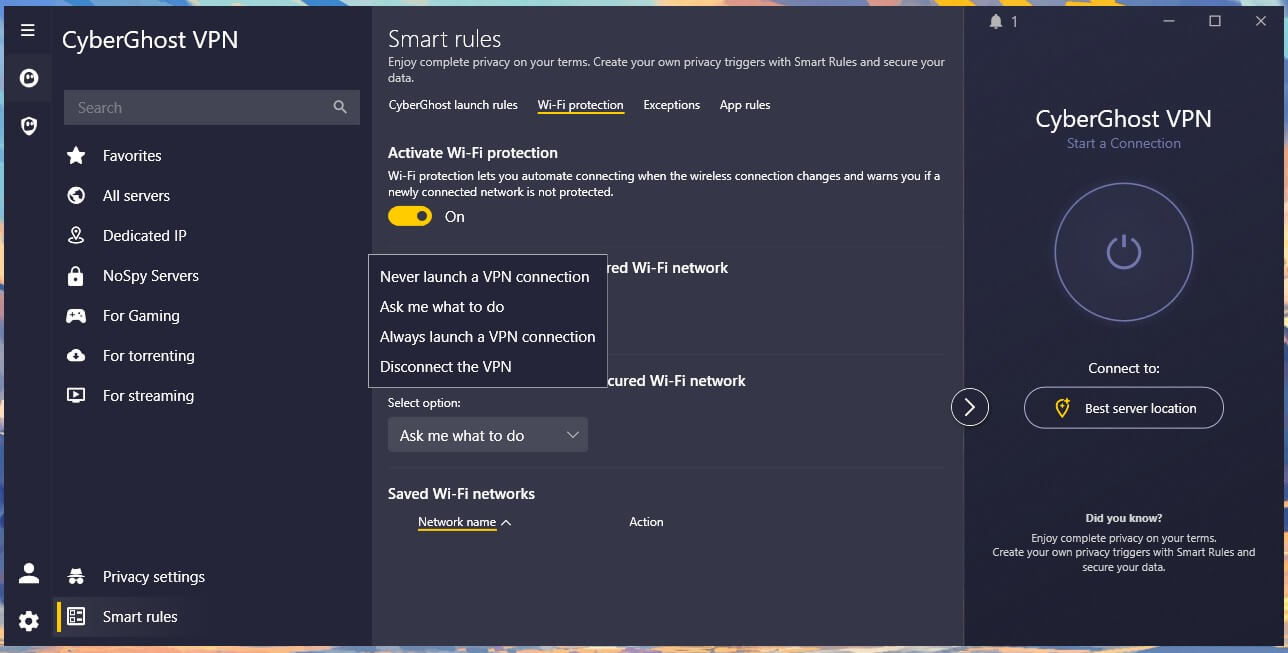
Split tunneling lets chosen apps skip the VPN, and one limitation stood out: app-level split tunneling is available only on Android.
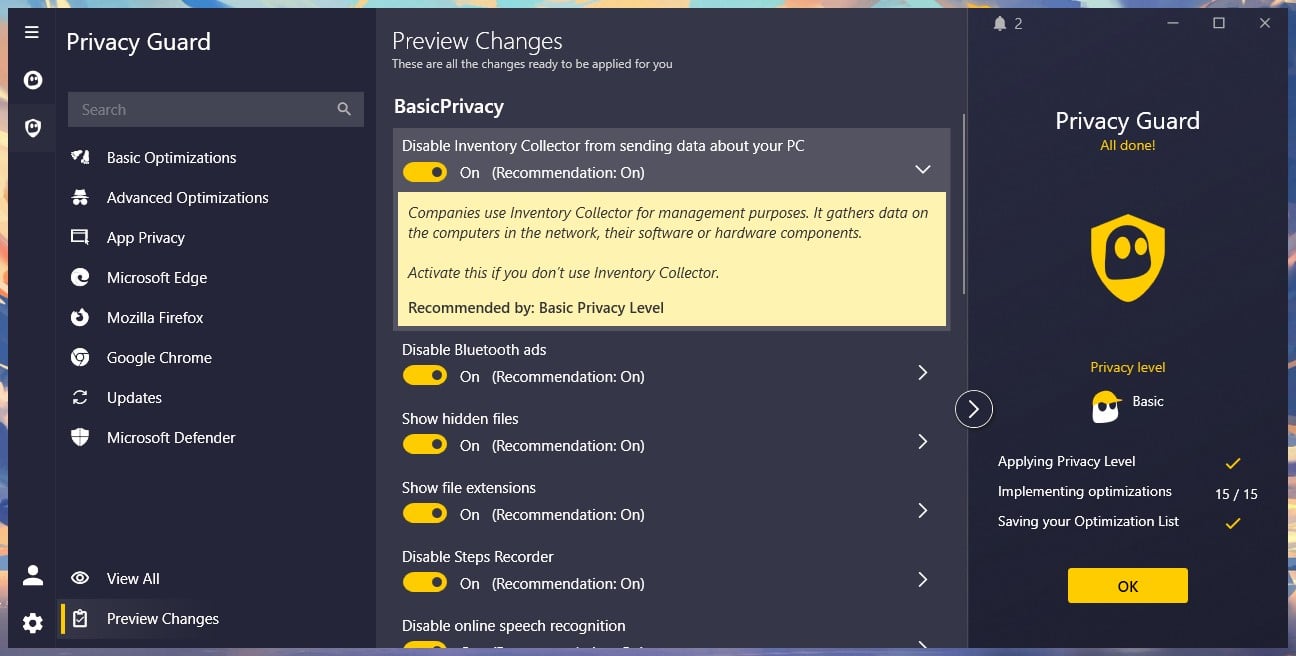
On Windows and macOS, Exceptions cover websites and IP addresses only, so you can’t keep a single app, such as a game launcher, outside the VPN. If you only want your banking site outside the VPN, you can add it to Exceptions. Privacy Guard comes with the Windows Security Suite. It disables Windows telemetry, the usage data Windows sends to Microsoft. It also blocks background camera and microphone access and typing data collection, with a separate toggle for each.
CyberGhost Review: IP and DNS Leak Test Results
A leak means your actual IP address or website lookups go out without the VPN’s protection. I checked ipleak.net and browserleaks.com on the British, American, and Japanese servers on Windows 11, clearing the browser cache between sessions. There were no IP address leaks, no DNS leaks, and no WebRTC exposure, so my home IP address never appeared, including in the IPv6 test.
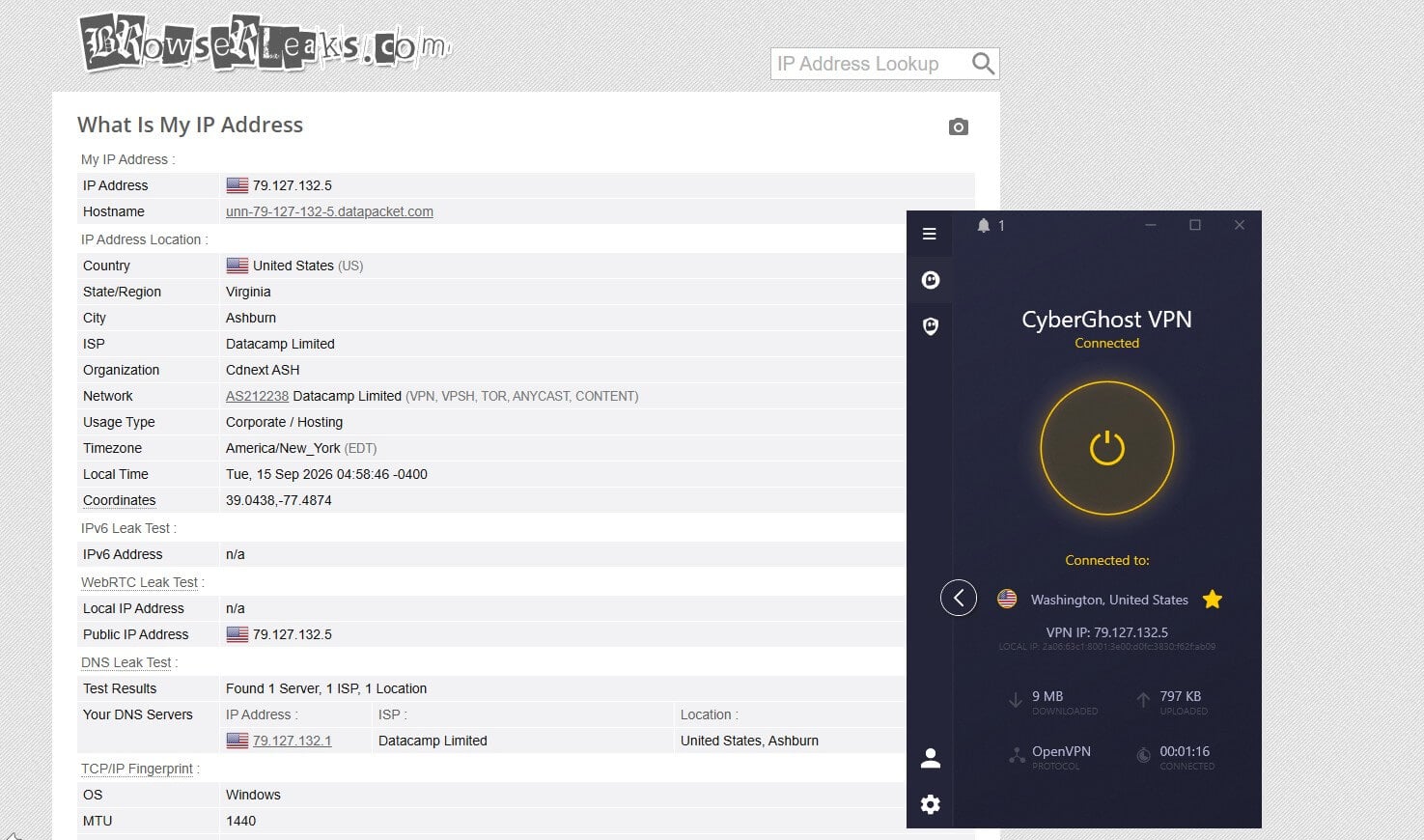
CyberGhost operates its own DNS servers instead of passing lookups to a third party, so the websites you visit aren’t shared with an outside company. The NoSpy server in Bucharest produced the same clean results as the standard ones.
CyberGhost Privacy Review: Romania and the Audit Record
CyberGhost operates from Romania, an EU member outside the 5, 9, and 14 Eyes intelligence-sharing arrangements, with no mandatory VPN logging. The country struck down its own data retention law as unconstitutional, a stronger position than most European jurisdictions offer. The privacy policy states that CyberGhost stores no browsing history, traffic destination or content, search history, connection logs, IP addresses or timestamps. In practice, there’s no record of what you do online for CyberGhost to hand over.
It keeps an email address, anonymized troubleshooting data, and aggregate service metrics, none of it linked to an individual session. The company publishes transparency reports four times a year, listing the legal requests it received and how it responded, a habit that started long before the audits. Deloitte has audited CyberGhost three times: first the no-log policy, then the servers, and most recently the token system behind dedicated IP addresses.
That token keeps your account unlinked from your dedicated IP address. CyberGhost belongs to Kape Technologies, which also owns ExpressVPN and Private Internet Access. Each brand commissions its own independent audits, and the Deloitte record has continued under that ownership, which I find reassuring. For a closer look at jurisdiction, the most secure VPN guide compares the approaches.
CyberGhost Review: Streaming and Torrenting
CyberGhost unblocked 11 of the 14 streaming services I tested. The streaming-labeled servers are the centerpiece of CyberGhost’s pitch, and they worked more often than not. ITVX is the standout: CyberGhost unblocked it on its dedicated British server, even though ITVX blocked two other VPNs I tested. Netflix US and BBC iPlayer were reliable too.
| Netflix US | Netflix Japan | BBC iPlayer | ITVX | JioHotstar |
| Unblocked | Blocked | Unblocked | Unblocked | Blocked |
It couldn’t unblock Netflix Japan, even on its own Japanese server, or JioHotstar on any server, and the desktop app couldn’t unblock a third service either. For Netflix Japan or JioHotstar, choose a different VPN.

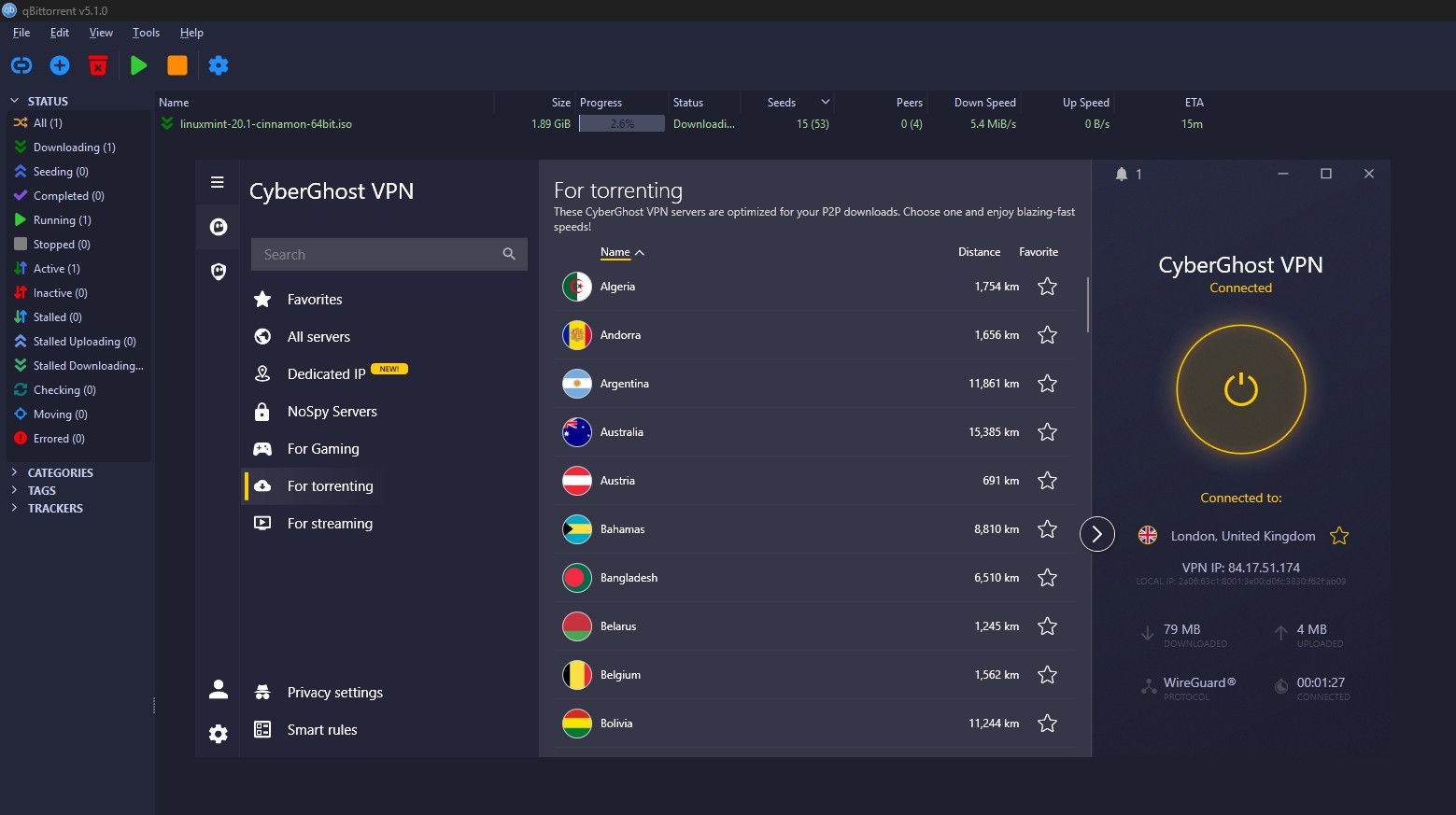
For torrenting, CyberGhost offers dedicated P2P servers, built for the file-sharing traffic torrents use, in most countries, and downloads moved as fast as the VPN connection allowed. Port forwarding is absent, however. Without it, other torrent users can’t connect to you directly, and your upload ratio on private trackers suffers, so seeders there should choose a VPN that has it.
CyberGhost Review: Server Network and Categories
The app lists 100 countries, and CyberGhost publishes a count of about 11,700 servers, a figure the app doesn’t display. Every server is RAM-only, meaning nothing is stored on a hard drive and a reboot wipes it, and the servers use 10 Gbps connections. Categories are the organizing idea: streaming servers labeled by service, P2P servers, gaming servers, and the NoSpy group in Romania.
In my tests, the streaming labels proved their worth. Dedicated IP addresses are available in countries including Canada, Switzerland, Australia, France, the UK, the US, and Japan. Smart DNS covers devices without VPN app support, such as some smart TVs and game consoles, with servers for the US, the UK, Germany, the Netherlands, and Japan. It changes your streaming location but encrypts nothing, so keep it for streaming and use the VPN app for everything else.
CyberGhost App Review: Ease of Use
The desktop app looks good and grows denser the further in you go. The main screen is a connect button and a server list. The settings panel has grown with each release, and finding a specific category takes more clicking than it should. Connections took 4 seconds on WireGuard.
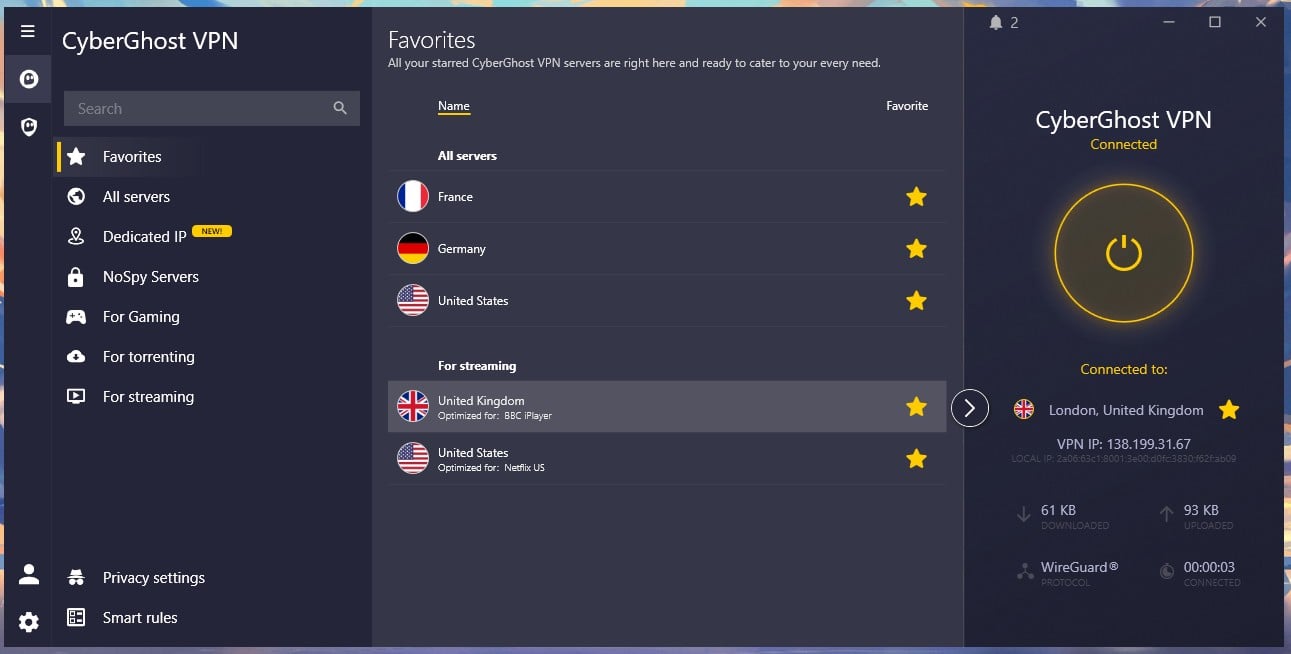
Leaving the protocol on Automatic occasionally picked OpenVPN, which made connecting take 6 seconds. Choosing WireGuard in the settings avoids that. In its favor, it connected every time across my testing, even with other VPN apps installed and idle in the background.
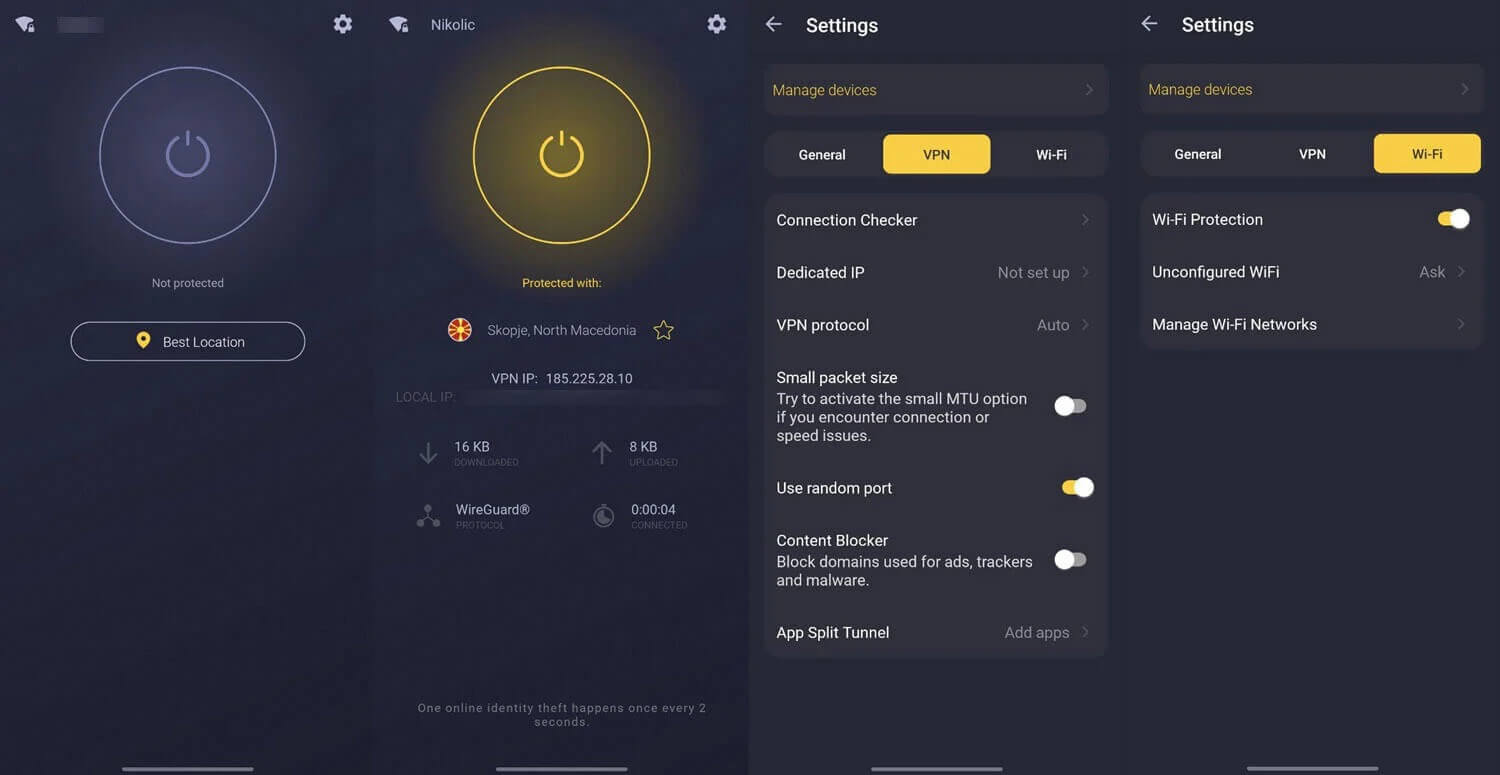
The mobile apps are cleaner and quicker to move around, and Android also has app-level split tunneling. The subscription covers seven devices, the lowest allowance among the major VPNs. A router counts as one device, so installing CyberGhost on your router covers everything behind it.
Compatibility
- Windows, macOS, and Linux (command-line only)
- iOS and Android phones and tablets
- Fire TV, Android TV, and Nvidia Shield
- Routers, including DD-WRT, Tomato, and AsusWRT
- Game consoles through a router or Smart DNS
- Chrome and Firefox extensions
CyberGhost Support Review
Live chat is available around the clock from the main site, without a detour through the Help Center. When I asked a protocol question, the agent answered accurately without passing me on. Support is offered in English, German, French, and Romanian. Few VPNs match that. The Help Center has illustrated setup guides for routers, Smart Rules, and streaming servers, so most questions don’t require live chat.
Conclusion
So, is CyberGhost good, or just cheap? For most people, it’s genuinely good. It’s easy to use from the first minute, it kept my connection fast on nearby servers, and it unblocked most of the streaming services I tried. For about the price of a coffee a month, that’s a lot. The low price does show in one place: advanced protection. Its kill switch let my traffic out when I restarted my PC, and it can’t hide the fact that you’re using a VPN.
I wouldn’t rely on it for sensitive work or take it to a country that blocks VPNs. If you mainly want to stream, browse safely on public Wi-Fi, and keep things simple, I’d happily recommend it. Its 45-day money-back guarantee also gives you more time than most to find out whether it’s right for you.
- Get CyberGhost if you’d like to try it on your computer before paying or you prefer servers sorted by task.
- Skip CyberGhost if you seed on private trackers, you want app-level split tunneling on a computer, or seven devices won’t cover your household.
To compare it with other VPNs, the fastest VPN ranking covers speed and the best VPN guide covers the wider field. For restrictive countries, the ExpressVPN vs NordVPN comparison covers two VPNs with obfuscation.
Frequently Asked Questions
Is CyberGhost good?
Yes, for nearby servers and streaming. It loses very little speed close to home and works well for torrenting, but it lacks obfuscation and has a low device limit.
How much does CyberGhost cost?
CyberGhost costs less than most major VPNs on its two-year plan, about $2 per month, which also comes with a longer money-back guarantee than the monthly plan. Shorter plans cost considerably more per month.
Does CyberGhost keep logs?
No. Deloitte has audited CyberGhost’s no-log policy, which excludes browsing history, IP addresses, and timestamps, and quarterly transparency reports list every legal request it receives.
Does CyberGhost work in China?
No. CyberGhost offers no obfuscation, so the deep packet inspection used in China identifies and blocks its connections. The company says so on its own website.
What are NoSpy servers?
NoSpy servers are CyberGhost’s own servers in Romania, managed by its staff with no outside hosting company involved. They’re nearly as fast as standard servers.
Does CyberGhost work with Netflix?
Yes, on every platform. The desktop trial requires no payment details and lasts a day, while the mobile trials last longer but require credit card information.
How many devices does CyberGhost cover?
Seven. That's the lowest allowance among the major VPNs, though a router installation counts as one connection and covers every device behind it.
Does CyberGhost have a free trial?
Yes, on every platform. The desktop trial requires no payment details and lasts a day, while the mobile trials last longer but require credit card information.