
A VPN hides your browsing history from your internet provider, the owner of the Wi-Fi network, and other parties watching the connection. It encrypts everything your device sends and passes it through a VPN server, so they see one encrypted connection instead of the sites you visit and the searches you run.
It doesn’t hide your history everywhere, though. Your browser still saves it on the device, Google still records searches made while you’re signed in, and monitoring software on a work or school computer sees your activity before the VPN encrypts it.
Who Can See Your Browsing History With a VPN?
Browsing history isn’t stored in one place. Your browser, your internet provider, the network you join, the websites you load, and the accounts you sign in to each keep their own record. A VPN removes some of those records and leaves others untouched:
| Who | Without a VPN | With a VPN |
| Your ISP | Every domain you visit, with times and data use | A VPN connection, its timing and data use |
| Wi-Fi owner or network admin | Domains and timing for each device | A VPN connection from your device |
| Others on public Wi-Fi | Domains, plus content on sites without HTTPS | Encrypted traffic only |
| Websites you visit | Your IP address and rough location | The VPN server’s IP address |
| Google, when you’re signed in | Searches saved to your account | Searches saved to your account |
| The VPN company | Nothing | The domains you connect to, without page content |
| Your browser | Full history on the device | Full history on the device |
| Monitoring software on a work device | Everything you do on the device | Everything you do on the device |
What Your Internet Provider Sees With and Without a VPN
Without a VPN, your ISP handles every DNS lookup and sees the name of each site you visit, even when the page loads over HTTPS. It can’t read the page itself or the words you type into a search box on an HTTPS site, but the list of domains and visit times is enough to build a detailed profile. In the UK, ISPs can be required to keep those connection records for up to a year, and in the US, they’re allowed to use browsing data for advertising.
With a VPN connected, the ISP sees a single encrypted connection to the VPN server. It can’t tell whether you’re reading the news, banking, downloading torrents, or visiting adult sites, and websites see the VPN server’s IP address in place of yours. The ISP can still log:
- When you connect to and disconnect from the VPN
- How much data you send and receive
- The VPN server’s IP address, which can show which VPN you use
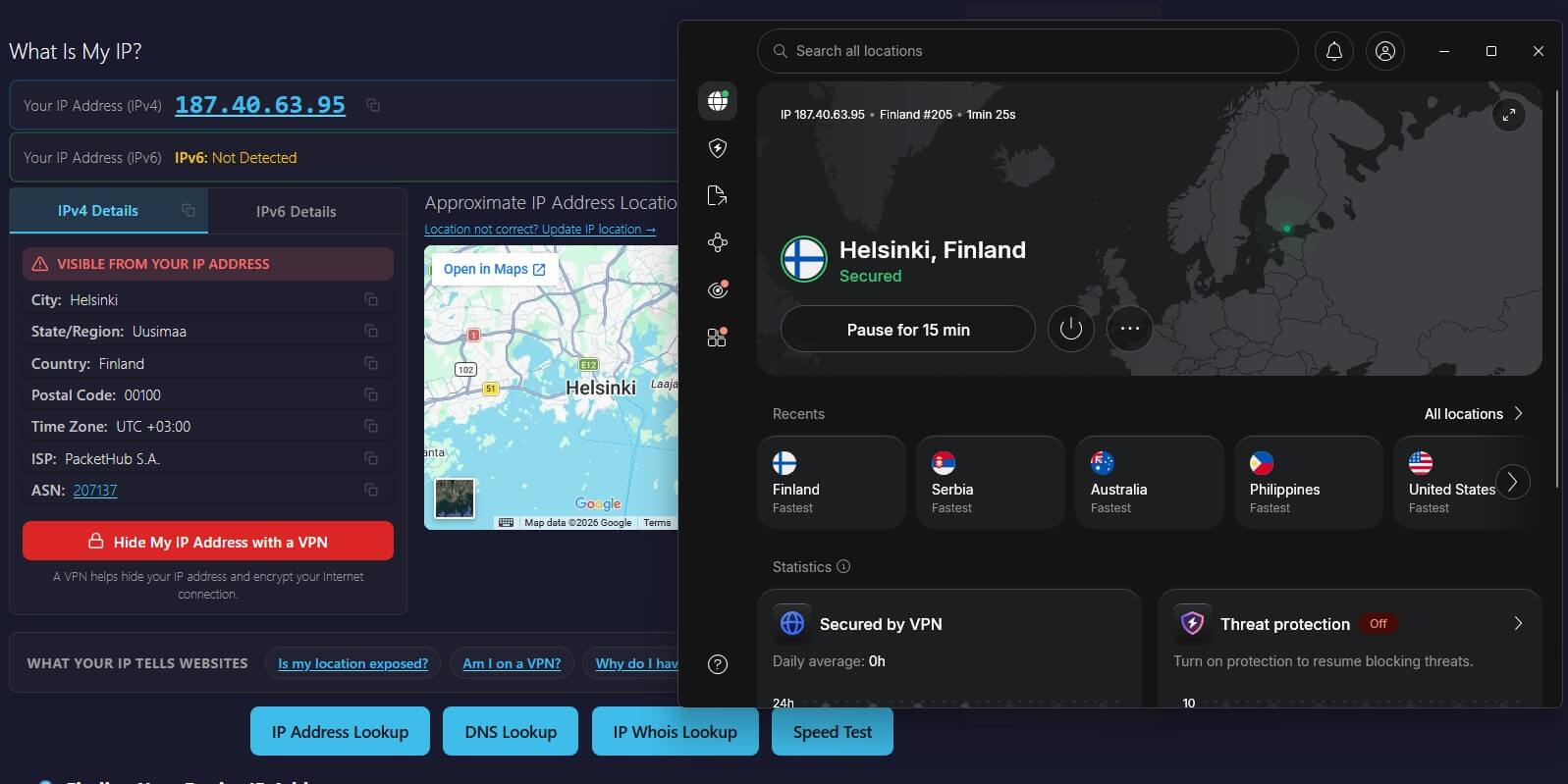
Some ISPs slow down or flag VPN traffic, especially during streaming or large downloads. Smart DNS, which some VPNs offer for TVs and consoles, isn’t a privacy tool: it changes the region a streaming service sees without encrypting the connection, so the ISP still sees every site.
Can the Wi-Fi Owner See Your History With a VPN?
No, only the VPN connection itself. Without a VPN, the router at home, at a café, or in a hotel can log the domains each device visits, along with connection times and data use, and parental control tools show the same list. Private browsing doesn’t change that. The router builds its list from network traffic, and a private window doesn’t encrypt it.
With a VPN, the router logs one encrypted connection from your device to a VPN server. The owner can still see that the device uses a VPN, when it connects, and how much data it moves. On public Wi-Fi, the encryption also protects passwords and form entries from other people on the same network.
Office, school, and university networks sometimes block known VPN servers. Obfuscated servers, such as NordVPN’s, make the VPN connection look like ordinary HTTPS traffic, so those networks have a harder time detecting it. The same feature is used in countries that restrict VPNs, such as China and the UAE.
Can Your Employer or School See Your History?
On a personal phone or laptop, a VPN hides your browsing from a work or school network the same way it does from a home router. A device the organization manages is different. Monitoring software on it can record the sites you visit, take screenshots, and log what you type before the VPN encrypts the traffic.
Security certificates installed by the IT team can also let the network inspect HTTPS traffic. A personal VPN can’t hide activity from software already installed on the device. Many employers also prohibit personal VPNs on company networks, so check the policy before connecting one.
Does Google Still Track Your Searches With a VPN On?
Yes, if you’re signed in. A VPN changes the IP address and location Google sees, but searches made while signed in to a Google account are saved to that account’s Web & App Activity, along with YouTube history and activity in other Google apps. NordVPN, ExpressVPN, or any other VPN connected at the time makes no difference to that record.
Signed out, Google can still link searches to your browser through cookies and browser fingerprinting. Fingerprinting combines details such as screen size, fonts, and language settings into an identifier that stays the same when your IP address changes.
To keep searches out of your Google account:
- Check My Activity at myactivity.google.com to see what’s saved.
- Disable Web & App Activity, or set auto-delete to remove records after 3, 18, or 36 months.
- Search signed out in a private window, so no cookies remain between sessions.
- Use a private search engine such as DuckDuckGo or Startpage, which doesn’t build a search history.

Tracker blockers built into VPNs help against third-party trackers on other websites. NordVPN’s next-gen antivirus includes an ad and tracker blocker, and Proton VPN’s NetShield blocks ad, tracker, and malware domains.
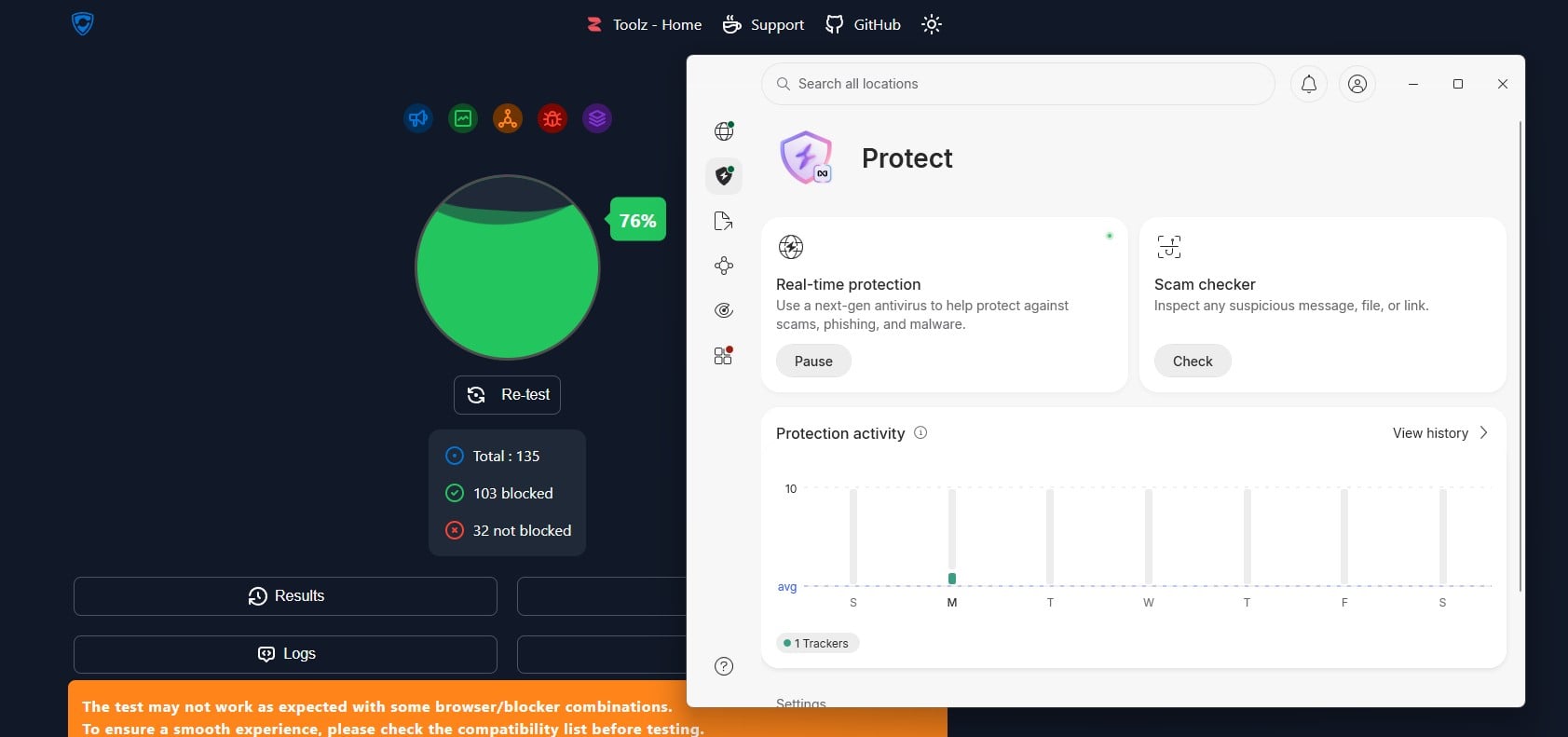
On d3ward’s ad-block test, NetShield blocked 93% of the listed domains and NordVPN’s blocker 76%. Neither one stops Google from saving a search made on google.com while you’re signed in.
Can the VPN Company See Your Searches?
Not the search terms. Every request passes through the VPN server, so the VPN company can see which domains you connect to, and its DNS servers answer the lookups. Searches on Google, Bing, or DuckDuckGo travel over HTTPS, though, and that encryption runs between your browser and the search engine. The VPN sees a connection to google.com without the words you typed.
A no-log policy means the VPN keeps no record of those connections, and independent audits check that claim. NordVPN’s no-log policy has been audited six times since 2018, first by PwC and then by Deloitte, and a packet capture showed its DNS queries going to NordVPN’s own servers. ExpressVPN’s no-log policy has also been independently audited, and Securitum has audited Proton VPN’s every year since 2022.
NordVPN and ExpressVPN use RAM-only servers too, which erase their data at every reboot. Our no-log VPN rankings compare the audit records. Free VPNs are riskier. Many fund the service with user data, and some leak. Hola’s free app requires users to share their device’s resources and IP address with Bright Data, and in a leak test on US and Canadian servers, it exposed the real IPv6 address. Our free VPN rankings list safer free plans.
Leaks Can Expose Your History Even With a VPN
A VPN hides your history only while every request stays in the encrypted connection. Three kinds of leak break that:
- DNS leaks send site lookups to your ISP’s servers instead of the VPN’s, so the ISP sees every domain again.
- IPv6 leaks expose your own IPv6 address when the VPN covers only IPv4 traffic.
- WebRTC leaks let the browser reveal your IP address to the sites you visit.
To check, load ipleak.net or dnsleaktest.com while connected. The IP address and DNS servers they list should belong to the VPN. NordVPN, Proton VPN, and ExpressVPN showed no IP, DNS, or WebRTC leaks on ipleak.net and browserleaks.com. A dropped connection is the other risk, and a kill switch blocks internet access until the VPN reconnects.
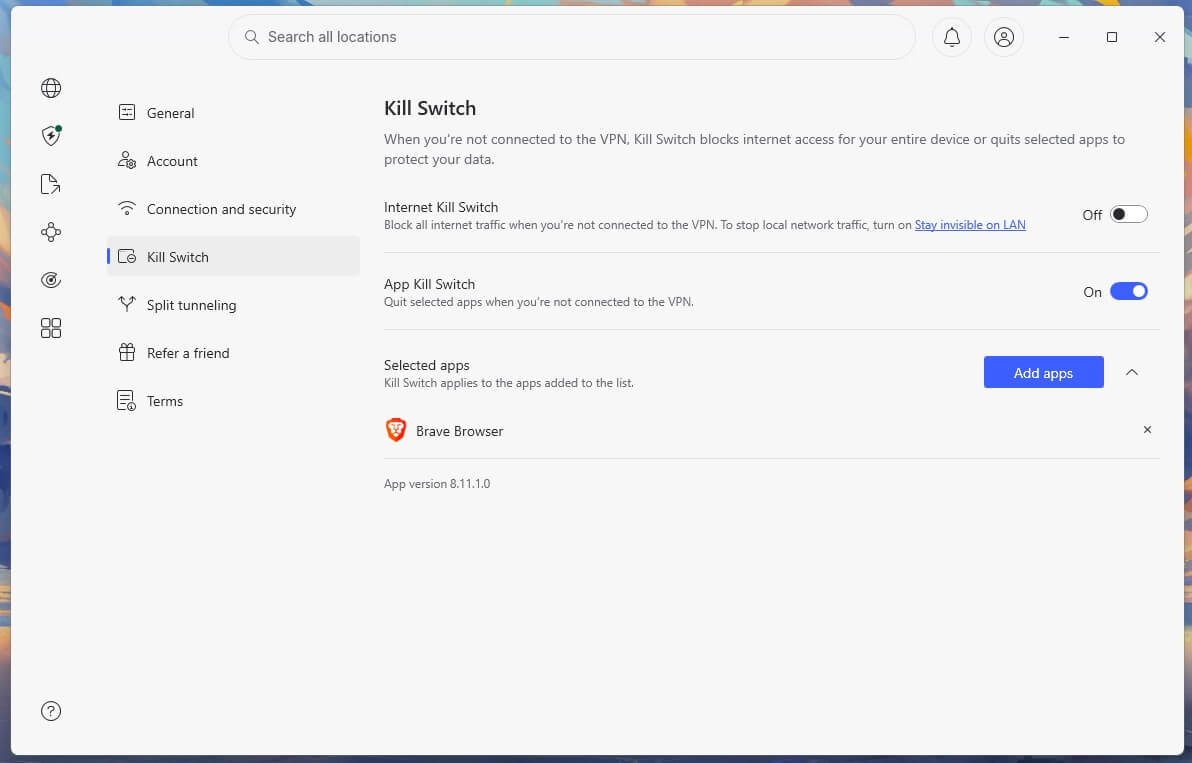
In Windows 11 tests, the default kill switches on Proton VPN and ExpressVPN let traffic out during a PC restart. NordVPN’s blocking mode, Proton VPN’s advanced kill switch, and ExpressVPN’s strictest setting kept it blocked, so enable the strictest mode your VPN offers.
Your Browser Keeps Its Own History
A VPN doesn’t touch the history saved on your device. Your browser keeps every page you visit, along with cookies, cached pages, and autofill entries, until you delete them. Browser sync can also copy that history to every device signed in to the same account, and on a shared computer, the history tab shows it in one click.
Incognito or private mode stops the browser from saving history, cookies, and form entries after the window closes. Network traffic stays visible, and a VPN covers that part:
| Hides your activity from | VPN | Incognito mode |
| Your ISP | Yes | No |
| The Wi-Fi owner | Yes | No |
| Websites (your IP address) | Yes | No |
| The history saved on your device | No | Yes |
| Google, when you’re signed in | No | No |
Disable history sync if you don’t want your browsing on other devices, and consider Firefox or Brave, which include fingerprinting protection and tracker blocking. For stronger anonymity, Tor Browser sends traffic through three volunteer relays, at a large cost in speed. Our guide to staying anonymous online covers how to combine these tools.
Summary
A VPN keeps your browsing away from your ISP, the Wi-Fi owner, and others on the same network, and it replaces the IP address websites see. It doesn’t erase the history in your browser, stop Google from saving searches to a signed-in account, or hide activity from monitoring software on a work device.
For a VPN that keeps no records, NordVPN has a repeatedly audited no-log policy and a kill switch with a blocking mode for restarts. Proton VPN blocks trackers with NetShield and has a free plan with no data cap. Our ranking of the best VPNs covers more options, and our guide to how a VPN works explains the encryption in more detail.
Frequently Asked Questions
Does a VPN hide search history?
Yes, from the ISP and the Wi-Fi owner. Google still saves searches made while signed in, and the browser keeps its own history on the device until it's deleted.
Does Google still track searches with NordVPN on?
Yes, when the user is signed in. Google saves searches to the account's Web & App Activity unless that setting is disabled, and NordVPN only changes the location attached to them.
Can ExpressVPN see what you search?
No. Searches travel over HTTPS between the browser and the search engine, so ExpressVPN sees only the domain, such as google.com, and its audited no-log policy means it doesn't store that.
Can the Wi-Fi owner see browsing history with a VPN?
No. The router records only an encrypted connection to a VPN server and its timing, so the owner can tell a VPN is in use but not which sites were visited.
Can an ISP see incognito history with a VPN?
No. With a VPN on, the ISP sees only encrypted traffic to the VPN server. Incognito mode alone hides nothing from the ISP: it affects only what the browser stores.
Does a VPN delete browsing history?
No. A VPN encrypts traffic leaving the device but never touches the browser's saved history, cookies, or cache, which stay until the user deletes them or browses in a private window.
Can police see browsing history with a VPN?
No, not from a no-log VPN, which has no records to hand over. Police can still request data from websites, Google, or the device, and a VPN offers no protection from lawful investigations.
Can an employer see browsing history with a VPN?
Yes, on a work device. Employer monitoring software records activity on the device, where a VPN offers no protection. On a personal device, the work network sees only the VPN connection.