AirVPN lives by a courageous slogan — the air to breathe the real internet. It promises high-level security, rock-solid privacy, and bypassing censorship anywhere, at any time. During our AirVPN review for 2026, we had the chance to use and fully test it for three months.
In this period, we had a fun time with it but we also unraveled some critical issues we want to report on in this review. AirVPN is a privacy-oriented VPN, so it lacks streaming prowess and a level of polish found in more prominent VPNs. This, we believe, isn’t an issue for everyone, as the VPN is still very popular.
If you’re interested in this provider as well, stop for a moment, and read this comprehensive AirVPN review. We’ll analyze everything — from prices, apps, and security features to streaming, torrenting, sidestepping censorship, and more. Let’s dive right in and see what’s up!
AirVPN
AirVPN is reliable and safe to use but ultimately let down by trivial things, such as streaming abilities, compatibility, performance, and convoluted app design. While it's reliable in China and fairly cheap, you'll find multiple options with more features at a similar price, making AirVPN pale in comparison.
Pros
- Affordable long-term plans
- Rock-solid security and privacy
- Great for avoiding censorship
Cons
- Complicated applications
- Unsuitable for streaming
- 5 simultaneous connections
- No 24/7 live chat support
- Servers in 20+ countries
AirVPN Pricing: Is It Affordable?
Unlike Proton VPN, AirVPN is a premium-only VPN. This means there’s no free plan, free trial, and other freebies most people love.
If that’s a big deal, perhaps check out Proton VPN and use its free plan forever. If AirVPN is your main obsession, let’s examine its plans and their prices.
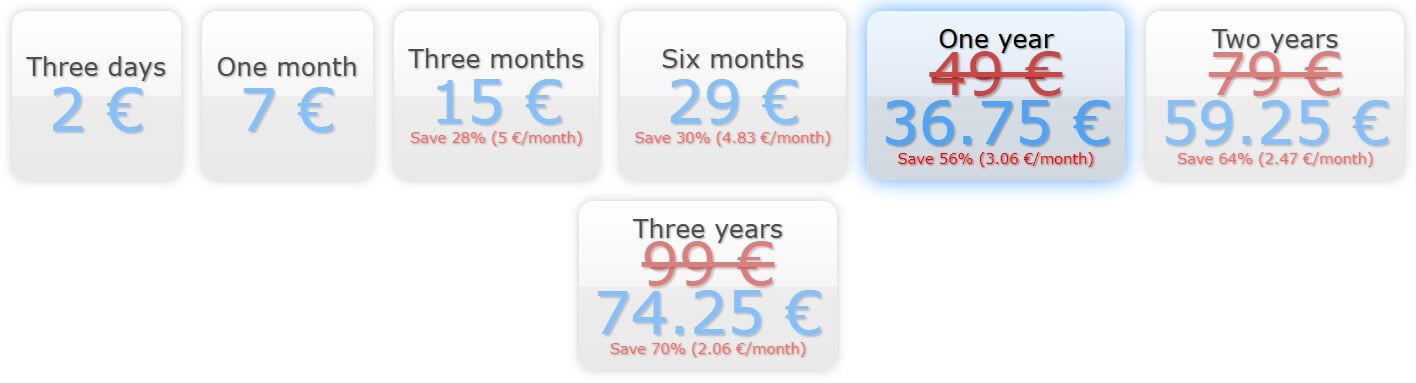
One thing you’ll notice is that AirVPN displays prices in Euros rather than Dollars but that’s because the VPN is based in Italy. However, we’ll do all the conversions for you. On the far left is a 3-day plan at about $2.2, which is sort of a trial but obviously not a free one.
Then, you have monthly, 3-month, six-month, annual, biennial, and triennial plans.
If you’re in for a long drive, the triennial plan at about $2.2/mo sounds pretty exciting. Calculated as an upfront payment, it’s about $80. You’ll pay that much for NordVPN’s cheapest biennial plan, for example. Another deal worth exploring is the biennial.
It’s about $2.7/mo or $65 for 24 months upfront, so it’s a bit pricier than CyberGhost VPN.
In our AirVPN review, we found the VPN quite affordable, although not the best value for money because of everything it offers — or better said, what it doesn’t offer. More about that very soon.
Payment Methods & Refund Policy
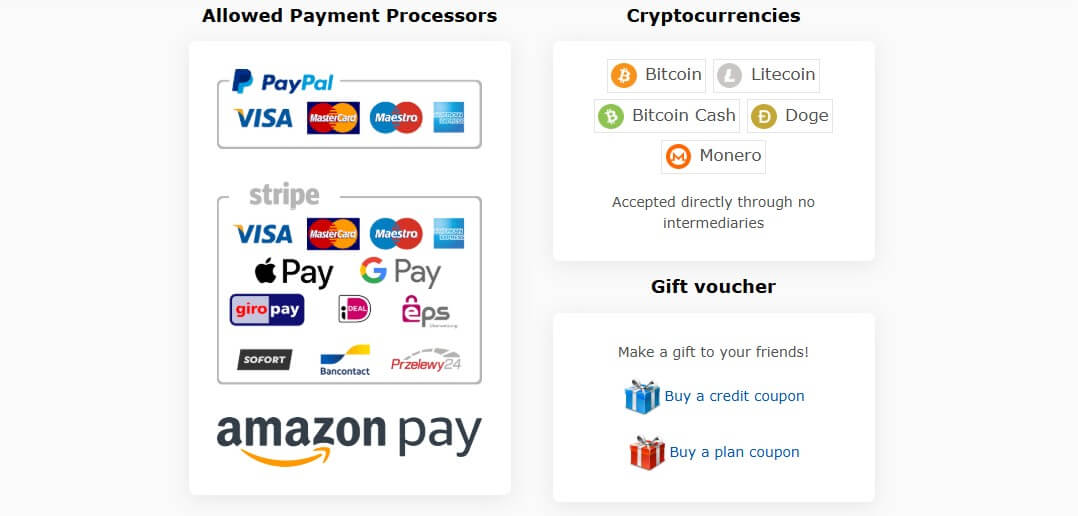
As for payment methods, AirVPN lets you get it however you want it. It offers some of the best selection of payment vendors, from Stripe and PayPal to crypto, Amazon Pay, and even gift vouchers. Stripe supports GiroPay, Sofort, Google Pay, iDeal, and other popular vendors.
That said, you have 10+ payment methods, which means even people on Jupiter would be able to buy the VPN.
AirVPN doesn’t state its refund conditions right away, so you’ll think a refund policy doesn’t exist. Luckily, this isn’t recently tested TunnelBear. AirVPN lets you get a full refund during the first 30 days, no questions asked, as long as you contact the support team during this period.
Device Compatibility & Ease of Use
Using AirVPN on multiple devices is possible unless you find 5 simultaneous connections underwhelming. We do, because all other VPNs offer at least 7 — CyberGhost, for example. We have NordVPN with 10, ExpressVPN with 8, and PIA with unlimited connections.
This minor (or perhaps major?!) setback continues in compatibility. AirVPN works on:
- Windows
- Linux
- macOS
- Android
- iOS
- ChromeOS
- Routers (DD-WRT, Tomato, AsusWRT, pfSense)
Not a bad list, huh? In our AirVPN test, we found that it works on Android TV and Fire OS. In the latter case, it still relies on its Android client, which needs to be sideloaded, so there’s no native, out-of-the-box support for Firestick. The same goes for Apple TV — such a shame.
AirVPN’s Linux support is great, on the other hand, and there’s a GUI version for Ubuntu and Debian. Speaking of a GUI, its apps look… well, terrible. We mostly used this VPN on our Windows PC but it doesn’t look any better on macOS, Android, and iOS. It’s the same stuff.

We dislike its overly complicated and unpolished interface. Compare this to Surfshark, NordVPN, and ExpressVPN, and you’ll be shocked. AirVPN is also a bit sluggish in comparison and its Settings menu is more “scientific”, so it’s not very beginner-friendly.

The VPN goes with this “raw” data and displays everything you need but still, it lacks some polish. Android and iOS versions prolong this trend of ugliness but at least, we haven’t found any bugs and glitches on either of the tested devices. Indeed, AirVPN works well overall.
AirVPN Security Features Review
This section of our AirVPN review for 2026 should be the most interesting. Well, we thought so as well during our assessment, but AirVPN doesn’t have that many security features. This VPN offers basics — a smidge more perhaps, and mostly focuses on customization.
Is that bad? Not necessarily.
Just don’t expect fancy Double VPN connections, advanced malware blocking, and other tools found in NordVPN or even Surfshark. Let’s list its features and then we’ll discuss them:
- 256-bit GCM ChaCha 20 encryption
- Automatic kill switch (Network Lock)
- Split Tunneling
- OpenVPN and WireGuard protocols
- Perfect Forward Secrecy
- Proprietary DNS
The feature list is more about quality than quantity and in our tests, we confirmed that. Its encryption is one of the best around and the kill switch is a beast.
How Does the Kill Switch Work?
Speaking of that, the kill switch in a VPN usually works by disabling internet traffic if the VPN malfunctions. This Network Lock can do that but it can also block internet traffic preemptively unless you connect to a VPN server. This is perfect for added privacy protection.
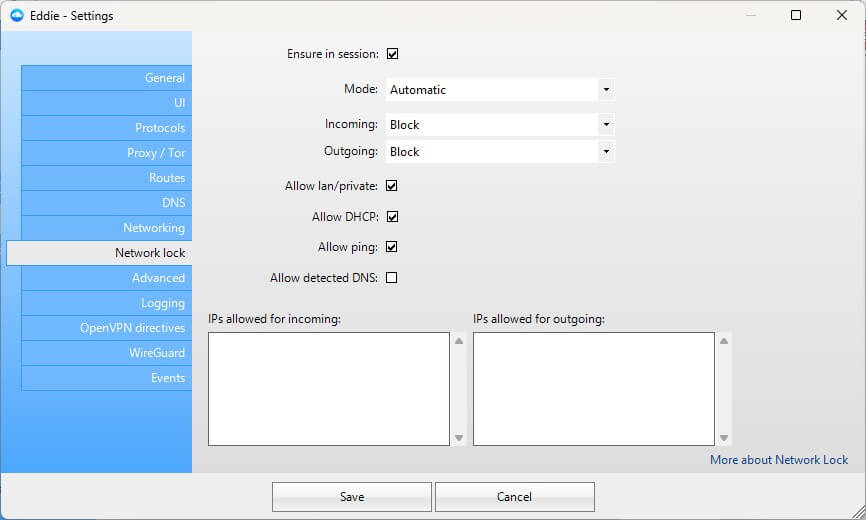
Customization options are there, too, so you can block incoming but allow outgoing traffic and vice versa. Users can also allow ping and DHCP, or even allow certain IPs for incoming and/or outgoing traffic that will sort of “bypass” the kill switch and still be able to function.
Protocol Selection Analysis
AirVPN offers two major protocols — OpenVPN and WireGuard.
The selection is pretty basic but there’s a catch. You can select different ports, which serve various purposes. For example, using the classing WireGuard UDP 1637 port allows you to enjoy efficient and lightweight connections with a fair degree of overall reliability.
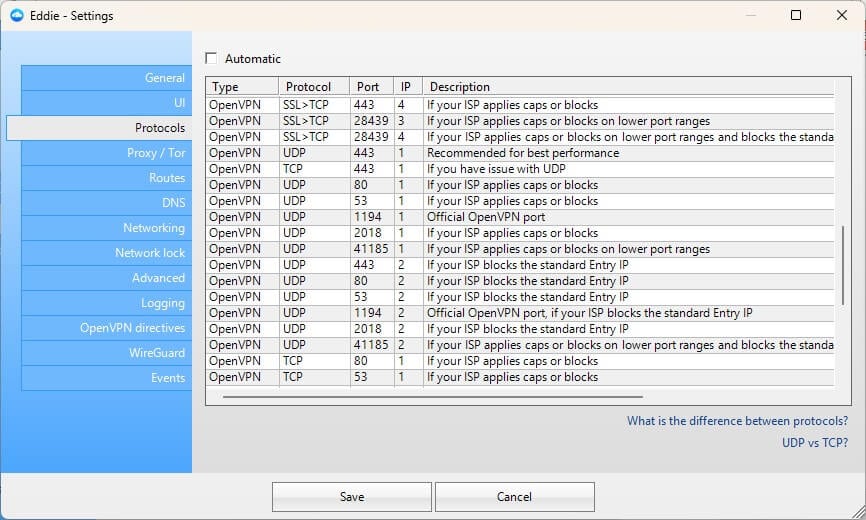
There’s also OpenVPN SSL>TCP and port 22 — this combo is great for various ISP blockages that would prevent you from connecting to a VPN properly. By playing around with these combinations of ports and protocols, you can efficiently overcome censorship with AirVPN.
We’ll address our experience with that later in this AirVPN analysis.
Other AirVPN Features
AirVPN fully supports proxies, allowing you to pick from HTTPS, SOCKS, and Tor.
You’ll need to manually configure your proxy, which seasoned veterans will know how to do. In this AirVPN analysis, we were also fans of its passive features, such as Perfect Forward Secrecy, which assigns unique encryption keys to every connection to boost your privacy.
AirVPN has an in-house DNS, preventing third-party DNS providers from interfering. As AirVPN operates per a no-logs policy, its DNS servers also retain no private data.
Before wrapping this section up, we want to touch on something called “OpenVPN Directives”. It’s a setting that enables customizing OpenVPN, which experts will appreciate. You can use it to customize the final config file and adapt the connection to your liking.
IP and DNS Leak Tests: Is AirVPN Safe in 2026?
Judging by its reliable security features and breadth of customization options, it’s easy to see where this is going. If you thought AirVPN would leak our IP and DNS addresses, you’re dead wrong. For this AirVPN review, we tested all of its countries — about twenty or so.
We used one server per country to test for IP and DNS leaks on two websites:
- ipleak.net
- browserleaks.com
At the time of writing, we were in Belgrade, which is in Serbia, and with each consecutive test, we couldn’t make AirVPN leak our original IP and DNS addresses no matter how hard we tried. For the sake of this review, we’ll display one of the results.
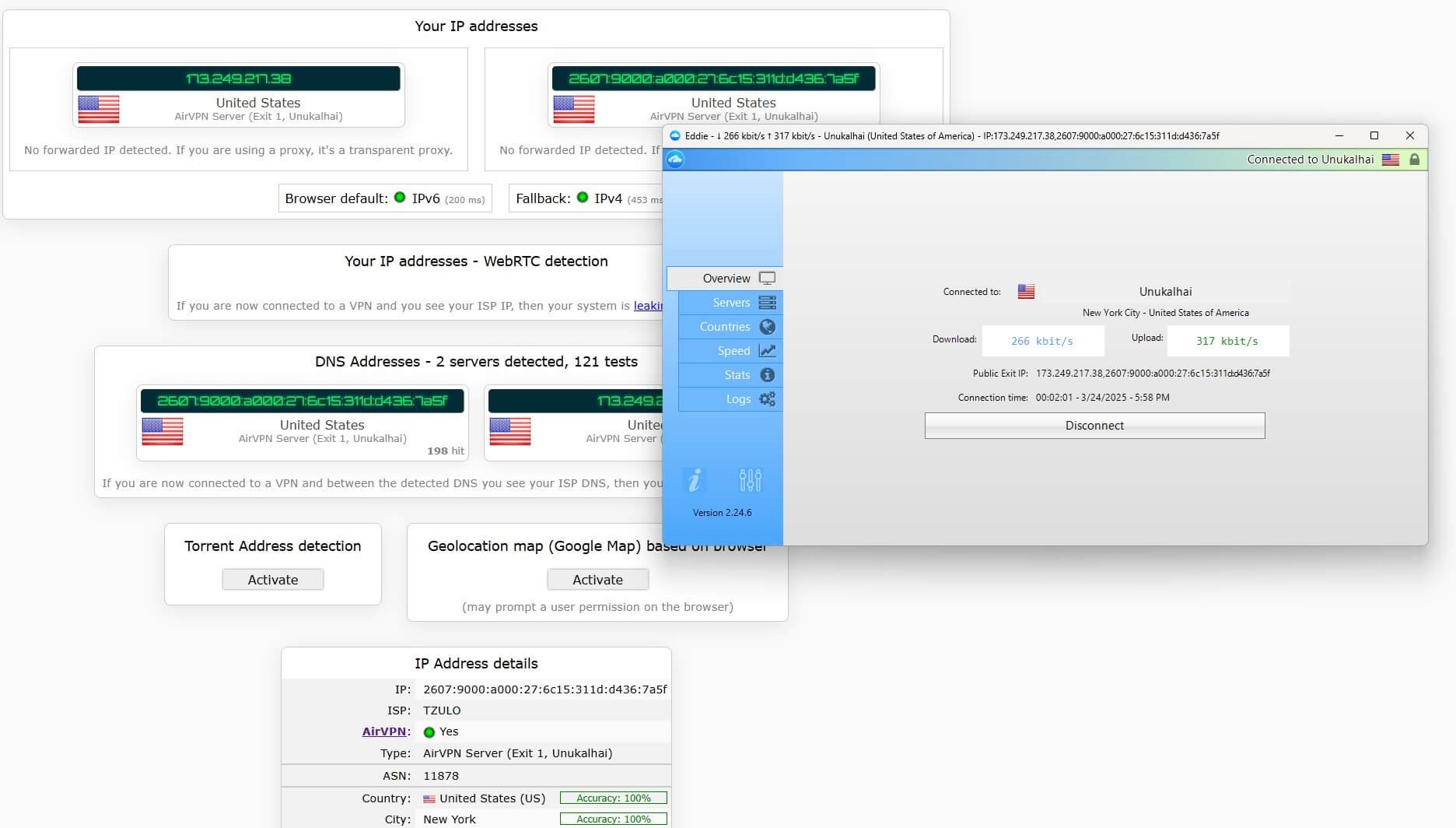
As you can see, when using the US server, both IP and DNS addresses were from the United States — not a single trace of our European whereabouts!
The same goes for the other test using the same server, which is displayed below.

AirVPN’s superb IP/DNS leak protection works like a well-oiled engine and the VPN is perfectly safe at all times. Pair this with top-of-the-line security features and advanced customization, and you can see why AirVPN is so beloved by VPN enthusiasts.
Does AirVPN Store Logs?
Built for security and privacy, you’d expect AirVPN to store minimal logs — and you’d be right! The VPN originates from Italy and even today, it resides in Perugia. The provider is very transparent and we can even see the name of the founder. Paolo Brini. There were multiple founds, actually.
Originally, AirVPN was founded by a hacktivist group in 2010. In 2022, AirVPN became independent, with Paolo Brini as its owner. Italy is a European Union country, so there are some concerns about government surveillance, data logging, and that kind of stuff.
To be fair, we used to think like that long ago. Nowadays, the VPN jurisdiction plot is a bit inflated, so if a VPN is in the US, Italy, the UK, etc, it doesn’t necessarily store logs.
Privacy Policy Analysis
The same can be said about AirVPN, which doesn’t store logs either. Its privacy policy is pretty short and can be summed up in one sentence, which we highlighted below:
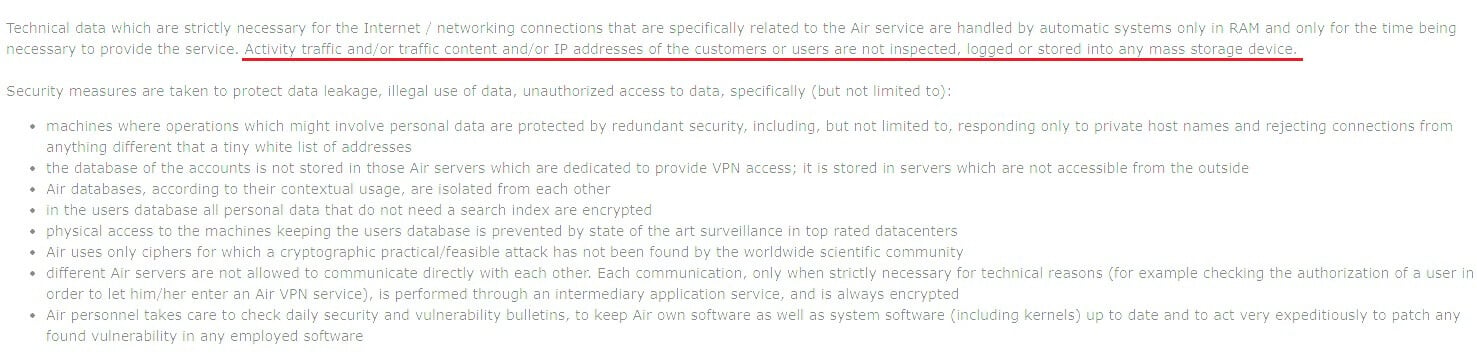
The VPN doesn’t retain any private information, including the IP address, visited websites, online history, original location, DNS requests, timestamps, etc. We must say this privacy policy sounds really good but it lacks a third-party audit from a renowned cybersecurity firm.
Is that necessary? Honestly, no, but it’s good to have it as a stamp of trustworthiness.
NordVPN has multiple direct audits on its no-log policy, which means it’s a bit more trustworthy, as clarified in our comparison with AirVPN. Audits do cost money and since this is a small, “niche” VPN, we can see why it hasn’t invited any cybersecurity firm to do its job.
Remember that AirVPN uses RAM servers, so all collected information is wiped clean with each restart. This “collected information” is minimal and includes only technical data for proper function. Besides, you can request the deletion of your data from the VPN if you want a clean slate.
All in all, AirVPN does not store any sensitive logs, which makes it favorable for online privacy. While it lacks third-party audits, AirVPN compensates by being transparent and not having a single data-leaking scandal that would’ve otherwise ruined its reputation.
AirVPN Speed Tests: Is It Fast and Reliable?
A VPN without a reliable connection and performance means very little. But AirVPN begs to differ and represents a solid choice if this is one of your primary concerns. We tested AirVPN to see how fast it would be and before we divulge the results, let’s look at our native speeds.
- Download: 50 Mbps
- Upload: 10 Mbps
- Ping: 7 ms

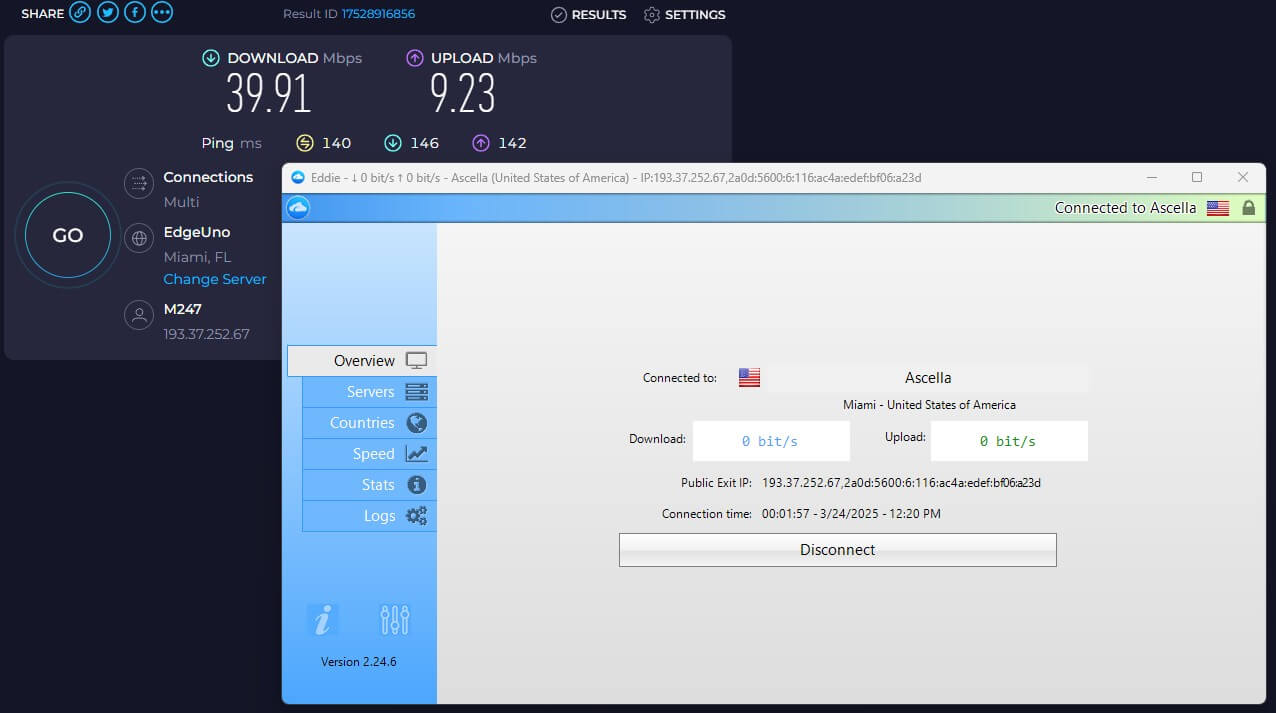
At the time of testing, we were in Belgrade (Serbia), where we performed 3 tests a day for 3 days in a row. Each test was on 3 server locations — the UK, the USA, and Japan. As you can see, we aimed mostly at distant locations to primarily gauge the VPN’s speed retention rate.
The protocol selection was untouched, so we politely left the option at “Automatic“.
Without further ado, let’s examine AirVPN’s speed test results and review them:
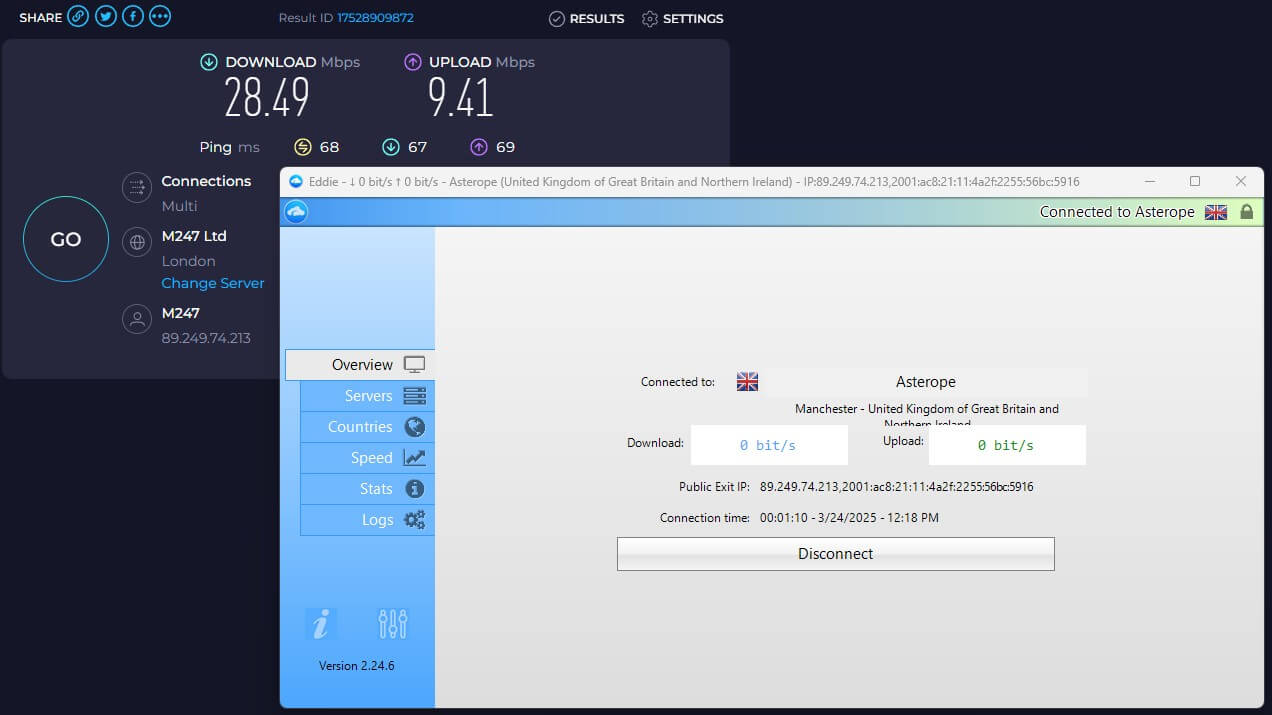
UK Speed Test Results
US Speed Test Results
Japan Speed Test Results
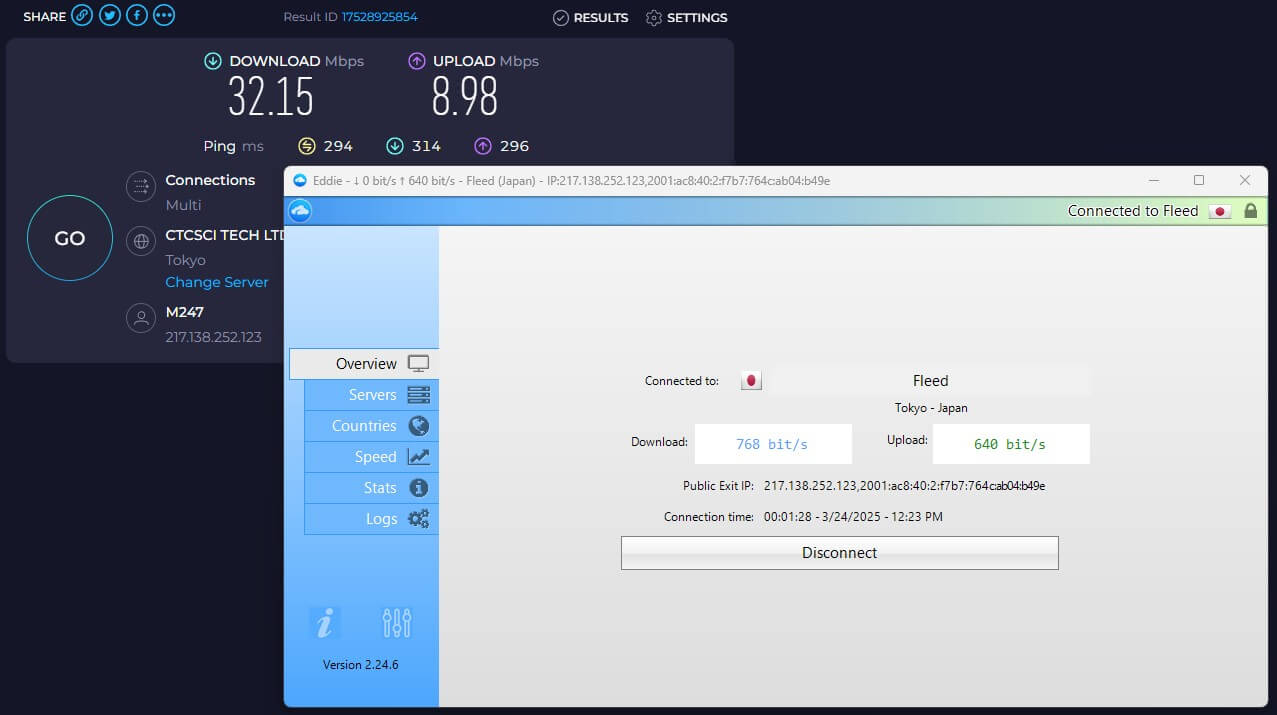
For some reason, the UK server’s performance was the weakest and vastly below the other two. If you need a faster VPN with UK servers, consider NordVPN or ExpressVPN.
We had the best experience on the American server, albeit, with slightly higher latency. According to our AirVPN speed tests, the VPN’s download speed drop was 32% while the upload speed drop was 7%. These aren’t the worst but also not the best results we got.
NordVPN, for example, showed an average download speed drop of 17%, so it’s a lot better.
To conclude this section, AirVPN is a respectable performer. Its speed retention is average on long-distance servers and pretty good on nearby servers. If you don’t mind slightly higher latency, AirVPN’s performance is smooth enough for day-to-day content consumption and browsing.
Streaming and Torrenting With AirVPN
After a somewhat solid round, we move on to the “darker” territory in which AirVPN could barely catch a breath. As you can already guess, AirVPN’s P2P and streaming performance is a mixed bag. But let’s define the mix and slit open the bag to see its contents.
Streaming — Forget About It
Streaming is a no-bueno with AirVPN. I mean, it’s terrible and doesn’t work with Netflix, BBC iPlayer, Hulu, and other streaming platforms on top of your head. We recommend checking out our comparison of VPNs that work with Netflix.
When you think about it — have you seen AirVPN advertising streaming on its site? We neither. Now, it makes sense.
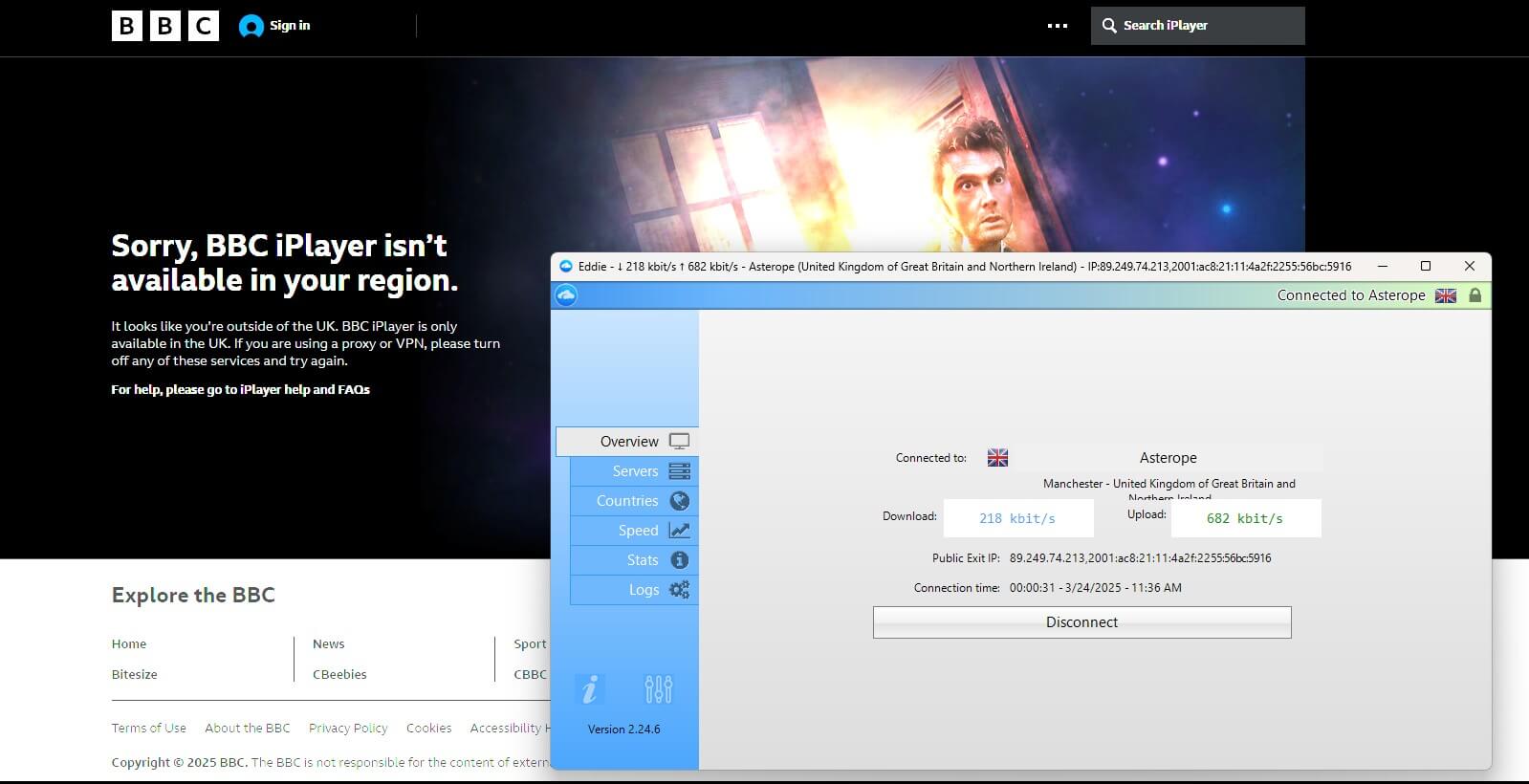
AirVPN’s streaming prowess is virtually non-existent, except for a few free TV channels from European countries. You can use some of them to stream the Tour de France race live or enjoy some light sports streaming on a lazy Sunday — nothing out of the ordinary.
If this is a deal breaker for you, we strongly advise using NordVPN or ExpressVPN instead. They’re proven to work with over 20 Netflix catalogs and can easily unblock popular streaming services like Discovery Plus, ESPN Plus, and hundreds of others.
Torrenting — Excellent Results
Torrenting was a bit of a relief for us because everything worked as intended.
You can use any AirVPN server for this purpose, so we’ve chosen the server in Serbia and initiated the download. We downloaded Linux Mint, a copyright-free OS, in pretty much a few minutes, which is a great result because of our average internet speed.
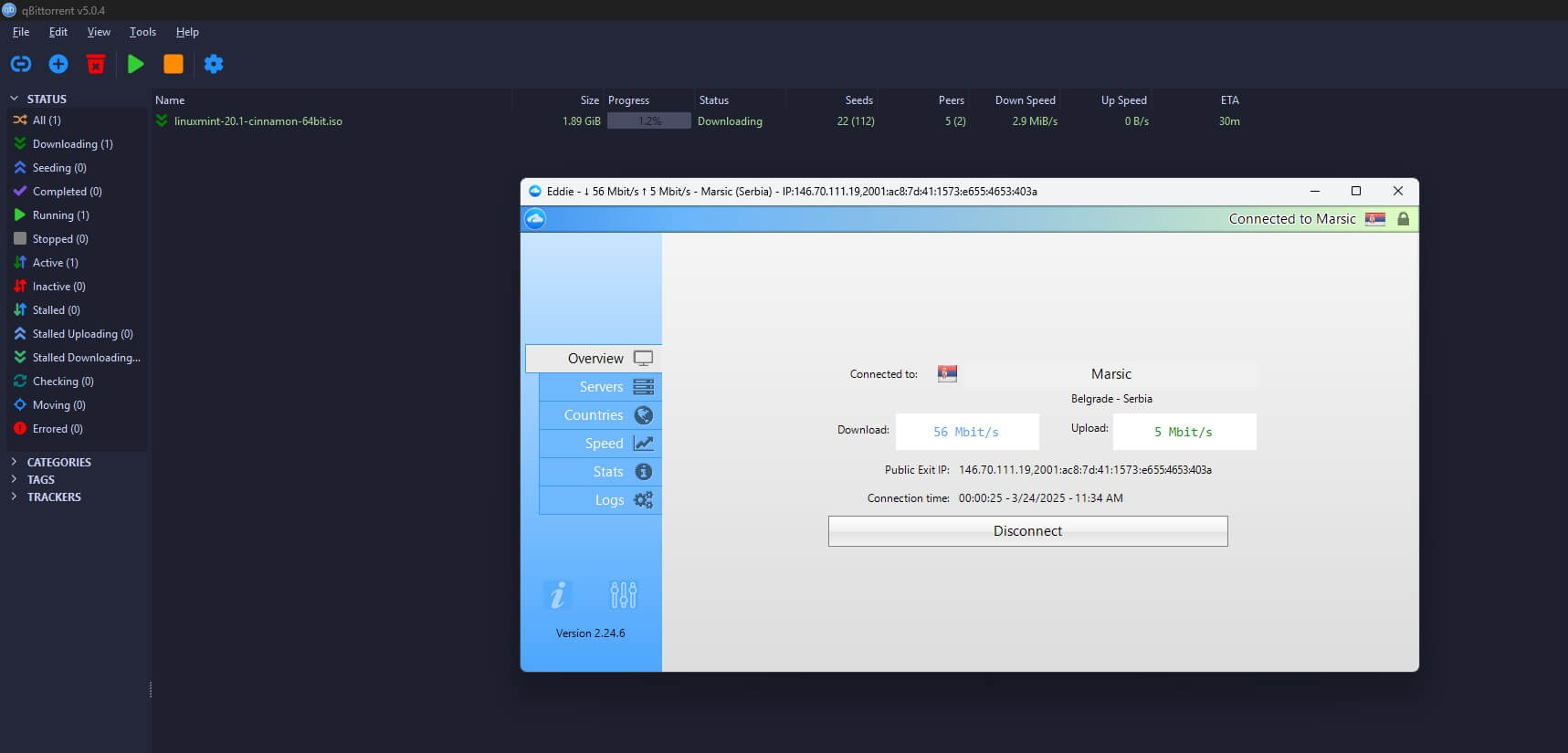
AirVPN also includes SOCKS5 plus port forwarding, both of which will enhance the performance of your torrent downloads. Given its security and privacy, torrenting with this VPN won’t be just fast but also free from ISP surveillance, government spying, and other fluff.
In conclusion, we discovered that AirVPN was reliable for torrenting but not so much for streaming. You’ll be better off with NordVPN, ExpressVPN, or Private Internet Access if you want to enjoy both activities.
Server Locations
As a small VPN service, AirVPN doesn’t govern thousands of global servers and it doesn’t need to. Smaller server fleets can be extremely powerful, as long as they’re not overloaded with users. At the moment of working on the AirVPN review, we found exactly that.
AirVPN has 200+ servers in 20+ countries.
On paper, the server fleet is minuscule and sounds like it’ll disintegrate at any moment. But by examining its countries, where we can also find server loads, we can see that very few servers are overloaded.
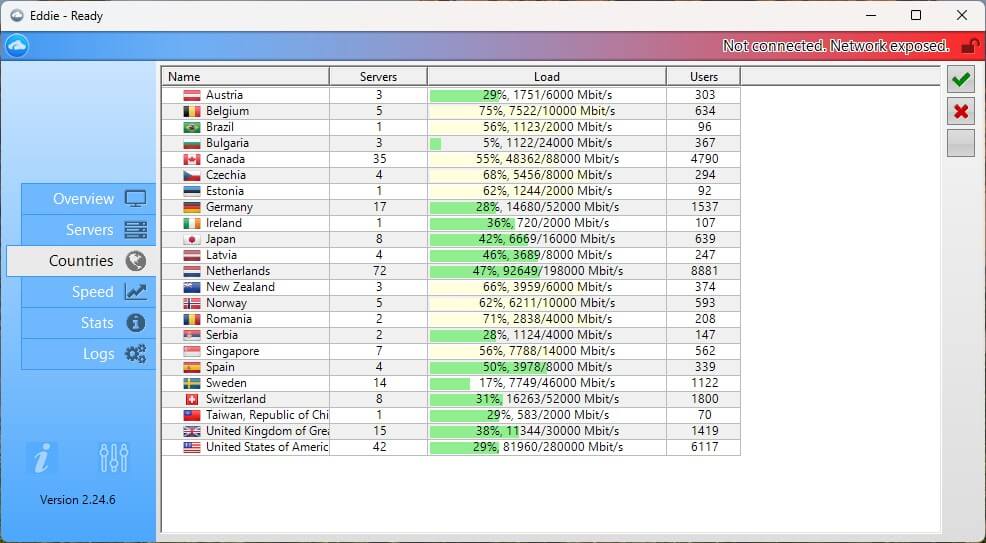
American servers, for instance, had a load of around 29%, while Romanian servers were at 71% but still running strong. Now, would we love to see more servers or countries? We would. The server coverage isn’t the best, as Asian and African locations are mostly missing.
There are just 8 servers in Japan and one in Brazil, which suffered a load of 56% at the time of taking a screenshot, which was around 1.00 pm — you can imagine the load during “peak” hours in the afternoon.
AirVPN lacks the server spread and count found in other premium alternatives. It functions well but be aware that some servers are severely overcrowded and will perform poorer from time to time. If that’s an issue, check out NordVPN or Proton VPN with servers in 118+ countries.
Does AirVPN Work in China?
AirVPN is just an average provider but that doesn’t apply to bypassing censorship. At the start of our review for 2026, we clarified that one of its main goals is overcoming network filtering and censorship. Well, if you’re traveling to China, AirVPN is a reliable companion.
We know this because we tested it first-hand and noticed how stable its connections were. However, we must admit that AirVPN is very slow in China, likely because of the Great Firewall’s undeniable influence.
On the flip side, the VPN rarely disconnects and is handy for unblocking WhatsApp in China or enjoying VoIP services in this or other censored regions. These “other” regions include the UAE, Qatar, Turkey, Dubai, Saudi Arabia, Russia, Iran, and likely dozens more.
AirVPN works in China, which is perfect. Just be sure to experiment with protocols and see which one works best for you. Since you can use the VPN in all censored countries, it’s also suitable for those who frequently travel abroad.
Customer Support: Is It Efficient?
AirVPN’s customer support is basic and if we come to terms with that, yes, it’s efficient. You can contact the support team via a support request, which is usually tackled in about a few hours. However, most of AirVPN’s users rely on the community forum.
Much to our surprise, the community forum is very active and we like one section in particular: Other VPN Competitors or Features. This section allows you to discuss other VPNs and their features without censorship, which shows how laid-back AirVPN is.
We love this community approach, especially since it’s active, but 24/7 live chat support would be more than welcome. Given the circumstances, the level of support is “okay” for the company’s size and smaller user base, which doesn’t seem to grow rapidly so far.
Conclusion: Should You Buy AirVPN in 2026?
AirVPN has a few qualities but not many redeeming ones. It’s affordable in the long run, performs just about right, and can be used in censored regions. Its security and privacy are likely one of the best around but the same can’t be said about other, equally important aspects.
On its own, it’s a good product. However, it doesn’t exist in a vacuum, and with the large playing field with similarly-priced VPNs, AirVPN fails to swim out on top. It lacks the polish of its more modern rivals, simultaneously lagging in streaming, compatibility, ease of use, and customer support.
If you want to get it because it’s affordable, there are better options at the price. NordVPN is slightly pricier, but definitely the best option. However, you can also consider Private Internet Access and Surfshark, both at less than $2.2/mo and with way more features for the price.