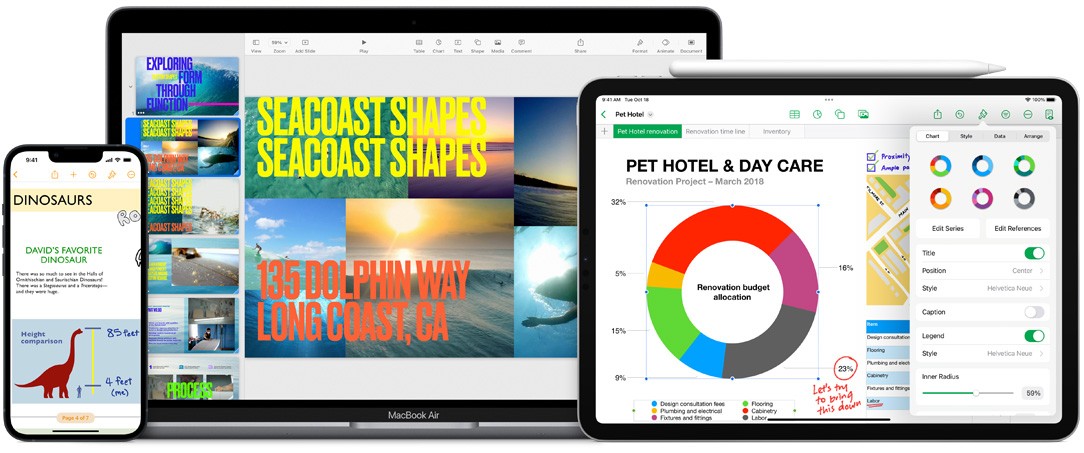
iWork is a full suite of applications that includes Pages for word processing and editing, Numbers for working with data on spreadsheets, and Keynote for designing presentations. Each one is deeply integrated into the Apple ecosystem and syncs your files with iCloud online storage, so you can pick them up again on a different device.
As usual with Apple products, the iWork programs have a simple and easy-to-use interface but still offer powerful features and libraries of templates, shapes, and formulas to get you started with different office tasks. You can also work with others in real time on shared files, and even reach the apps through a web-based service if you don't own an Apple device at all.
This set of apps is a perfect choice whether you're writing an essay, putting together a financial analysis, or designing a pitch presentation, and all of them are free, unlike their Microsoft competitors.
Why should I download iWork?
While most people view iWork as nothing more than an alternative to the Microsoft Office suite, it's actually more than that, thanks to its native integration with Apple devices and infrastructure. iWork is made out of 3 different apps: Pages for word processing, Numbers for spreadsheets, and Keynote for presentations.
Pages is a great tool for easily creating beautiful documents, especially if you start from one of the templates it offers, whether that's for a resume, a report, or a more official document. You can use it not only to write text but also to add images, charts, videos, or tables to your documents, and each of those elements can be edited without destroying your overall page and document layout. Pages also has features dedicated to collaboration, where you can track changes, leave comments, or edit the same file with other people at the same time.
Numbers takes a slightly different approach than Microsoft Excel, which is based mainly on spreadsheets divided into different tabs. With Apple's solution, you work on a large canvas where you can insert charts, tables, and text as well as embed multimedia files. Numbers makes it easy to generate interactive and dynamic charts for reports, budgets, or various data dashboards. You can also draw on a collection of over 250 different formulas and functions to make your calculations much easier.
Keynote is best known for its dynamic and impressive animations and transitions, which are unlike what most people are used to seeing. You can create slides that include moving objects, add audio files, or embed videos. You and your team can work on a presentation together in real time, and then export the file either in the native Keynote format or as a PowerPoint or PDF file.
All of the apps connect with iCloud to sync your files to the online storage, so you can switch between devices and carry on with the same document. Changes sync in real time, and the apps are optimized for both desktop computers and touchscreen devices. You can share files with other people via secure links and quickly manage their permissions. You can also protect your documents with Touch or Face ID, so nobody gets access who isn't supposed to.
You can download iWork on iPads and iPhones, and it also comes preinstalled on Mac computers. Windows users are left with the web-based service, where they only need to set up a free iCloud account.
Is iWork free?
Yes, all Apple users can download the iWork apps for free, and you don't need a special subscription or license to use them. Pages, Numbers, and Keynote are usually preinstalled on new devices, especially MacBooks and iMacs, but you can always grab them from the App Store. The web-based service is free as well, as long as you sign up for an iCloud account.
What operating systems are compatible with iWork?
iWork is fully optimized and developed to work with all Apple devices. For macOS, you need version 11 (Big Sur) or later, though you can also download legacy versions for older systems, where some features might be unavailable. On iPhones and iPads, you need at least iOS 14, and the apps have full support for Apple Pencil.
If you'd rather use the iWork programs on the web, you can reach them through a browser on any operating system (Windows, Linux, ChromeOS, macOS). You just need to create a free Apple ID account on the website or log into an existing one.
What are the alternatives to iWork?
The most obvious competitor is, of course, Microsoft Office, which includes staples like Word, Excel, and PowerPoint. While this suite of apps is available on Windows, macOS, iOS, and Android devices, you need to buy a license or a paid subscription to download the programs to your machine. The online version is free, though it doesn't have quite all the features the dedicated apps have (but most of them). You can use the set of programs to edit documents, analyze data in spreadsheets, or create presentations, and all of them natively integrate with OneDrive, Teams, and Outlook.
Google Workspace/Google Drive is another alternative, but one built around the cloud and its web services, though it does offer apps for mobile devices. With this suite of products, you can choose between Google Docs, Sheets, Slides, Forms, and more. It's a great solution if you want to collaborate with others in real time, see their edits, make suggestions or comments, or check the different versions of the same document. You can also work on your files offline, and the changes will sync automatically once you have an internet connection again. For personal use, all of the apps are free and you can access most of their features. Some functionality, like advanced security and permission management, is limited to commercial users with a paid Workspace license.
There's also an open-source alternative called OnlyOffice, which you can get on Windows, macOS, Linux, Android, and iOS. You can use this set of apps through a website as well. OnlyOffice works with various file types, including DOCX, XLSX, and PPTX files, so it covers your needs for text, spreadsheets, or presentation documents. The Community edition is free, but if you need OnlyOffice for commercial or business use, there are two paid tiers to choose from.