ESPN’s streaming service is built for viewers in the US. Load it on a work trip to London or during a semester in Madrid, and ESPN’s website shows an access-denied page where your plan should be. Your subscription doesn’t change that. ESPN checks your IP address against its US-only rules before a stream starts.
Connecting through a US server changes the location ESPN sees. ESPN blocks many VPN servers, though, and finding ones that worked took a lot of trial and error. These three VPNs unblocked it in our tests.
VPNs That Unblocked ESPN+ in 2026
- ExpressVPN: Best overall, working in both its app and browser extension
- Surfshark: Best value, with a Miami server that unblocked ESPN
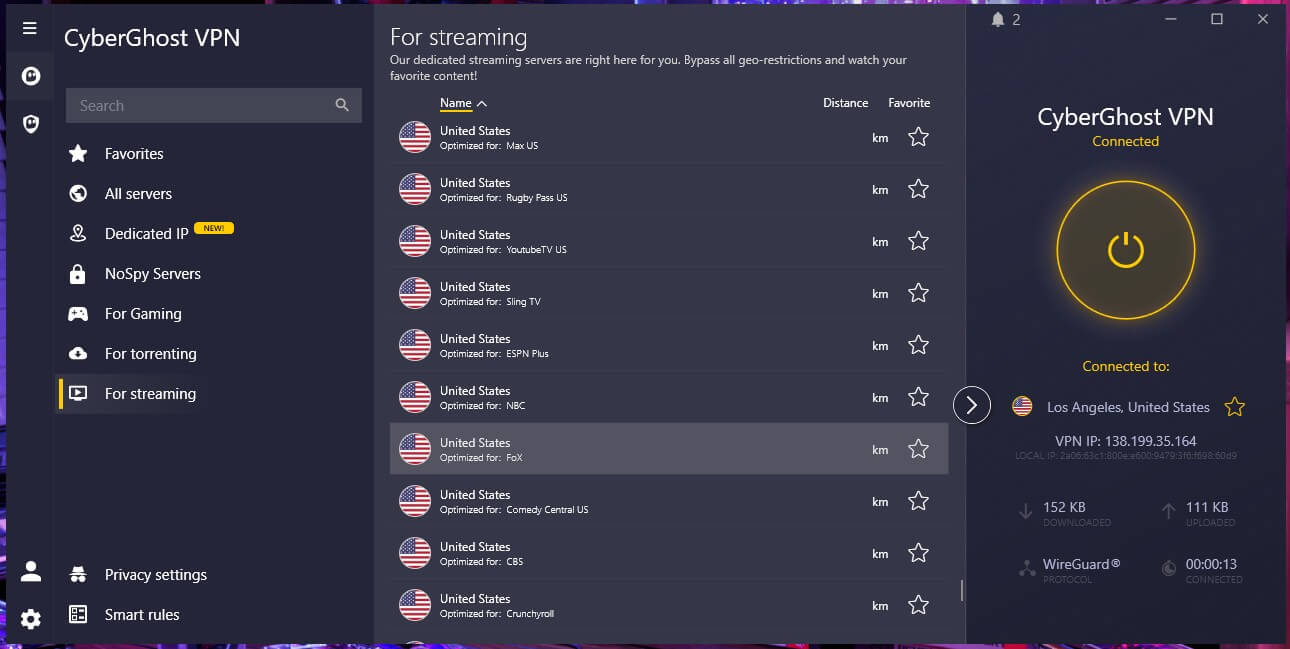
- CyberGhost: Best for a longer refund window, with a Los Angeles server labeled for FOX
How to Watch ESPN+ Outside the US
Connect to a US server that ESPN doesn’t block, then sign in with your ESPN account. With a US IP address, ESPN sees a domestic viewer, and the site loads as usual:
- Subscribe to ExpressVPN and install its app or browser extension.
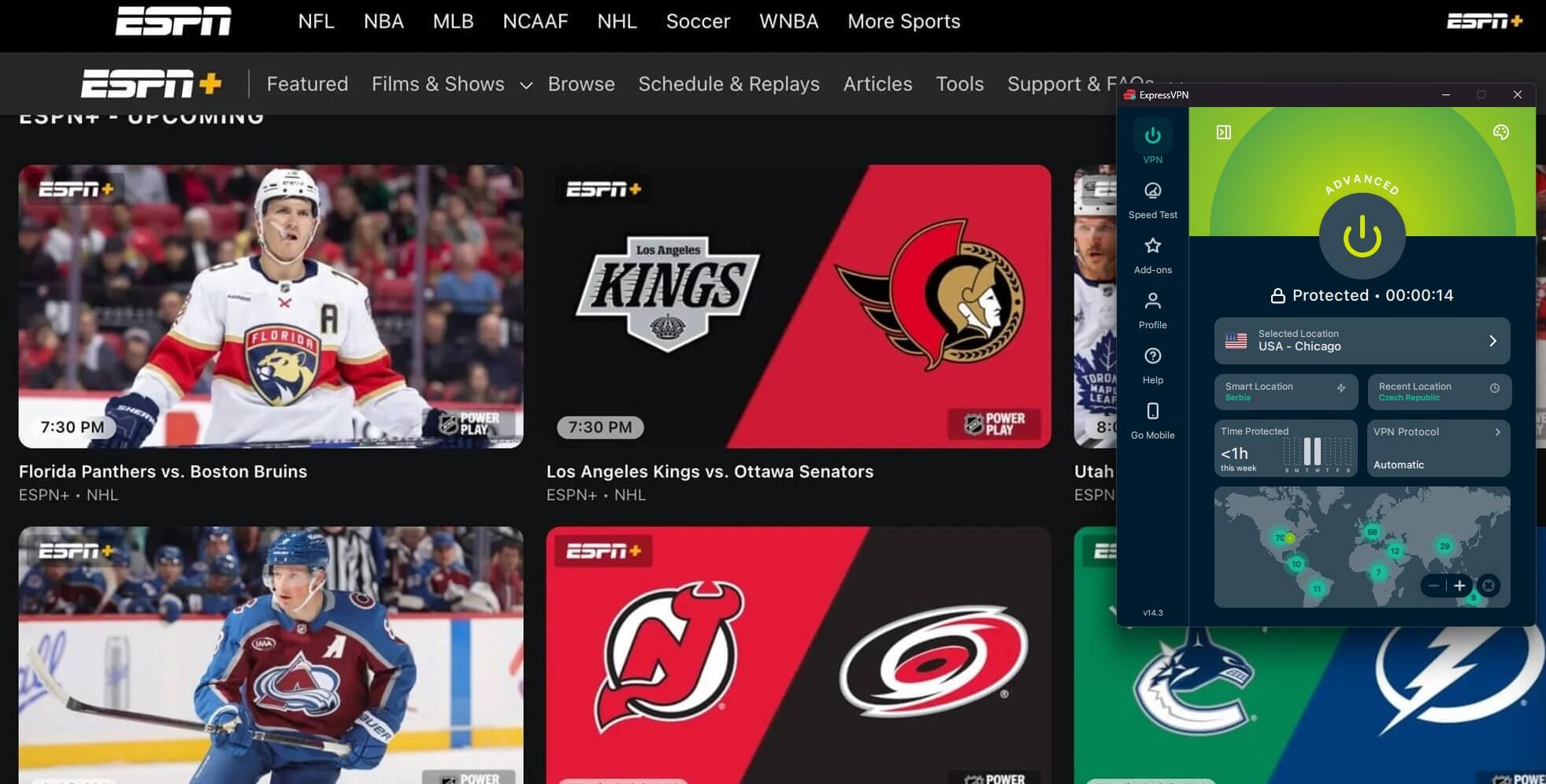
- Connect to a server in a US city. Chicago worked for us on ExpressVPN.
- Sign in to ESPN in its app or on espn.com.
- Switch to another US city if ESPN shows an error, then reload.
Android users abroad can also install the ESPN app from Google Play. Buying a plan from overseas is trickier. ESPN sells subscriptions only to US residents, and checkout requires a US payment method. A VPN works best for viewers who already subscribe, such as Americans traveling or living overseas.
Watch ESPN+ Abroad With ExpressVPN
Comparing the VPNs That Worked With ESPN+
| VPN | US server that unblocked ESPN | Average speed loss | Devices | Money-back guarantee | Long-term price |
| ExpressVPN | Chicago | 7.8% | 10 | 30 days | $2.99 a month |
| Surfshark | Miami | 9.6% | Unlimited | 30 days | $2.49 a month |
| CyberGhost | Los Angeles (FOX streaming server) | 13.3% | 7 | 45 days | About $2 a month |
Three VPNs That Work With ESPN+
We tested ESPN’s website and app on US servers in October. Speed loss in the table is averaged across three regions: the UK, the US, and Japan. ESPN+ was very difficult to unblock in my tests.
I had to experiment with many US locations before finding servers that worked. NordVPN and Proton VPN failed on every US server I tried, and I was shocked I couldn’t make NordVPN work, given its excellent unblocking performance.
1. ExpressVPN: Best Overall for ESPN+
Pros
- ESPN unblocked in the app and the extension
- Many US cities to switch between
- Apple TV app for the living room
- Simple setup on phones and laptops
Cons
- Some US locations blocked by ESPN
- Few settings to fine-tune
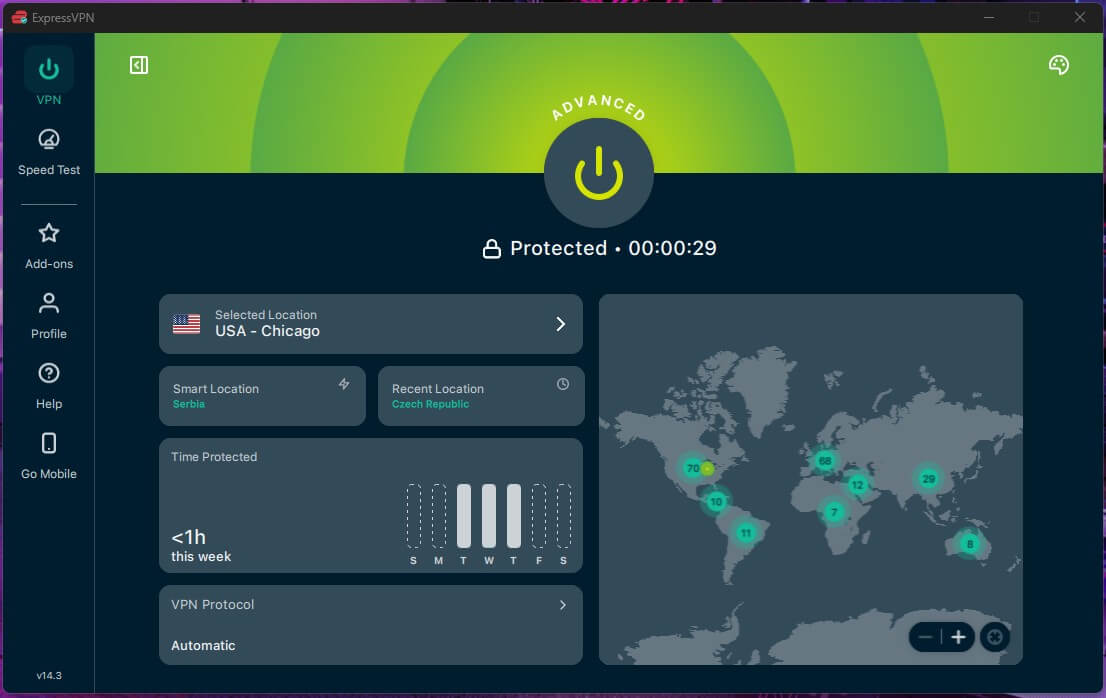
ExpressVPN unblocked ESPN on its Chicago server, in the desktop app and in its browser extension. Several other US locations were blocked. Connect to Chicago first, and switch cities if ESPN shows an error. Its average speed loss of 7.8% is too small to affect a live game, and it’s one of our top VPNs for streaming.
Its apps keep settings to a minimum. For ESPN, connecting to Chicago is the only step. ExpressVPN’s Basic plan costs $2.99 a month when you pay $83.72 for 28 months, and it renews at $99.95 a year.
2. Surfshark: Best Value for ESPN+ and Other Streaming
Pros
- Unblocks Netflix US and Hulu
- CleanWeb blocks ads and trackers
- No cap on connected devices
- Independently verified no-logs policy
Cons
- ESPN blocked most US cities we tried
- Occasional connection delays
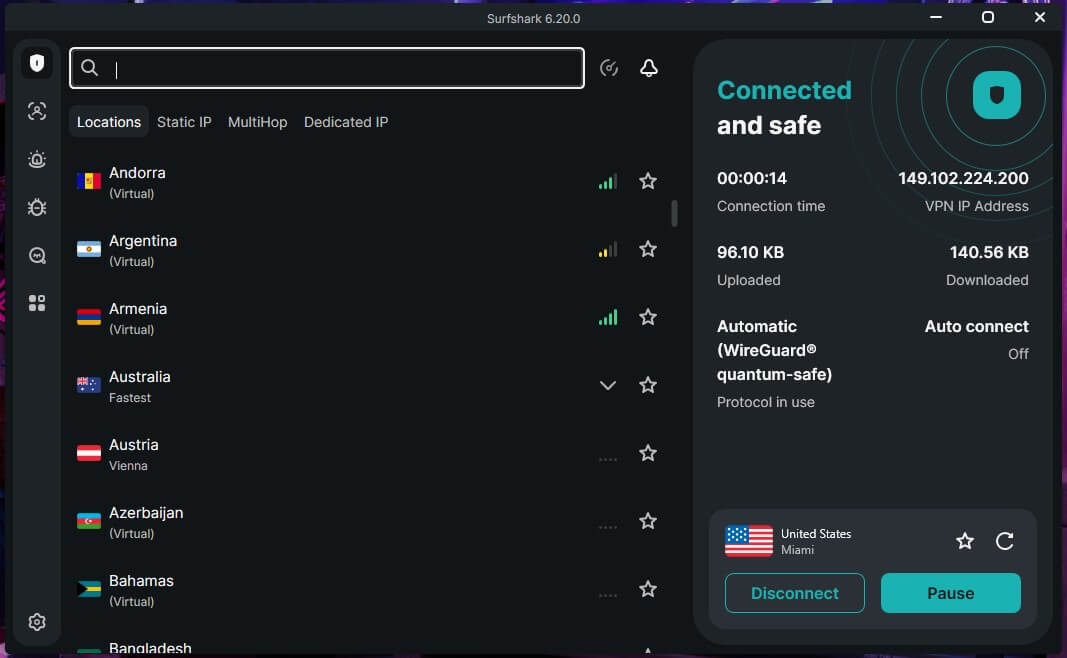
Surfshark unblocked ESPN on its Miami server after the other US cities we tried were blocked. Start with Miami to save time. Its average speed loss was 9.6%, low enough for HD sports. Beyond ESPN, it unblocked every service in our wider streaming tests, and it ranks among the best VPNs for Hulu.
Connecting occasionally took longer than expected. If it stalls, cancel and try again. Surfshark’s Starter plan costs $2.49 a month over a 27-month term ($67.23) and renews at $79 a year.
3. CyberGhost: Best for a Longer Refund Window
Pros
- Streaming servers labeled by service
- Money-back guarantee longer than a month
- Low price on long plans
Cons
- Its ESPN+ streaming server was blocked
- Device cap on each plan
CyberGhost labels its servers by streaming service, and I found its ESPN result strange. Its server labeled for ESPN+ was blocked, while its Los Angeles server labeled for FOX unblocked ESPN. Skip the ESPN+ server and start with that one. Its average speed loss was 13.3%, the highest of the three but still fine for HD sports.
Long-term plans come with a 45-day money-back guarantee, which leaves time to try several US servers before you commit. Each CyberGhost plan covers seven devices, enough for a phone, a laptop, and a TV.
CyberGhost’s two-year plan works out to about $2 a month, and renewal costs less than at Surfshark or ExpressVPN.
ESPN+, ESPN Select, and ESPN Unlimited
ESPN+ is now sold as ESPN Select. The company relaunched its streaming service in the US in August 2025, and existing ESPN+ subscribers moved to the ESPN Select plan. ESPN still uses the ESPN+ name for the library that plan includes:
- ESPN Select: the ESPN+ library of live events and replays, at $13.99 a month or $139.99 a year.
- ESPN Unlimited: ESPN+ plus ESPN’s TV channels, including ESPN, ESPN2, ESPNU, SEC Network, ACC Network, and NFL Network, at $31.99 a month or $319.99 a year.
Each plan allows three streams at once in one household. Fubo and YouTube TV also include ESPN Unlimited.
What’s on ESPN+ Now
ESPN Select’s ESPN+ library centers on soccer, hockey, golf, and college sports:
- Soccer: every LaLiga match and the FA Cup.
- Hockey: 1,000+ out-of-market NHL games a season.
- Golf: PGA Tour coverage.
- College sports and lacrosse: events across dozens of college sports and the Premier Lacrosse League.
NHL games follow local blackout rules, which ESPN applies by IP address. NFL, NBA, and WWE require ESPN Unlimited. For football without a subscription, free NFL live streams are another way to watch.
What Left ESPN+
- UFC: moved to Paramount+ in January 2026.
- Formula 1: now streams on Apple TV in the US.
- Bundesliga: now on USA Network.
- EFL: moved to CBS.
- Top Rank boxing: moved to DAZN after its ESPN deal ended in 2025.
Is URC Rugby on ESPN+?
No. FloRugby has the US rights to the United Rugby Championship through 2027 and streams every match. ESPN showed the league from 2018 to 2021, when it was called PRO14.
ESPN+ Not Working With a VPN?
Change the server first. In our tests, private browser windows and disabling the ad blocker didn’t help on blocked servers, while a different US city did:
- Black screen with an application error: ESPN has blocked that server. Connect to another US city and reload.
- Location prompt on a phone: ESPN can check a phone’s location, and a VPN doesn’t change it. Watch on a laptop if the phone app keeps showing an error.
- ESPN won’t load on a hotel or office network: the network may be filtering sites, and our guide on how to unblock websites covers that case.
Free VPNs and ESPN+
Free VPNs are a poor fit for ESPN. Most free VPNs limit data and server choice, and Proton VPN’s free plan, for example, doesn’t let users choose a US server. ESPN also blocked several paid VPNs in our tests. For privacy without streaming in mind, Mullvad VPN is built around anonymity.
Verdict
ESPN+ works abroad for existing subscribers, as long as the VPN server isn’t blocked. The three VPNs that unblocked it each did so from one US city: Chicago on ExpressVPN, Miami on Surfshark, and Los Angeles on CyberGhost. We recommend ExpressVPN first.
It unblocked ESPN in both its app and its browser extension, and it was the fastest of the three in our speed tests. Surfshark costs less and covers every device you own, and CyberGhost’s 45-day guarantee leaves the most time to test servers.
Before game time, connect and play a free highlight to confirm the server works. The same US connection is how you watch US TV abroad, from Hulu to Peacock.
Frequently Asked Questions
What is the best VPN for ESPN+?
ExpressVPN is the best VPN for ESPN+, unblocking it in both its app and browser extension on US servers. Surfshark and CyberGhost also unblock ESPN on selected US servers.
Does ESPN+ work outside the US?
No. ESPN streams only to viewers in the US, and subscribers abroad see an access-denied page. Connecting to an unblocked US server through a VPN restores access.
Does ESPN+ have a free trial?
No. ESPN doesn't offer a free trial for ESPN Select or ESPN Unlimited. With a free ESPN account, viewers can watch clips and highlights, while live events and replays require a paid plan.
Is ESPN+ the same as ESPN Select?
Yes. ESPN Select is the plan that includes the ESPN+ library, while ESPN Unlimited adds ESPN's TV channels, such as ESPN, ESPN2, and the SEC Network.
Why does ESPN+ block some VPN servers?
ESPN's sports rights cover the US, and it blocks IP addresses it links to VPN services. A blocked server shows an error, and switching to another US city often fixes it.
Can you subscribe to ESPN+ from abroad?
No. ESPN plans are for US residents, and checkout accepts only US payment methods. Travelers can subscribe before leaving the US and keep the plan active abroad.