Skip to content

DNS vs VPN: 2026 Side-by-side Comparison

By Florian Gray
Dns Vs Vpn
© Gizmodo.com

Online privacy isn’t just an afterthought—91% of organizations faced a cyber incident last year, according to Deloitte’s 2023 survey. If big corporations are struggling to stay secure, what does that mean for the average internet user? That’s where the DNS vs VPN debate begins. Both change how your internet traffic is managed, but they do so in completely different ways. A DNS service reroutes connections for faster streaming and geo-unblocking, but offers zero encryption. A VPN encrypts your traffic and hides your IP, keeping your data private.

Which one should you use? Let’s break down the differences to help you make the right choice between VPN, DNS, and even Smart DNS.

What is DNS?

DNS (Domain Name System) is the internet’s address book. Every time you type in a website like bbc.com or netflix.com, DNS translates that human-readable name into an IP address so your device knows where to connect. Without it, you’d have to memorize long strings of numbers for every website you visit.

By default, your ISP controls your DNS settings, which means they can track your activity, block certain sites, or throttle your speed. Changing your DNS to a third-party provider can help bypass restrictions, but it doesn’t add encryption or hide your online activity.

Dns (domain Name System)
© NordVPN

What is Smart DNS?

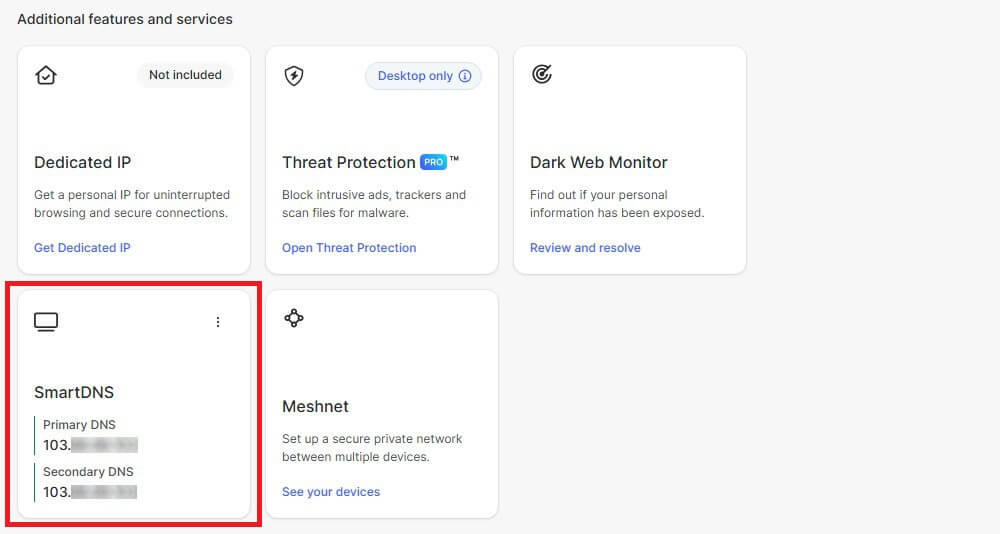
Smart DNS takes it a step further. Instead of just resolving domain names, it reroutes specific traffic through proxy servers, allowing you to bypass geo-restrictions without changing your IP address.

This is why services like ExpressVPN’s MediaStreamer and NordVPN’s SmartPlay exist—they help users stream content that’s otherwise locked to certain regions.

Visit NordVPN

Visit ExpressVPN

Unlike VPNs, Smart DNS doesn’t encrypt your connection. That’s great for speed, but bad for privacy—your ISP, hackers, and even governments can still see what you’re doing.

Nordvpn Smartdns
© NordVPN

What is a VPN?

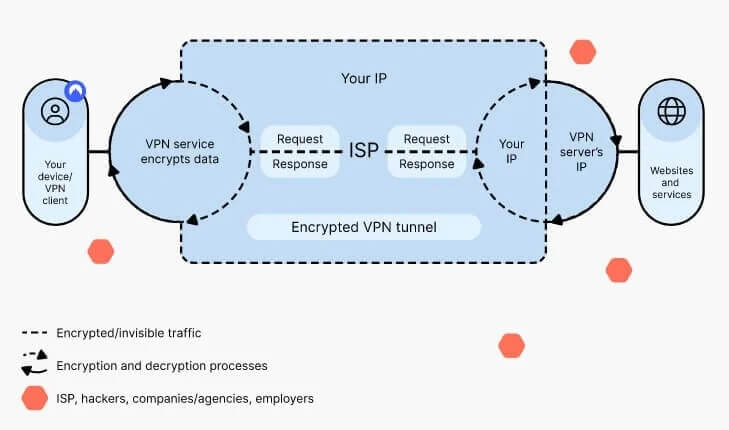
A VPN (Virtual Private Network) is the full package—it encrypts your entire internet connection, changes your IP address, and reroutes your traffic through a secure server. This means:

  • Your ISP can’t track your browsing habits.
  • Websites can’t see your real location.
  • Your connection is protected on public Wi-Fi.

If you want to learn more, we have an article that explains in detail how a VPN works.

NordVPN and ExpressVPN take this even further with obfuscated servers, which disguise VPN traffic as regular browsing—useful in places where VPNs are restricted. While a VPN can slightly reduce speed due to encryption overhead, the trade-off is privacy and unrestricted access anywhere in the world.

Try NordVPN risk-free

Now that we’ve covered the basics, let’s get into how they compare.

Virtual Private Network
© NordVPN

DNS vs VPN: What’s the Difference?

At first glance, DNS and VPNs might seem similar. Both change how your internet traffic is processed, both can help with accessing geo-blocked content, and both are widely used to improve the browsing experience. But that’s where the similarities end.

A DNS (Domain Name System) functions like an address book for the internet, mapping domain names (like youtube.com) to IP addresses. Your device uses DNS every time you visit a website, sending queries to a DNS server that resolves the request. By default, your ISP controls your DNS settings, which means they can log your browsing history, restrict access to certain websites, or throttle speeds based on your activity.

A VPN (Virtual Private Network), on the other hand, does more than just resolve domain names—it encrypts your entire internet connection and reroutes it through a secure server. This means:

  • Your real IP address is hidden—websites, advertisers, and even your ISP can’t see where you’re browsing from.
  • Your data is encrypted, keeping your activity private from hackers, government surveillance, and network admins.
  • You can bypass firewalls, censorship, and regional restrictions without exposing your actual location.

While both tools can help bypass geo-blocks, DNS alone doesn’t offer encryption—making it more suited for speed-focused activities like streaming rather than privacy and security.

What About Smart DNS and SmartPlay?

While a traditional DNS only resolves domain names without encryption, Smart DNS and hybrid solutions like SmartPlay take it a step further by rerouting specific traffic to bypass geo-restrictions. However, they work very differently in terms of security.

Smart DNS – Faster, but No Encryption

Smart DNS services, like NordVPN’s SmartPlay and ExpressVPN’s MediaStreamer, allow users to access region-locked content by modifying DNS settings without rerouting or encrypting all internet traffic. This makes it ideal for:

  • Devices that don’t support VPN apps, such as gaming consoles and some Smart TVs.
  • Users who prioritize speed over privacy, as there’s no encryption slowing down the connection.

However, because SmartDNS doesn’t encrypt your data or hide your IP address, your ISP can still track your activity, and you won’t get any additional online security protections.

SmartPlay – Streaming Access with VPN Security

NordVPN’s SmartPlay is an advanced feature that combines Smart DNS with VPN encryption, providing both geo-unblocking and data protection. Unlike regular Smart DNS, SmartPlay:

  • Encrypts your traffic to prevent ISPs and third parties from tracking your activity.
  • Is automatically enabled in NordVPN apps, so users don’t have to configure anything manually.
  • Works for streaming while maintaining VPN-level security, making it a great option for users who want privacy without sacrificing access to geo-restricted content.

If you’re purely looking to stream content with minimal speed loss, Smart DNS is a great option. But if you also care about privacy and security, SmartPlay (or a full VPN connection) is the better choice.

DNS vs VPN: Breaking Down the Key Differences

Both DNS and VPNs change how your internet traffic is processed, but they do it in fundamentally different ways. Whether you prioritize speed, security, or geo-unblocking, understanding these key differences will help you decide which tool is right for you.

1. Privacy & Security – Does It Keep You Anonymous?

If security is a concern, not all tools offer the same level of protection. Here’s how they compare:

  • DNS: No encryption at all. Your ISP sees everything you do, and your real location stays exposed.
  • Smart DNS: Still no encryption. It only reroutes certain traffic to bypass geo-blocks, but your ISP, network admins, and even hackers can still track your activity.
  • VPN: Fully encrypts your internet traffic, hiding your IP address and online activity from ISPs, advertisers, and surveillance agencies.

A standard DNS or Smart DNS is fine if you only care about access, not privacy. But if you’re in a country with censorship, ISP tracking, or strict work/school firewalls, a VPN is the only reliable option for privacy.

Privacy & Security
© Freepik

2. Speed & Performance – Which One Is Faster?

One of the biggest trade-offs between DNS, Smart DNS, and VPNs is speed vs security:

  • DNS: The fastest option because it only resolves website addresses—no rerouting, no encryption.
  • Smart DNS: Also very fast since it only reroutes certain traffic (like streaming requests) while keeping general browsing untouched.
  • VPN: Encryption adds some overhead, which can slow down speeds slightly—but high-end VPNs like NordVPN (with its own protocol, NordLynx) and ExpressVPN (Lightway 2.0) are optimized to keep speeds high.

If your only goal is streaming, Smart DNS is the fastest option. But if you want both access and security, a VPN with fast servers is the better balance.

3. Streaming & Geo-Unblocking – Which One Works Best?

Not all tools bypass geo-restrictions equally—some work for certain platforms, while others get blocked.

  • DNS: Works for basic geo-unblocking, but many streaming services block DNS-based location changes.
  • Smart DNS: The best choice for high-speed streaming—it reroutes only location-relevant traffic, so your real IP stays intact and speeds remain high.
  • VPN: Works on all streaming platforms but can sometimes trigger VPN detection systems, leading to blocked access unless you use a premium VPN with optimized servers for streaming.

NordVPN’s SmartPlay and ExpressVPN’s MediaStreamer combine both approaches, offering Smart DNS functionality with added VPN security to ensure uninterrupted streaming.

If you want flawless access to Netflix, BBC iPlayer, or Hulu, without sacrificing speed, Smart DNS is ideal. But if you also need privacy and encryption, a VPN is the better choice. Whether you use a VPN or Smart DNS, you will have no trouble changing your region on Netflix to access exclusive content.

4. Compatibility – Which Devices Support It?

Some devices support VPN apps natively, while others require manual setup or alternative solutions:

  • DNS: Works on all internet-connected devices but requires manual configuration.
  • Smart DNS: The best option for Smart TVs, gaming consoles, and streaming devices that don’t support VPN apps.
  • VPN: Works on PCs, mobile devices, routers, and select streaming devices, but not all Smart TVs or gaming consoles support VPN apps. If it helps, we recently made a comparison of the best VPNs to use on Android.

If you’re using a PlayStation or an Xbox, Smart DNS (like SmartPlay from NordVPN) is the best option. But if you want a fully encrypted connection for your entire network, setting up a VPN on a router extends protection to all connected devices.

Discover NordVPN’s SmartPlay

When to Use DNS, Smart DNS, or a VPN

Choosing between DNS, Smart DNS, and a VPN depends entirely on what you need. If your goal is faster streaming, one solution makes more sense. If you’re looking for total privacy and security, another option is the better fit. Here’s a breakdown:

When to Use Standard DNS

Best for: Everyday browsing with no security concerns.

Why? DNS is built into how the internet works—it’s automatic, requires no setup, and is the fastest way to connect to websites.

What it won’t do: It doesn’t unblock content or protect your privacy. Your ISP can still see everything you do online and throttle speeds based on your activity.

When to Use Smart DNS

Best for: Unblocking streaming platforms without losing speed.

Why? Services like NordVPN’s SmartDNS and ExpressVPN’s MediaStreamer reroute your DNS queries to make it seem like you’re in a different country, letting you watch geo-blocked content without changing your actual IP address.

What it won’t do: No encryption, no security, no privacy. Your ISP, advertisers, and websites can still track everything you do online.

If you want to watch BBC iPlayer from abroad on a Smart TV or gaming console that doesn’t support VPN apps, Smart DNS is the best choice—it’s fast and works seamlessly on devices that typically block VPNs.

When to Use a VPN

Best for: Privacy, security, and unrestricted internet access.

Why? A VPN encrypts all internet traffic, hides your IP, and prevents ISP tracking, cyber threats, and government surveillance. With NordVPN’s SmartPlay or ExpressVPN’s optimized streaming servers, you also get seamless geo-unblocking while keeping your data private.

What it won’t do: A VPN can sometimes slow down speeds slightly due to encryption overhead—but with fast protocols like NordLynx and Lightway, the impact is minimal.

If you want to access Netflix libraries worldwide while keeping your data private, a VPN is the best solution. It bypasses geo-blocks, encrypts your traffic, and keeps your identity anonymous online.

The best VPNs to use in 2026:

NordVPN
Mac Windows Android iOS Linux Router

 9200 servers

 167 covered countries

 30 days money-back guarantee

 10 simultaneous connections

Mac Windows Android iOS Linux Router

9.4 /10

Monthly price
3,09 $
27 MONTHS
4,99 $
12 MONTHS
11,99 $
1 MONTH
Our opinion: The best overall VPN for reliability and security
Speed
Security
Features
Ease of use
Customer support
Value for money
SEE MORE
1
ExpressVPN
Mac Windows Android iOS Linux Router

 3000 servers

 105 covered countries

 30 days money-back guarantee

 10 simultaneous connections

Mac Windows Android iOS Linux Router

9.1 /10

Monthly price
2,44 $
28 MONTHS
2,99 $
15 MONTHS
9,99 $
1 MONTH
Our opinion: The fast and easy to use quality VPN
Speed
Security
Features
Ease of use
Customer support
Value for money
SEE MORE
2
Private Internet Access
Mac Windows Android iOS Linux

 27000 servers

 91 covered countries

 30 days money-back guarantee

 Unlimited connections

Mac Windows Android iOS Linux

9 /10

Monthly price
2,19 $
26 MONTHS
7,50 $
6 MONTHS
11,99 $
1 MONTH
Our opinion: The best VPN at affordable rates
Speed
Security
Features
Ease of use
Customer support
Value for money
SEE MORE
3

Which One Should You Choose?

Ultimately, your choice between DNS, Smart DNS, and a VPN depends on what you need from your internet connection.

  • If you just want to browse the web quickly without restrictions, regular DNS is fine—but keep in mind, it offers zero privacy protections and won’t help with blocked content.
  • If your main goal is to stream geo-restricted content on devices that don’t support VPNs, Smart DNS is the better choice. It’s faster than a VPN since it doesn’t encrypt your connection, but it doesn’t hide your IP or protect your data.
  • If you need full privacy, security, and unrestricted internet access, a VPN is the best solution. It encrypts your entire connection, preventing ISPs, hackers, and governments from tracking your online activity.

For most users, a VPN is the better all-in-one solution. While Smart DNS works well for streaming, it does nothing to protect your personal information, making it a risky choice if you value privacy. A VPN, on the other hand, gives you both streaming access and security—but with a slight trade-off in speed due to encryption.

If you want the best of both worlds, services like NordVPN’s SmartPlay and ExpressVPN’s MediaStreamer provide a hybrid approach. They combine the streaming benefits of Smart DNS with VPN security, ensuring you can access geo-blocked content without compromising privacy.

So, if you’re looking for maximum speed and don’t care about security, go with Smart DNS. But if you want a secure, private, and unrestricted online experience, a VPN is the clear winner.

Pros and Cons: DNS vs VPN

To make things easier, here’s a side-by-side comparison of DNS, Smart DNS, and VPNs, highlighting their strengths and weaknesses.

Feature Standard DNS Smart DNS VPN
Privacy & Security ❌ No encryption, ISP can track browsing ❌ No encryption, no IP masking ✅ Fully encrypted, hides IP address
Bypasses Geo-Blocks ❌ No, it works only for local sites ✅ Yes, but only for streaming ✅ Yes, works for streaming and censorship bypass
ISP Tracking Prevention ❌ No ❌ No ✅ Yes, it prevents ISP logging
Speed & Performance ✅ Fastest option, no encryption overhead ✅ Very fast, since only specific traffic is rerouted ⚠️ Slightly slower due to encryption, but premium VPNs minimize speed loss
Works on All Devices ✅ Yes, built into internet settings ✅ Yes, ideal for Smart TVs and gaming consoles ⚠️ Mostly, but not all devices support VPN apps
Public Wi-Fi Security ❌ No protection ❌ No protection ✅ Yes, encrypts connection to prevent hacking
Streaming Optimization ❌ No ✅ Yes, fast and smooth ✅ Yes, but it may require optimized servers to avoid detection
Censorship Bypass ❌ No ❌ No ✅ Yes, VPNs work in restrictive regions like China & UAE
Ease of Setup ✅ Automatic ⚠️ Requires manual configuration ⚠️ Requires installation but simple setup on most devices
Best For General browsing Streaming on non-VPN-supported devices Security, privacy, and unrestricted access

Final Thoughts: DNS vs VPN – Which One is Right for You?

If you’re just looking for fast browsing with no restrictions, DNS is fine, but it won’t help with geo-blocks or privacy. Smart DNS takes it a step further, rerouting your traffic for streaming access, making it ideal for unblocking content on Smart TVs and gaming consoles. However, it still leaves your online activity exposed, since there’s no encryption.

A VPN is the only option that provides both unrestricted access and privacy. It hides your IP, encrypts traffic, and works in censorship-heavy regions where Smart DNS won’t. While encryption can slightly slow speeds, top VPNs like NordVPN and ExpressVPN use optimized protocols to minimize any drop in performance.

For those who want the best of both worlds, NordVPN’s SmartPlay and ExpressVPN’s MediaStreamer offer the speed of Smart DNS while keeping VPN security in place. If speed is your only concern, Smart DNS works well. But if you want security, access, and true privacy, a VPN is the clear winner.

Try NordVPN for yourself


DNS vs Smart DNS vs VPN: FAQs

Below are answers to some of the most relevant questions to help you decide which option works best for your needs.

Can I use both Smart DNS and a VPN at the same time?

Yes, but not always. Some VPNs, like NordVPN and ExpressVPN, offer built-in Smart DNS solutions (SmartPlay and MediaStreamer), meaning you don’t have to choose one or the other. However, if you manually configure Smart DNS while connected to a VPN, conflicts can occur, since they both alter your connection settings.

Can a VPN be detected and blocked?

Yes, some services actively detect and block VPN traffic. Streaming platforms like Netflix, Hulu, and BBC iPlayer use VPN detection systems to prevent users from bypassing regional restrictions. However, premium VPNs like NordVPN and ExpressVPN use obfuscated servers and Smart DNS features to evade detection.

Which is better for streaming – VPN or Smart DNS?

If privacy isn’t a concern, Smart DNS is the better choice since it offers faster speeds with no encryption overhead. However, a VPN ensures access to geo-blocked content while also protecting your data. If you want both, NordVPN’s SmartPlay and ExpressVPN’s MediaStreamer give you the best of both worlds.

Is Smart DNS legal? What about VPNs?

In most countries, both Smart DNS and VPNs are legal, but there are exceptions. Some regions, like China, the UAE, and Russia, restrict or regulate VPN usage and block Smart DNS services to enforce censorship laws. Always check local regulations before using either of these tools. We also have an article listing all the countries where using a VPN is illegal or strongly discouraged.