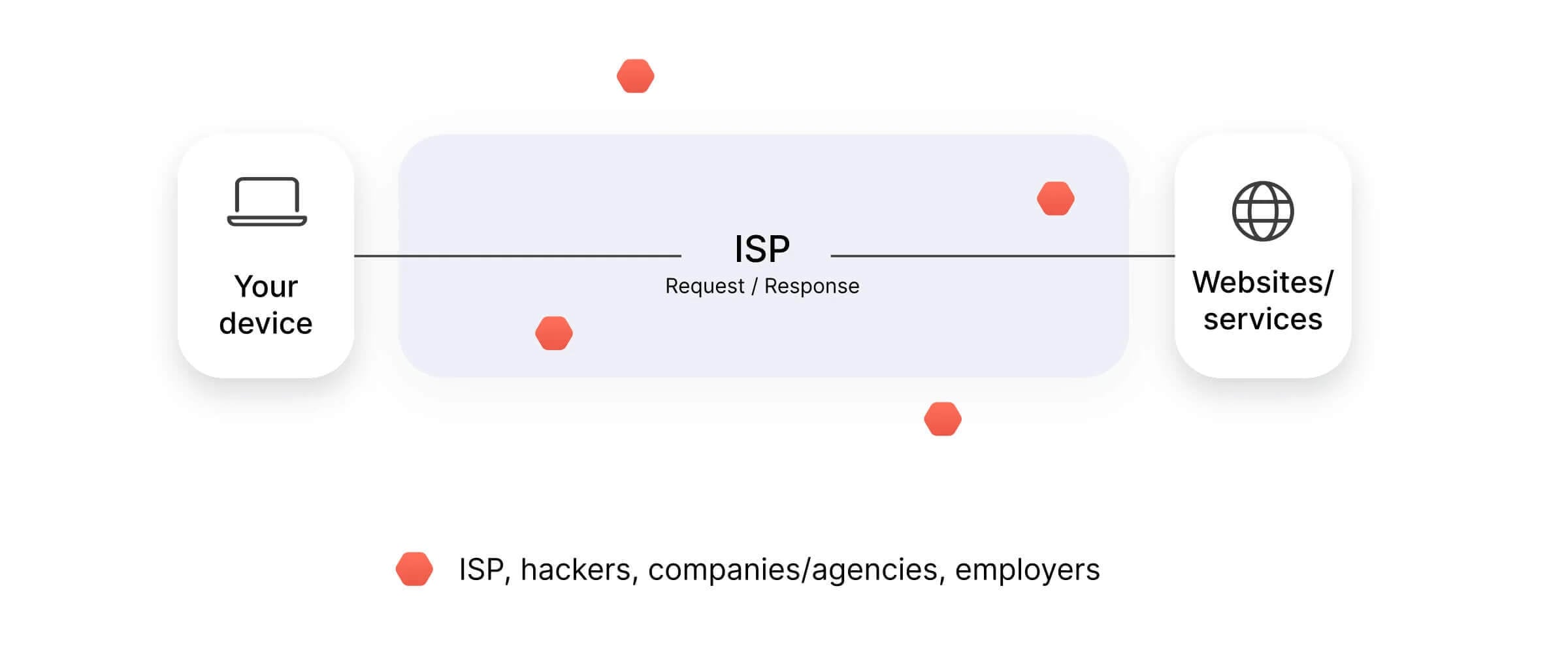
You’ve probably been told to use a VPN at some point. Maybe it was before logging in to your bank on hotel Wi-Fi, when a show wouldn’t play abroad, or in an ad promising to make you invisible online. So why do so many people recommend one? Because a VPN is a service that encrypts everything your device sends and passes it through a server operated by the VPN company.
Websites then see that server’s IP address instead of yours, and your ISP sees only encrypted data it can’t read. That protects you on public Wi-Fi, keeps your browsing away from your ISP, and lets you appear in another country. It has limits, though, and that promise of invisibility is one of them. Here’s how it works, and what it can and can’t do for you.
What Is a VPN?
VPN stands for virtual private network, and each word describes part of how it works. Virtual, because the private network exists in software instead of cables. Private, because its traffic is encrypted and unreadable to the network operator or an eavesdropper. Network, because your device joins the VPN company’s network and receives an IP address there.
Two things change the moment you connect:
- Your IP address. Sites, apps, and trackers record the server’s IP address in the country you picked, instead of the one your ISP assigned.
- Your traffic. Everything between your device and that server is encrypted. An ISP, a network administrator, or a stranger on the same Wi-Fi sees only encrypted data going to one destination.
Businesses have used the same technology for decades to let staff open internal systems from outside the office. Consumer VPNs apply it to ordinary browsing.
How Does a VPN Work?
Every connection goes through three steps:
- Authentication. The app proves to the VPN server that your account is valid, and the two sides agree on the encryption keys for the session. NordVPN, ExpressVPN, and Surfshark now add post-quantum key exchange at this step, which protects recorded traffic from future quantum computers.
- Encryption. The connection is protected with AES-256 or ChaCha20, the same class of encryption banks and governments use, so intercepted traffic is unreadable.
- Encapsulation. Each data packet is placed inside another packet, like a letter sealed in a second envelope. The outer layer takes the traffic to the VPN server, which unwraps it and passes the request on. People call this encrypted, wrapped connection the VPN tunnel.
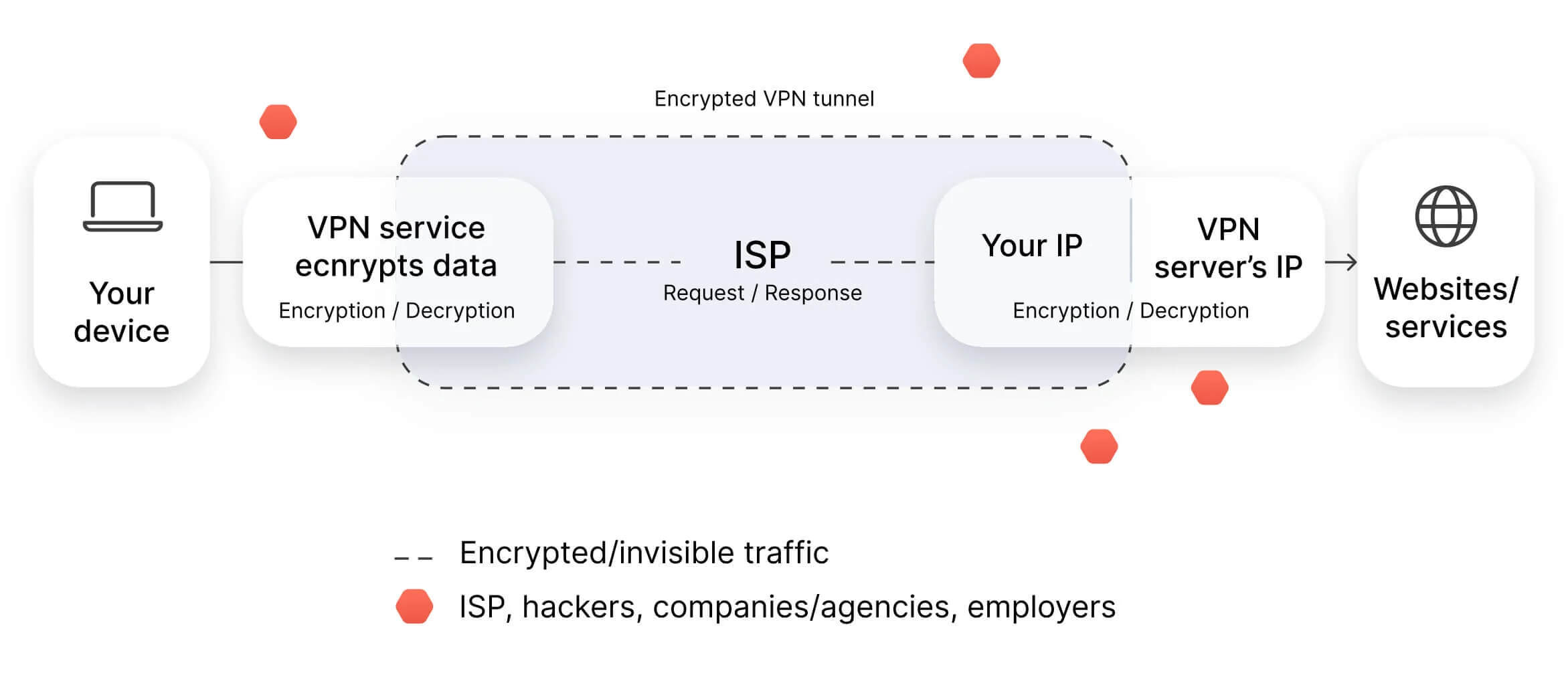
Without a VPN, websites see the IP address your ISP assigned, and your ISP sees every domain you request. HTTPS hides what’s on most pages, but your ISP still sees which sites you visit and when. In the UK, ISPs can be required to keep those connection records for up to a year. In the US, ISPs are allowed to use browsing data for advertising.
DNS lookups, the step where your device finds a website’s IP address from its name, require the same protection. A good VPN resolves them on its own servers, so your ISP never receives a list of the domains you visit.
What Is a VPN Server?
A VPN server is a computer in a data center that receives your encrypted traffic and decrypts it. It then sends each request on to the website using its own IP address, and replies come back the same way. VPN companies operate thousands of them, so you can choose the country websites see: NordVPN has servers in 152 countries and Proton VPN in 149.
Some locations are virtual. The server is in a neighboring country, while its IP address is registered to the one you picked, so websites treat you as local. Several VPNs, including NordVPN and ExpressVPN, also use RAM-only servers, so a reboot erases everything stored on them.
What Does a VPN Do?
- Hides your IP address from sites you visit. Advertisers, forums, and streaming services log the server’s IP address instead of your home one.
- Encrypts public Wi-Fi sessions. Hotel, airport, and café networks are shared with strangers, and encryption makes intercepted traffic worthless.
- Keeps browsing away from your ISP. It sees a connection to a VPN server and nothing about the sites behind it.
- Changes which region a service sees. A server in another country unblocks that country’s Netflix catalog or lets you sign in to home banking while you travel.
- Covers torrent traffic. A VPN for torrenting keeps your IP address out of the swarm, so other peers see the VPN server’s IP address instead.
- Works around network filters. School, office, and national blocks work on the destination, and with a VPN, the only destination they see is the VPN server.
What a VPN Doesn’t Do
- It doesn’t make you anonymous. Signing in to an account identifies you regardless of your IP address. Google knows it’s you when you’re signed in, whichever country the connection appears to come from.
- It doesn’t stop cookies or browser fingerprinting. Trackers that identify your browser instead of your IP address keep working. A private window and a tracker blocker deal with those.
- It doesn’t remove malware. Some VPNs filter known malicious domains, which helps, but nothing in the tunnel scans files or cleans an infected computer.
- It doesn’t hide your activity from the VPN company. You move your trust from your ISP to the VPN, so check that its no-logs policy has been independently audited.
- It doesn’t change what’s legal. Copyright law, local law, and a website’s terms apply exactly as they did before you connected.
Types of VPN
- Personal VPN. The consumer apps most people mean when they say VPN. You subscribe, install the app, and connect to the company’s servers for privacy and region changes.
- Browser extension. A VPN’s Chrome or Firefox add-on covers traffic in that browser only, while other apps stay on your normal connection. Extensions generally lack a kill switch.
- Remote access VPN. What employers set up so staff can open internal systems from home. The destination is the company network, and the open internet stays outside it.
- Site-to-site VPN. A permanent encrypted link between two office networks, configured on routers and firewalls instead of on your laptop.
VPN Protocols Compared
The protocol is the set of rules for building the tunnel, and each one balances speed and compatibility differently. Most apps choose one automatically, and the default works for everyday use. On a network that blocks VPNs, such as some hotel or office Wi-Fi, switch to an obfuscated protocol, which makes VPN traffic look like regular browsing.
| Protocol | Strength | Best for |
| WireGuard | Fast, modern, small codebase | Everyday use on any device |
| NordLynx | NordVPN’s version of WireGuard | Everyday use on NordVPN |
| Lightway | ExpressVPN’s own protocol | Quick reconnects on mobile |
| OpenVPN | Older, widely audited | Routers and restrictive networks |
| IKEv2 | Reconnects quickly after a network change | Phones moving between Wi-Fi and mobile data |
| Stealth, NordWhisper | Makes VPN traffic look like regular web traffic | Networks that block VPNs |
Does a VPN Slow Your Connection?
Yes, slightly. Encryption adds a little work to every data packet, and traffic makes a detour through the VPN server on its way to the website. On a nearby server, the difference is hard to notice. In October tests from Europe on a 190.36 Mbps connection, NordVPN kept 97% of the speed on a UK server, 95% on a US server, and 84% on a server in Japan.
That’s still enough for several 4K streams at once. Distant servers also increase ping, the delay before a site responds, so you’d notice them in video calls and online games while video playback stays smooth.
Are VPNs Legal?
Yes, in most countries, including the US, the UK, Canada, Australia, and the EU member states. A short list of countries restricts or bans them, including China, Iran, Turkmenistan, Belarus, and Oman. A VPN changes who can observe your activity, and the law covering that activity stays the same: an illegal act is still illegal with the VPN connected. The guide to VPN legality covers the country list in detail.
How Much Does a VPN Cost?
Long plans cost the least per month:
- NordVPN: under $3.50 a month on the two-year Basic plan
- Proton VPN: under $3 a month on the two-year VPN Plus plan
- ExpressVPN: under $3 a month on the two-year Basic plan
These rates cover the first term only. After that, renewals cost roughly two to three times as much, and paying month to month costs three to five times as much. NordVPN and ExpressVPN refund the full price within 30 days, and Proton VPN refunds the unused part of the term.
Proton VPN also has a free plan with no data cap, though it chooses the server country for you. The free VPN rankings cover the alternatives.
Do VPNs Protect Against Viruses?
Not by themselves. A VPN encrypts traffic, but it doesn’t inspect downloads or scan your drive. Several now include filters that help at the edges. Proton VPN’s NetShield blocks known malware, ad, and tracker domains, and ExpressVPN includes Advanced Protection.
NordVPN’s Complete and Prime plans add next-gen antivirus, which scans downloaded files. Treat these as an extra layer, with antivirus software still doing the scanning. For antivirus and a VPN in one subscription, see the list of VPNs with built-in antivirus.
How Do You Use a VPN?
- Subscribe and create an account.
- Install the app on the device you browse from.
- Sign in and enable the kill switch, which blocks your internet if the VPN connection drops.
- Connect to a server nearby for speed, or in a specific country for that region’s services.
- Check your IP address on a lookup site such as ipleak.net, which should show the server’s country and DNS servers from the VPN company.
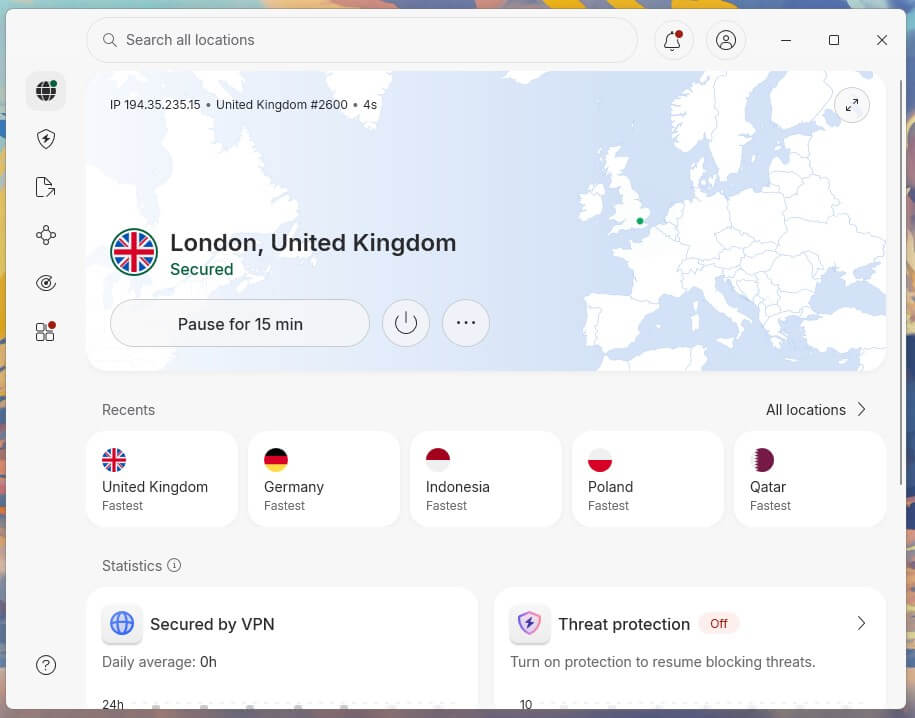
The full setup guide covers phones, smart TVs, consoles, and routers, including the settings to change on the first connection.
How to Choose a VPN
- An audited no-logs policy. An independent firm should have checked the VPN’s servers and confirmed it keeps no activity records.
- A kill switch and leak protection. They keep your IP address and DNS requests in the tunnel when the connection drops.
- Speed on nearby servers. A good VPN keeps over 90% of your connection’s speed on a server close to you.
- Server countries. Check that the VPN covers the countries you want to appear in, for streaming or travel.
- The renewal price. Find it before checkout, since the advertised rate covers the first term only.
The ranking of the best VPNs applies these criteria to each VPN on the list.
Conclusion
A VPN is a simple tool with a specific job. It encrypts what leaves your device, changes the IP address websites see, and keeps your browsing away from your ISP. On a nearby server, it costs little speed, so it’s easy to leave on all day. Invisibility isn’t part of the deal, though. It won’t make you anonymous to accounts you’re signed in to, scan files for malware, or change what’s legal where you are.
If you want safer public Wi-Fi, more privacy from your ISP, or your usual services while traveling, a VPN does that job well. If you want to stay anonymous, you’ll also want a privacy-focused browser and accounts that aren’t tied to your name. When you choose one, look for two things first: an independently audited no-logs policy and a kill switch that’s enabled from your first session.
Frequently Asked Questions
What does VPN stand for?
VPN stands for virtual private network. The name describes a private network built in software, which a device joins over the internet to encrypt its traffic and use another IP address.
What is a VPN connection?
A VPN connection is an encrypted link between a device and a VPN server. Websites see the server's IP address, and networks along the way see only encrypted data.
What is a VPN app?
A VPN app is the software that creates the encrypted connection on a phone, computer, or TV. It handles sign-in, server choice, and protocols, plus features such as the kill switch.
What is a VPN used for?
A VPN is used to encrypt traffic on public Wi-Fi, hide browsing from the ISP, change the country websites see while traveling, and keep an IP address out of torrent swarms.
Does a VPN make you anonymous?
No. A VPN hides the IP address and encrypts traffic, but account sign-ins, cookies, and browser fingerprinting still identify the user to websites and advertisers.
Does a VPN slow down the internet?
Yes, slightly. Encryption and the extra connection to the VPN server cost some speed, mostly on servers in faraway countries. On a nearby server with a modern protocol, the slowdown is hard to notice.
Can a VPN stop viruses?
No, not on its own. Encryption protects data in transit and does nothing about infected files. Proton VPN's NetShield blocks malicious domains, and NordVPN's Complete plan adds antivirus, but neither replaces security software.